Forum Discussion

Anonymous
6 years agoNot applicable
Dax measure using table and columns
Hi everyone,
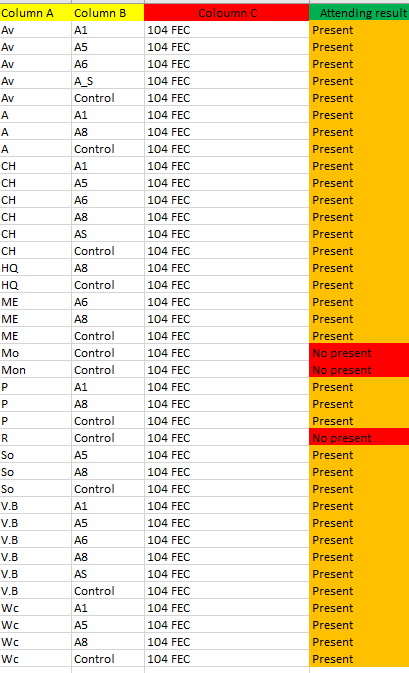
I'm making a measure to summarize it into a matrix table.
The measure that I want to do is to create the fourth column (Attending result) that shows a message "present" if one letter from column A has code as Control and other codes (A1, A5...) from column B and the same package from column C; and I would show also "no present" if one letter from column A has only code as Control from column B and the same package from column C.
Column A and B are from the same table (Table 1) and column C is from (Table 2).
In column C we have the same package for this example but it can changes.
Thank you for your response. Best regards.
Hi Anonymous
Try the below.
Measure =
VAR _tbl = ALLEXCEPT( 'Table', 'Table'[Column A], 'Table'[Column C] )
VAR _isControl =
    CALCULATE(
        COUNTROWS( 'Table' ),
        'Table'[Column B] = "Control",
        _tbl
    ) > 0
VAR _isNotControl =
    CALCULATE(
        COUNTROWS( 'Table' ),
        NOT 'Table'[Column B] = "Control",
        _tbl
    ) > 0
RETURN IF( _isNotControl && _isControl, "Present", "Not present" )
Best Regards,
Mariusz
If this post helps, then please consider Accepting it as the solution.
Please feel free to connect with me.

1 Reply
- Mariusz
Community Champion
Hi Anonymous
Try the below.
Measure =
VAR _tbl = ALLEXCEPT( 'Table', 'Table'[Column A], 'Table'[Column C] )
VAR _isControl =
    CALCULATE(
        COUNTROWS( 'Table' ),
        'Table'[Column B] = "Control",
        _tbl
    ) > 0
VAR _isNotControl =
    CALCULATE(
        COUNTROWS( 'Table' ),
        NOT 'Table'[Column B] = "Control",
        _tbl
    ) > 0
RETURN IF( _isNotControl && _isControl, "Present", "Not present" )
Best Regards,
Mariusz
If this post helps, then please consider Accepting it as the solution.
Please feel free to connect with me.