This is best Fabric, Power BI, SQL and AI community event. How do we know? The last event sold out! Save €200 with code FABCMTY200.
Register nowA new Data Days event is coming soon! This time we’re going bigger than ever. Fabric, Power BI, SQL, AI and more. Don't miss out.
Hi all,
I'm new to the forums so forgive me if this isn't explained that well. I'm trying to work out how it would be possible to show businesses whose sales are on a downward trend.
I have sales information for a large number of businesses and I use a measure to display their sales over the previous 12 months (12 month total sales) by month. What I would like to do is to identify those that have had declining sales for three straight months. I currently display the 12 month total sales in a table but have no way of sorting out the businesses in decline.
I've popped some dummy data in below. I don't know how to achieve it but I would like to be able to filter Bravo and Delta out of the data below.
| 12month total sales | |||
| Business Name | Jan-17 | Feb-17 | Mar-17 |
| Alpha | 1000 | 1200 | 1000 |
| Bravo | 1500 | 1400 | 1300 |
| Charlie | 1200 | 1100 | 1200 |
| Delta | 400 | 300 | 250 |
| Echo | 1000 | 1000 | 1000 |
| Foxtrot | 1000 | 1200 | 1400 |
Thanks in advance for your help. Let me know if you need anything else.
Solved! Go to Solution.
Hi @arcadefire4,
If I understand you correctly, you should be able to follow steps below to sorting out the businesses in decline.
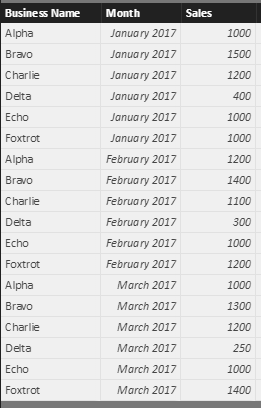
I assume you have a table called 'Table1' like below.
1. Use the formula below to create a new calculate column in 'Table1'.
Is In Decline =
VAR previousMonthSales =
CALCULATE (
SUM ( Table1[Sales] ),
ALLEXCEPT ( Table1, Table1[Business Name] ),
PREVIOUSMONTH ( Table1[Month] )
)
VAR NextMonthSales =
CALCULATE (
SUM ( Table1[Sales] ),
ALLEXCEPT ( Table1, Table1[Business Name] ),
NEXTMONTH ( Table1[Month] )
)
RETURN
IF (
Table1[Sales] < previousMonthSales
&& Table1[Sales] > NextMonthSales
&& NextMonthSales <> 0,
1,
0
)
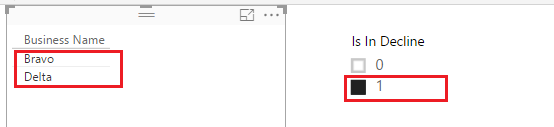
2. Then you should be able to use the new create calculate column as Slicer or visual level filter to sorting out the businesses in decline.
Here is the sample pbix file for your reference. ![]()
Regards
Hi @arcadefire4,
If I understand you correctly, you should be able to follow steps below to sorting out the businesses in decline.
I assume you have a table called 'Table1' like below.
1. Use the formula below to create a new calculate column in 'Table1'.
Is In Decline =
VAR previousMonthSales =
CALCULATE (
SUM ( Table1[Sales] ),
ALLEXCEPT ( Table1, Table1[Business Name] ),
PREVIOUSMONTH ( Table1[Month] )
)
VAR NextMonthSales =
CALCULATE (
SUM ( Table1[Sales] ),
ALLEXCEPT ( Table1, Table1[Business Name] ),
NEXTMONTH ( Table1[Month] )
)
RETURN
IF (
Table1[Sales] < previousMonthSales
&& Table1[Sales] > NextMonthSales
&& NextMonthSales <> 0,
1,
0
)
2. Then you should be able to use the new create calculate column as Slicer or visual level filter to sorting out the businesses in decline.
Here is the sample pbix file for your reference. ![]()
Regards
Check out the May 2026 Power BI update to learn about new features.
Sign up to receive a private message when registration opens and key events begin.
If you have recently started exploring Fabric, we'd love to hear how it's going. Your feedback can help with product improvements.
| User | Count |
|---|---|
| 28 | |
| 28 | |
| 26 | |
| 19 | |
| 16 |
| User | Count |
|---|---|
| 52 | |
| 47 | |
| 39 | |
| 21 | |
| 20 |