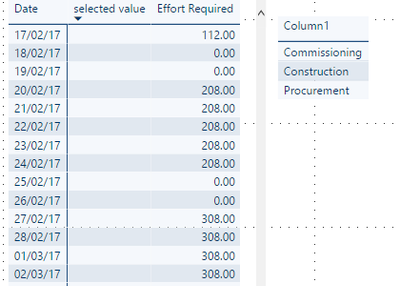
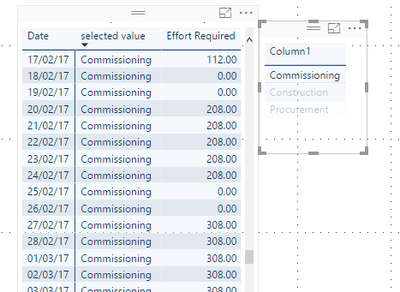
Hi guys,
Hoping someone can help me out, i have been looking at this for a couple of days now and really struggling to figure out a solution
Within my model I have a 'Task' table that contains details such as start date, end date and effort required to complete each task. I have created the ability to draw an S-curve (line chart) from my 'Dates' table to show when each task is planned over time using an 'Effort per day' calculated column that is the summed in the visualisation.
I now need to create a way of filtering my 'Dates'[Effort required] column by the 'Task'[Code4] column, which contains details of who is doing the work, so that the S-Curve reflects only the data relating to the selected company.
Below is my 'Dates'[Effort required] calculated column. The line which is currently filtered out creates exactly the result I require but involves a hard coded string being passed to the calulation. I was hoping the preceeding line would give the same result by passing a selected value from a slicer that is created from distinct 'Task'[Code4] values.
However this is simply returning all 'Effort per day' values and is not filtering the data down as desired. Any ideas what is going wrong??
Effort Required = if(Dates[WorkDays]=false,0,
    calculate(
    sum('Task'[Effort per Day]),
   		filter('Task', Dates[Date]>='Task'[Planned Effort Start Date]-1),
    	        filter('Task',Dates[Date]<='Task'[Planned Effort Finish Date]),
		filter(task,Task[Code4]=[selected value]),
		//filter(task,Task[Code4]="Construction"),
		filter(ReportDateSummary,ReportDateSummary[ReportDateCounter]=1))
		)