Don't miss your chance to take the Fabric Data Engineer (DP-600) exam for FREE! Find out how by attending the DP-600 session on April 23rd (pacific time), live or on-demand.
Learn moreNext up in the FabCon + SQLCon recap series: The roadmap for Microsoft SQL and Maximizing Developer experiences in Fabric. All sessions are available on-demand after the live show. Register now
Hello, To be honest, i even don't have a clue on how to define a correct subject for this problem.
I'll explain, please consider this table
Table
The idea is that we know by day what was the maximum out of order machine we had, we also know for that day how many machines where operational, so we can calculate the ratio. We also know the max time all the machines where simultaneous out of order.
Now is the goal that depending on the date selection we would by machine find the record with the highest Ratio.
But we would also want to display the corresponding MaxOutOofOrder and the Time
This means that when there is no date selection the report should show the first table and if 2/6/2017 is selected the second.
Ok The be even more demanding, it would be nice that in case 2 days have the same Ratio then we display the one woth the highest Time ...
Pleas feel free to help, kind regards, Harry
Solved! Go to Solution.
Hi @Anonymous,
Current power bi not support to create a dynamic calculate column/table based on filter/slicer.
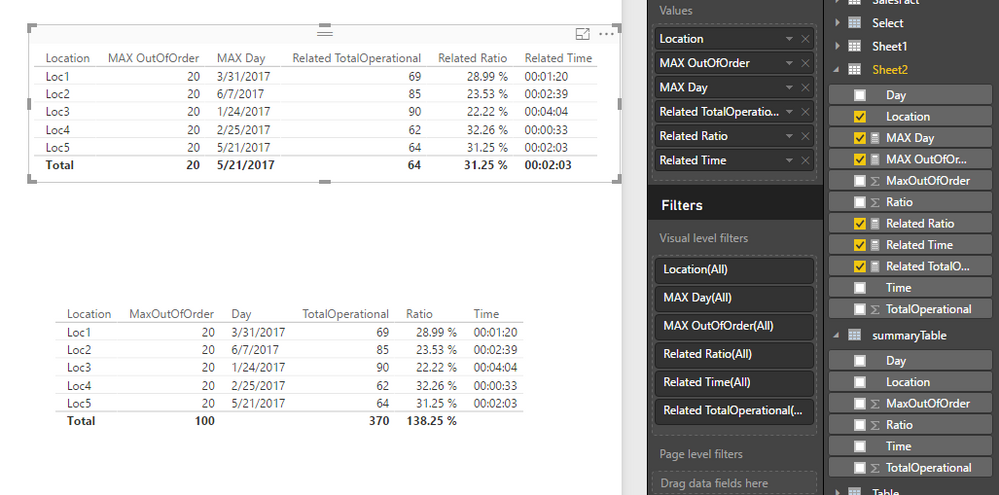
In my opinion, I'd like to suggest you convert these columns to measure and use original location column as the group to calculate the related value.
Sample measures:
MAX OutOfOrder = MAX(Sheet2[MaxOutOfOrder]) MAX Day = var currentLocation = LASTNONBLANK(Sheet2[Location],Sheet2[Location]) var maxOrder=MAXX(FILTER(ALLSELECTED(Sheet2),Sheet2[Location]=currentLocation),[MaxOutOfOrder]) return MAXX(FILTER(ALLSELECTED(Sheet2),[Location]=currentLocation&&[MaxOutOfOrder]=maxOrder),[Day]) Related TotalOperational = var currentLocation = LASTNONBLANK(Sheet2[Location],Sheet2[Location]) var maxOrder=MAXX(FILTER(ALLSELECTED(Sheet2),Sheet2[Location]=currentLocation),[MaxOutOfOrder]) var maxDay=MAXX(FILTER(ALLSELECTED(Sheet2),[Location]=currentLocation&&[MaxOutOfOrder]=maxOrder),[Day]) return LOOKUPVALUE(Sheet2[TotalOperational],Sheet2[Location],currentLocation,Sheet2[MaxOutOfOrder],maxOrder,Sheet2[Day],maxDay) Related Ratio = var currentLocation = LASTNONBLANK(Sheet2[Location],Sheet2[Location]) var maxOrder=MAXX(FILTER(ALLSELECTED(Sheet2),Sheet2[Location]=currentLocation),[MaxOutOfOrder]) var maxDay=MAXX(FILTER(ALLSELECTED(Sheet2),[Location]=currentLocation&&[MaxOutOfOrder]=maxOrder),[Day]) return LOOKUPVALUE(Sheet2[Ratio],Sheet2[Location],currentLocation,Sheet2[MaxOutOfOrder],maxOrder,Sheet2[Day],maxDay) Related Time = var currentLocation = LASTNONBLANK(Sheet2[Location],Sheet2[Location]) var maxOrder=MAXX(FILTER(ALLSELECTED(Sheet2),Sheet2[Location]=currentLocation),[MaxOutOfOrder]) var maxDay=MAXX(FILTER(ALLSELECTED(Sheet2),[Location]=currentLocation&&[MaxOutOfOrder]=maxOrder),[Day]) return LOOKUPVALUE(Sheet2[Time],Sheet2[Location],currentLocation,Sheet2[MaxOutOfOrder],maxOrder,Sheet2[Day],maxDay)
Regards,
Xiaoxin Sheng
Hi @Anonymous,
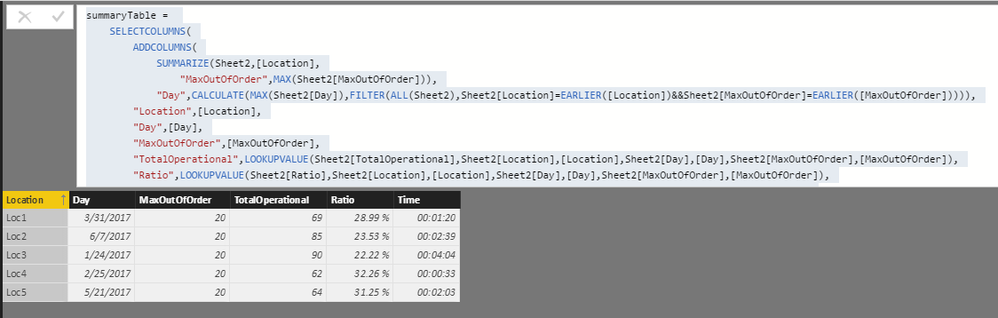
You can refer to below formula to achieve your requirement:
Steps:
1. Use summarize function to group records to find the "MaxOutOofOrder" of each "Location".
2. Search for the max day by "Location" and "MaxOutOofOrder".
3. Use lookupvalue function to find out other columns based on above thress columns.
Table formula:
summaryTable = SELECTCOLUMNS( ADDCOLUMNS( SUMMARIZE(Sheet2,[Location], "MaxOutOfOrder",MAX(Sheet2[MaxOutOfOrder])), "Day",CALCULATE(MAX(Sheet2[Day]),FILTER(ALL(Sheet2),Sheet2[Location]=EARLIER([Location])&&Sheet2[MaxOutOfOrder]=EARLIER([MaxOutOfOrder])))), "Location",[Location], "Day",[Day], "MaxOutOfOrder",[MaxOutOfOrder], "TotalOperational",LOOKUPVALUE(Sheet2[TotalOperational],Sheet2[Location],[Location],Sheet2[Day],[Day],Sheet2[MaxOutOfOrder],[MaxOutOfOrder]), "Ratio",LOOKUPVALUE(Sheet2[Ratio],Sheet2[Location],[Location],Sheet2[Day],[Day],Sheet2[MaxOutOfOrder],[MaxOutOfOrder]), "Time",LOOKUPVALUE(Sheet2[Time],Sheet2[Location],[Location],Sheet2[Day],[Day],Sheet2[MaxOutOfOrder],[MaxOutOfOrder]))
Regards,
Xiaoxin Sheng
Hi Xiaoxin Sheng,
Wonrdefull, but this is static, the calculated table is 'created' when loading the data and doesn't change when filtering is applied.
But I will give it a try based on your DAX formulas ..
Hi @Anonymous,
Current power bi not support to create a dynamic calculate column/table based on filter/slicer.
In my opinion, I'd like to suggest you convert these columns to measure and use original location column as the group to calculate the related value.
Sample measures:
MAX OutOfOrder = MAX(Sheet2[MaxOutOfOrder]) MAX Day = var currentLocation = LASTNONBLANK(Sheet2[Location],Sheet2[Location]) var maxOrder=MAXX(FILTER(ALLSELECTED(Sheet2),Sheet2[Location]=currentLocation),[MaxOutOfOrder]) return MAXX(FILTER(ALLSELECTED(Sheet2),[Location]=currentLocation&&[MaxOutOfOrder]=maxOrder),[Day]) Related TotalOperational = var currentLocation = LASTNONBLANK(Sheet2[Location],Sheet2[Location]) var maxOrder=MAXX(FILTER(ALLSELECTED(Sheet2),Sheet2[Location]=currentLocation),[MaxOutOfOrder]) var maxDay=MAXX(FILTER(ALLSELECTED(Sheet2),[Location]=currentLocation&&[MaxOutOfOrder]=maxOrder),[Day]) return LOOKUPVALUE(Sheet2[TotalOperational],Sheet2[Location],currentLocation,Sheet2[MaxOutOfOrder],maxOrder,Sheet2[Day],maxDay) Related Ratio = var currentLocation = LASTNONBLANK(Sheet2[Location],Sheet2[Location]) var maxOrder=MAXX(FILTER(ALLSELECTED(Sheet2),Sheet2[Location]=currentLocation),[MaxOutOfOrder]) var maxDay=MAXX(FILTER(ALLSELECTED(Sheet2),[Location]=currentLocation&&[MaxOutOfOrder]=maxOrder),[Day]) return LOOKUPVALUE(Sheet2[Ratio],Sheet2[Location],currentLocation,Sheet2[MaxOutOfOrder],maxOrder,Sheet2[Day],maxDay) Related Time = var currentLocation = LASTNONBLANK(Sheet2[Location],Sheet2[Location]) var maxOrder=MAXX(FILTER(ALLSELECTED(Sheet2),Sheet2[Location]=currentLocation),[MaxOutOfOrder]) var maxDay=MAXX(FILTER(ALLSELECTED(Sheet2),[Location]=currentLocation&&[MaxOutOfOrder]=maxOrder),[Day]) return LOOKUPVALUE(Sheet2[Time],Sheet2[Location],currentLocation,Sheet2[MaxOutOfOrder],maxOrder,Sheet2[Day],maxDay)
Regards,
Xiaoxin Sheng
Great stuff, Thx.![]()
If you have recently started exploring Fabric, we'd love to hear how it's going. Your feedback can help with product improvements.
A new Power BI DataViz World Championship is coming this June! Don't miss out on submitting your entry.
Share feedback directly with Fabric product managers, participate in targeted research studies and influence the Fabric roadmap.
| User | Count |
|---|---|
| 48 | |
| 43 | |
| 39 | |
| 19 | |
| 17 |
| User | Count |
|---|---|
| 69 | |
| 63 | |
| 32 | |
| 30 | |
| 23 |