Get Fabric or SQL Certified for Free.
Get certified for free when you join Fabric Data Days 2026 and dive into Fabric, Power BI, SQL, AI, and other essential data skills.
Join now- Power BI forums
- Get Help with Power BI
- Desktop
- Service
- Report Server
- Power Query
- Mobile Apps
- Developer
- DAX Commands and Tips
- Custom Visuals Development Discussion
- Health and Life Sciences
- Power BI Spanish forums
- Translated Spanish Desktop
- Training and Consulting
- Instructor Led Training
- Dashboard in a Day for Women, by Women
- Galleries
- Data Stories Gallery
- Themes Gallery
- Contests Gallery
- QuickViz Gallery
- Quick Measures Gallery
- Visual Calculations Gallery
- Notebook Gallery
- Translytical Task Flow Gallery
- TMDL Gallery
- R Script Showcase
- Webinars and Video Gallery
- Ideas
- Custom Visuals Ideas (read-only)
- Issues
- Issues
- Events
- Upcoming Events
July 7 - July 17 | Round 2 of the Power BI Dataviz World Championships. Don't miss your chance! Learn more
- Power BI forums
- Forums
- Get Help with Power BI
- Desktop
- Re: Filtering across column headers?
- Subscribe to RSS Feed
- Mark Topic as New
- Mark Topic as Read
- Float this Topic for Current User
- Bookmark
- Subscribe
- Printer Friendly Page

- Mark as New
- Bookmark
- Subscribe
- Mute
- Subscribe to RSS Feed
- Permalink
- Report Inappropriate Content
Filtering across column headers?
Hi there,
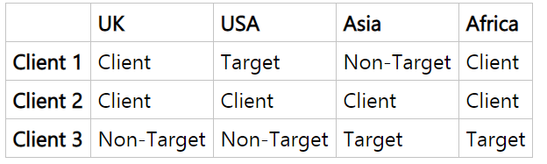
I have a dataset which provides client status across a different field - sample data below where i've used region and my companies on the database. I want to be able to filter on a region to see clients to then see how those clients operate. That seems easy enough. But i want users to be able to select a region from a filter.
Unpivoting doesnt seem to help becasue i'm then not seeing the associated data.
I was thinking i would duplicate the table but i wasnt quite sure
Example Data
Intention
User filters on region to see how clients with that status are performing across different regions - so we can analyse regions, clients etc.
Solved! Go to Solution.


- Mark as New
- Bookmark
- Subscribe
- Mute
- Subscribe to RSS Feed
- Permalink
- Report Inappropriate Content
Hi @AMARSHALL80
It is actually possible to do this, but I don't really consider it a "clean" way.
- edit the query
- duplicate the table you want to filter based on columns
- select all the columns you want to be able to filter (using shift and or control)
- right-click and select unpivot data
- now you can filter based on the new "attributes" column
Notice how this is not a good suggestion for large data as you have to copy the entire table.
It works though...
To actually implement the filter I would recommend using the chiclet slicer from the custom visuals store
- Mark as New
- Bookmark
- Subscribe
- Mute
- Subscribe to RSS Feed
- Permalink
- Report Inappropriate Content
Thank you @Anonymous and @SushainKoul - really appreciate you coming back.
The unpivot is helpful and the duplicating of table seems to be getting me closer, but i dont it quite does what i am hoping to do (and i used regions just as sample data) - i would like to be able to filter on a Region and Status (e.g. USA Clients) to then show how those Clients (or other status selected) perform across other regions.
- Mark as New
- Bookmark
- Subscribe
- Mute
- Subscribe to RSS Feed
- Permalink
- Report Inappropriate Content
Hi @AMARSHALL80
Welcome. Didn't you still get the solution u were looking for??
- Mark as New
- Bookmark
- Subscribe
- Mute
- Subscribe to RSS Feed
- Permalink
- Report Inappropriate Content
- Mark as New
- Bookmark
- Subscribe
- Mute
- Subscribe to RSS Feed
- Permalink
- Report Inappropriate Content
Hi @AMARSHALL80 .Your Welcome. If u still don't get it or u r facing any problems in this or near future u can ask me.

- Mark as New
- Bookmark
- Subscribe
- Mute
- Subscribe to RSS Feed
- Permalink
- Report Inappropriate Content
Hi @AMARSHALL80 ,
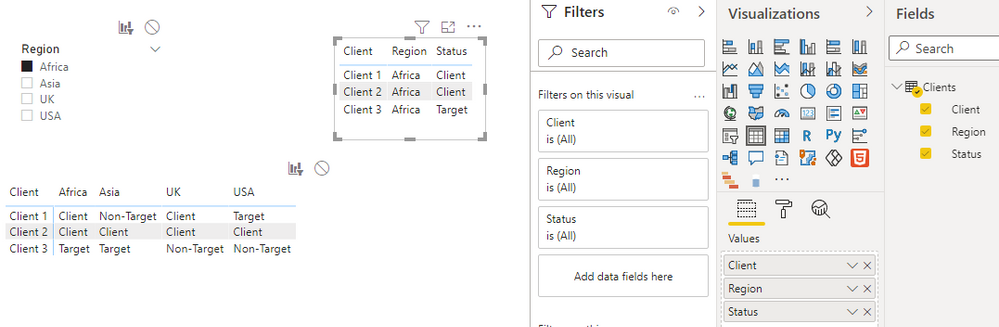
I created a sample pbix file(see attachment) for you using UNPIVOT function, please check whether that is what you want. If no, please provide your expected result with backend logic and specifc examples. Thank you.
Best Regards
- Mark as New
- Bookmark
- Subscribe
- Mute
- Subscribe to RSS Feed
- Permalink
- Report Inappropriate Content
Hi @AMARSHALL80
It is actually possible to do this, but I don't really consider it a "clean" way.
- edit the query
- duplicate the table you want to filter based on columns
- select all the columns you want to be able to filter (using shift and or control)
- right-click and select unpivot data
- now you can filter based on the new "attributes" column
Notice how this is not a good suggestion for large data as you have to copy the entire table.
It works though...
To actually implement the filter I would recommend using the chiclet slicer from the custom visuals store
Helpful resources

FabCon & SQLCon – Barcelona 2026
Join us in Barcelona for FabCon and SQLCon, the Fabric, Power BI, SQL, and AI community event. Save €200 with code FABCMTY200.

Data Days 2026
Join Data Days 2026: 60 days of free live/on-demand sessions, challenges, study groups, and certification opportunities.

Power BI DataViz World Championships - June 2026
A new Power BI DataViz World Championship is coming this June! Don't miss out on submitting your entry.

| User | Count |
|---|---|
| 26 | |
| 23 | |
| 19 | |
| 18 | |
| 15 |


| User | Count |
|---|---|
| 46 | |
| 46 | |
| 43 | |
| 36 | |
| 31 |


