cancel
Showing results for 
Search instead for 
Did you mean: 

We've captured the moments from FabCon & SQLCon that everyone is talking about, and we are bringing them to the community, live and on-demand. Starts on April 14th. Register now

Reply
theo
Helper III
Helper III

Filtering Visual

Hi everyone,


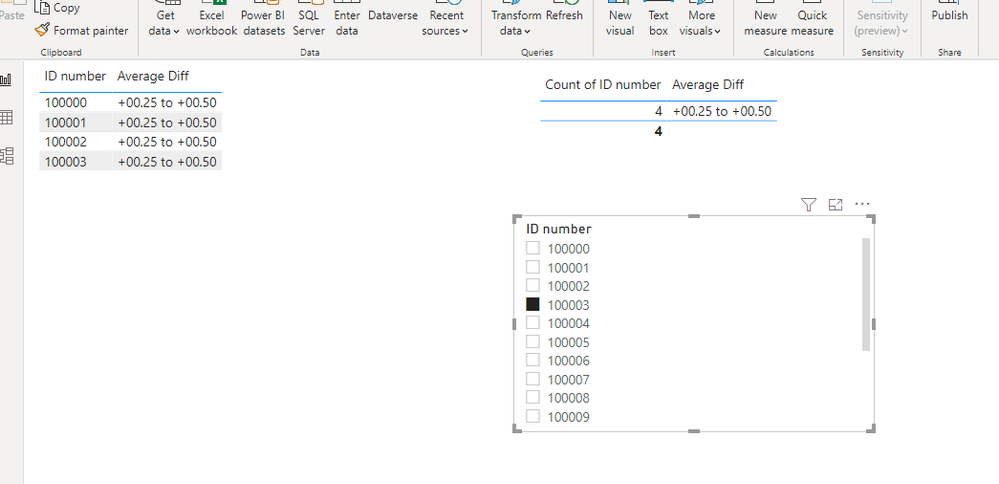
I'm looking for a way to show the count of specific information using a filter hopefully withou any measure or custom column created since the original data itself is already huge.

example of my current data:

ID number Average Diff
100000 +00.25 to  +00.50
100001 +00.25 to  +00.50
100002 +00.25 to  +00.50
100003 +00.25 to  +00.50
100004 +00.50 to  +00.75
100005 +00.50 to  +00.75
100006 +00.50 to  +00.75
100007 +00.50 to  +00.75
100008 +00.50 to  +00.75
100009 +00.50 to  +00.75
100010 +00.50 to  +00.75
100011 +00.50 to  +00.75
100012 +00.50 to  +00.75
100013 +00.50 to  +00.75
100014 +00.50 to  +00.75
100015 +00.50 to  +00.75
100016 +00.50 to  +00.75


Visual:

Count of IDAverage Diff
544377 +00.25 to  +00.50
541226 +00.50 to  +00.75
539448 +00.00 to  +00.25
535120 +00.75 to  +01.00


- when I filter this for ID 100000, it will result to 


Count of IDAverage Diff
1 +00.25 to  +00.50


but want to show count of the "average diff" to be shown instead like below.  If possible, no additional measure since I need similar information for about a 1000 columns.  Thanks in advance.

Count of IDAverage Diff
544377 +00.25 to  +00.50
1 ACCEPTED SOLUTION

Hi, @theo 

You can try copy a new table "Table2".

Then create a many-to-many bidirectional filtering relationship based on column "Average Diff", and use the ID field in Table 2 to filter the data.

6.png


Best Regards,
Community Support Team _ Eason

View solution in original post

5 REPLIES 5
theo
Helper III
Helper III

Hi @aj1973 ,


Thanks but it provides same result as current filter.

The ID's are unique/distint and there many ID's in the same "average diff" entry.  In my case, , there are around 544377 under this "+00.25 to  +00.50"?


But when I filter with ID 100000, it still results in 1 count (as this is due to the fact that there is only 1 ID 100000).  Is there a prerequisite for this to work?

thanks.

Hi, @theo 

You can try copy a new table "Table2".

Then create a many-to-many bidirectional filtering relationship based on column "Average Diff", and use the ID field in Table 2 to filter the data.

6.png


Best Regards,
Community Support Team _ Eason

Thanks @v-easonf-msft .

It works, however, I cannot use this to my file because the original table is already huge (original CSV is 62gb)  and it is taking a long time to load and refreshed.  It does provide a partial solution to the problem.

Hi,  @theo 

Since you are directly using the ID column of the original table to filter the data, the filtering effect of the visual object is also directly affected by the original table ID. As of now, I am afraid that it is impossible to change the default filtering method without creating a new measure or calculation table.

Even some custom visual objects can't achieve the effect you want.


Best Regards,
Community Support Team _ Eason

aj1973
Community Champion
Community Champion

Hi @theo 

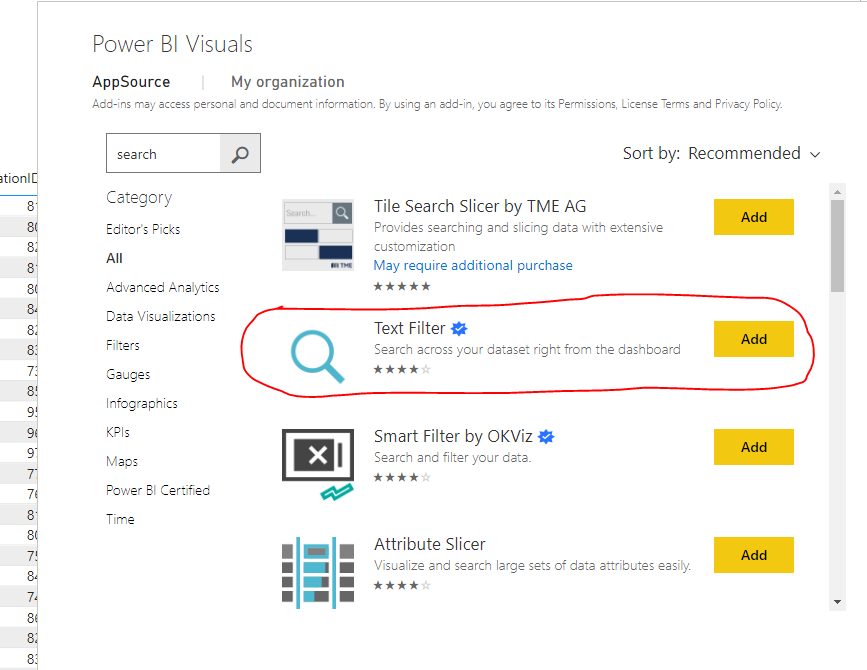
You can add Search visual from 

aj1973_0-1625430843986.png

and insert the ID number field in it to search by it.


Regards
Amine Jerbi

If I answered your question, please mark this thread as accepted
and you can follow me on
My Website, LinkedIn and Facebook

Helpful resources

Announcements
New to Fabric survey Carousel

New to Fabric Survey

If you have recently started exploring Fabric, we'd love to hear how it's going. Your feedback can help with product improvements.

Power BI DataViz World Championships carousel

Power BI DataViz World Championships - June 2026

A new Power BI DataViz World Championship is coming this June! Don't miss out on submitting your entry.

Join our Fabric User Panel

Join our Fabric User Panel

Share feedback directly with Fabric product managers, participate in targeted research studies and influence the Fabric roadmap.