Join us at FabCon Atlanta from March 16 - 20, 2026, for the ultimate Fabric, Power BI, AI and SQL community-led event. Save $200 with code FABCOMM.
Register now!Get Fabric Certified for FREE during Fabric Data Days. Don't miss your chance! Request now
Hi,
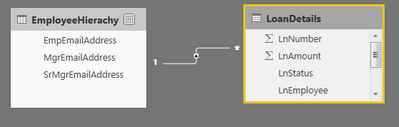
I have the Below Tables, and they are related by EmployeeName. I am trying to create a security for Row Level .
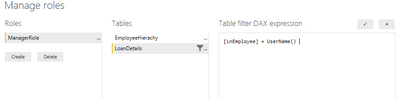
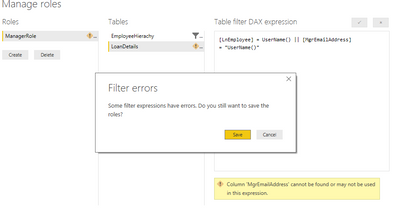
I using [lnemployee] as a filter in LoanDetails , but is it possible to use [MgrEmailAddress] as well from the EmployeeHierarchy table into the LoanDetails Filter.
Regards,
Solved! Go to Solution.
@Anonymous,
No, it is not possible to use [MgrEmailAddress] from the EmployeeHierarchy table into the LoanDetails Filter.
You don’t need to add any expression in LoanDetails table, just add “[MgrEmailAddress]= usename()” expression in EmployeeHierarchy table. As you have created the relationship between the two tables, the LoanDetails table will be filtered to return correct rows with the “[MgrEmailAddress]= usename()” expression.
Regards,
Lydia
@Anonymous,
No, it is not possible to use [MgrEmailAddress] from the EmployeeHierarchy table into the LoanDetails Filter.
You don’t need to add any expression in LoanDetails table, just add “[MgrEmailAddress]= usename()” expression in EmployeeHierarchy table. As you have created the relationship between the two tables, the LoanDetails table will be filtered to return correct rows with the “[MgrEmailAddress]= usename()” expression.
Regards,
Lydia
Hi,
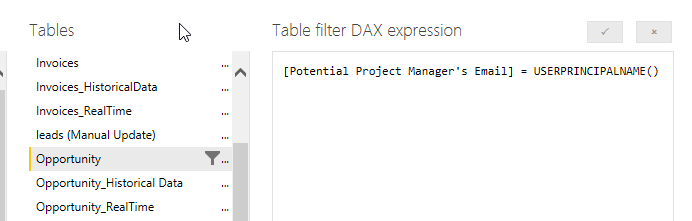
I use the email too, but since we have a "complex" employee hierarchy, I use different rls for each hierarchy, and to check the email with the user, i use this:
Check out the November 2025 Power BI update to learn about new features.
Advance your Data & AI career with 50 days of live learning, contests, hands-on challenges, study groups & certifications and more!