Join us at FabCon Atlanta from March 16 - 20, 2026, for the ultimate Fabric, Power BI, AI and SQL community-led event. Save $200 with code FABCOMM.
Register now!View all the Fabric Data Days sessions on demand. View schedule
Hi
I have a dataset as shown below.
| Product | Dimension 1 | Dimension 2 |
| A | 25 | 20 |
| B | 32 | 19 |
| C | 21 | 26 |
| D | 26 | 25 |
| E | 20 | 23 |
| F | 19 | 27 |
Objectives are :
1- To create two slicers with Dimension 1 and Dimesion 2 , on which we can enter the values (New Paramter Slicer).
2- A Card Visual or any big visual where we get the Value of Area i.e. (Dimension 1 * Dimesion 2)
3- Then value of Area should filter the table with 5% tolerance.
For Eg:
Dimension 1 is 20 and Dimension 2 is 21, then we have Area as 420. This Value 420 should filter the Table with 5% tolerance, that should give the values of area in Area column from min 399 to max 441.
Solved! Go to Solution.
Hi @PowerBi_Xandar ,
Because in your example, dimension 1 and dimension 2 you choose the values of different rows in the same main table. So for the dimension fields of the two slicers, they need to come from two new separate tables.
Two calculated tables:
D1 = DISTINCT('Table'[Dimension 1])D2 = DISTINCT('Table'[Dimension 2])
The measure of area can be created like:
Area = SELECTEDVALUE('D1'[Dimension 1])*SELECTEDVALUE('D2'[Dimension 2])
At last, create a measure to filter the area column.
IF(ISFILTERED('D1'[Dimension 1])&&ISFILTERED('D2'[Dimension 2]),IF([Area]*1.05>=MAX('Table (2)'[Area column])&&[Area]*0.95<=MAX('Table (2)'[Area column]),1),1)
Put it into the visual-level filters, set up show items when the value is 1.
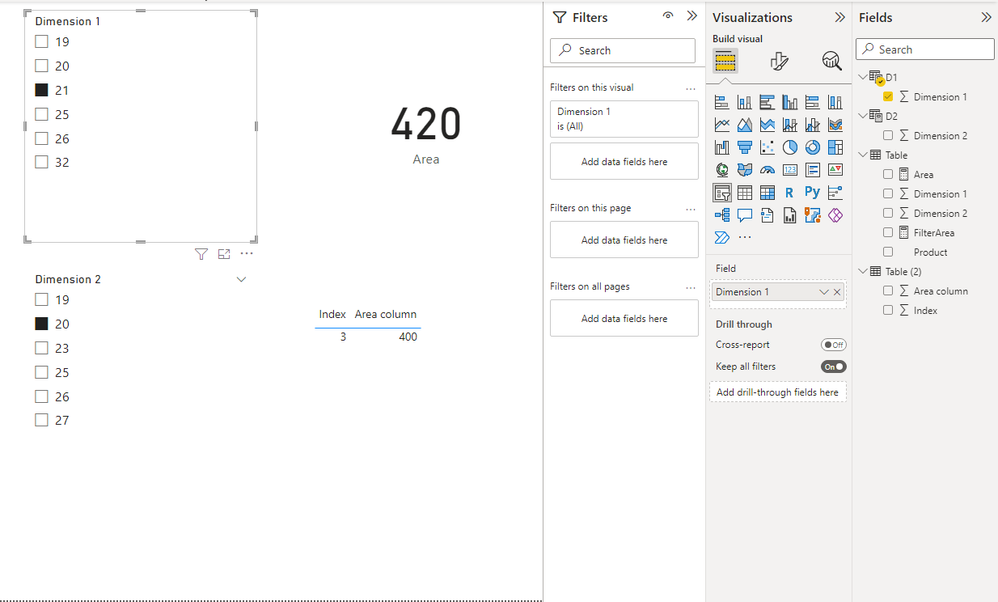
When 21 and 20 are filtered.
Best Regards,
Stephen Tao
If this post helps, then please consider Accept it as the solution to help the other members find it more quickly.
Hi @PowerBi_Xandar ,
Because in your example, dimension 1 and dimension 2 you choose the values of different rows in the same main table. So for the dimension fields of the two slicers, they need to come from two new separate tables.
Two calculated tables:
D1 = DISTINCT('Table'[Dimension 1])D2 = DISTINCT('Table'[Dimension 2])
The measure of area can be created like:
Area = SELECTEDVALUE('D1'[Dimension 1])*SELECTEDVALUE('D2'[Dimension 2])
At last, create a measure to filter the area column.
IF(ISFILTERED('D1'[Dimension 1])&&ISFILTERED('D2'[Dimension 2]),IF([Area]*1.05>=MAX('Table (2)'[Area column])&&[Area]*0.95<=MAX('Table (2)'[Area column]),1),1)
Put it into the visual-level filters, set up show items when the value is 1.
When 21 and 20 are filtered.
Best Regards,
Stephen Tao
If this post helps, then please consider Accept it as the solution to help the other members find it more quickly.
Hi Stephen,
Thank You for the solution, it works.
I wish power bi fix the What if slicer single value selection issue.
Check out the November 2025 Power BI update to learn about new features.
Advance your Data & AI career with 50 days of live learning, contests, hands-on challenges, study groups & certifications and more!