We've captured the moments from FabCon & SQLCon that everyone is talking about, and we are bringing them to the community, live and on-demand. Starts on April 14th. Register now
Hi,
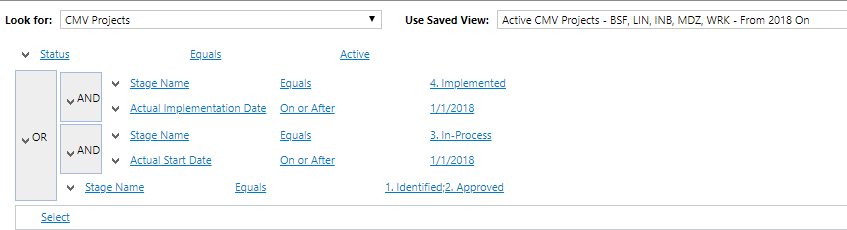
I had an advanced find in my CRM program and I am having a hard time translating into PowerBi.
It looks like below.
If I filter down the dates in my query, I lose the other stages.
Any help would be great 🙂
Cindy
Solved! Go to Solution.
I have one column in my data set that has five stages:
1. Identified
2. Approved
3. In-Process
4. Implemented
5. Completed
I want to bring in all rows for the first 2 stages.
I want to then filter the Actual Start Date from stage 3 to be after 1/1/2018.
I also want to do this stage 4 with the actual implementation date to be after 1/1/2018.
I am not sure how to filter this with DAX.
@Anonymous you can put a slicer visual on the page and use this column in slicer, and based on the selection in the slicer, your data will get filter.
If you can provide a sample data in excel using onedrive/google drive, remove any sensitive information and I can get you the working solution.
Subscribe to the @PowerBIHowTo YT channel for an upcoming video on List and Record functions in Power Query!!
Learn Power BI and Fabric - subscribe to our YT channel - Click here: @PowerBIHowTo
If my solution proved useful, I'd be delighted to receive Kudos. When you put effort into asking a question, it's equally thoughtful to acknowledge and give Kudos to the individual who helped you solve the problem. It's a small gesture that shows appreciation and encouragement! ❤
Did I answer your question? Mark my post as a solution. Proud to be a Super User! Appreciate your Kudos 🙂
Feel free to email me with any of your BI needs.
I have one column in my data set that has five stages:
1. Identified
2. Approved
3. In-Process
4. Implemented
5. Completed
I want to bring in all rows for the first 2 stages.
I want to then filter the Actual Start Date from stage 3 to be after 1/1/2018.
I also want to do this stage 4 with the actual implementation date to be after 1/1/2018.
I am not sure how to filter this with DAX.
@Anonymous you can put a slicer visual on the page and use this column in slicer, and based on the selection in the slicer, your data will get filter.
If you can provide a sample data in excel using onedrive/google drive, remove any sensitive information and I can get you the working solution.
Subscribe to the @PowerBIHowTo YT channel for an upcoming video on List and Record functions in Power Query!!
Learn Power BI and Fabric - subscribe to our YT channel - Click here: @PowerBIHowTo
If my solution proved useful, I'd be delighted to receive Kudos. When you put effort into asking a question, it's equally thoughtful to acknowledge and give Kudos to the individual who helped you solve the problem. It's a small gesture that shows appreciation and encouragement! ❤
Did I answer your question? Mark my post as a solution. Proud to be a Super User! Appreciate your Kudos 🙂
Feel free to email me with any of your BI needs.
@Anonymous sorry not very clear about your ask. Read ths post to get your answer quickly.
Subscribe to the @PowerBIHowTo YT channel for an upcoming video on List and Record functions in Power Query!!
Learn Power BI and Fabric - subscribe to our YT channel - Click here: @PowerBIHowTo
If my solution proved useful, I'd be delighted to receive Kudos. When you put effort into asking a question, it's equally thoughtful to acknowledge and give Kudos to the individual who helped you solve the problem. It's a small gesture that shows appreciation and encouragement! ❤
Did I answer your question? Mark my post as a solution. Proud to be a Super User! Appreciate your Kudos 🙂
Feel free to email me with any of your BI needs.
If you have recently started exploring Fabric, we'd love to hear how it's going. Your feedback can help with product improvements.
A new Power BI DataViz World Championship is coming this June! Don't miss out on submitting your entry.
| User | Count |
|---|---|
| 56 | |
| 40 | |
| 36 | |
| 18 | |
| 18 |
| User | Count |
|---|---|
| 70 | |
| 67 | |
| 38 | |
| 34 | |
| 23 |