FabCon is coming to Atlanta
Join us at FabCon Atlanta from March 16 - 20, 2026, for the ultimate Fabric, Power BI, AI and SQL community-led event. Save $200 with code FABCOMM.
Register now!- Power BI forums
- Get Help with Power BI
- Desktop
- Service
- Report Server
- Power Query
- Mobile Apps
- Developer
- DAX Commands and Tips
- Custom Visuals Development Discussion
- Health and Life Sciences
- Power BI Spanish forums
- Translated Spanish Desktop
- Training and Consulting
- Instructor Led Training
- Dashboard in a Day for Women, by Women
- Galleries
- Data Stories Gallery
- Themes Gallery
- Contests Gallery
- QuickViz Gallery
- Quick Measures Gallery
- Visual Calculations Gallery
- Notebook Gallery
- Translytical Task Flow Gallery
- TMDL Gallery
- R Script Showcase
- Webinars and Video Gallery
- Ideas
- Custom Visuals Ideas (read-only)
- Issues
- Issues
- Events
- Upcoming Events
The Power BI Data Visualization World Championships is back! It's time to submit your entry. Live now!
- Power BI forums
- Forums
- Get Help with Power BI
- Desktop
- Filtering Line Chart multiple Values
- Subscribe to RSS Feed
- Mark Topic as New
- Mark Topic as Read
- Float this Topic for Current User
- Bookmark
- Subscribe
- Printer Friendly Page

- Mark as New
- Bookmark
- Subscribe
- Mute
- Subscribe to RSS Feed
- Permalink
- Report Inappropriate Content
Filtering Line Chart multiple Values
Hello everyone,
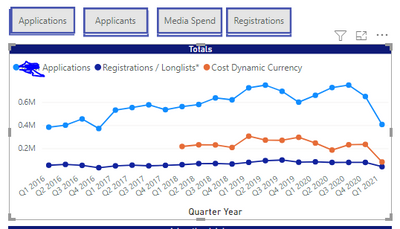
I would like to make a filter to filter each of the values here.
However I want to have the possibility to choose 2 of the 3 values as well in the same time.
I do not want to create 6-7 Bookmarks to do it, do you have an idea?
Thank you!
Ahmet
Solved! Go to Solution.
- Mark as New
- Bookmark
- Subscribe
- Mute
- Subscribe to RSS Feed
- Permalink
- Report Inappropriate Content
Hello guys,
I have solved the problem by adding a new visual filter called : POWER KPI. 2:0
Thanks!
Ahmet
- Mark as New
- Bookmark
- Subscribe
- Mute
- Subscribe to RSS Feed
- Permalink
- Report Inappropriate Content
Hello guys,
I have solved the problem by adding a new visual filter called : POWER KPI. 2:0
Thanks!
Ahmet


- Mark as New
- Bookmark
- Subscribe
- Mute
- Subscribe to RSS Feed
- Permalink
- Report Inappropriate Content
HI @Anonymous ,
- Mark as New
- Bookmark
- Subscribe
- Mute
- Subscribe to RSS Feed
- Permalink
- Report Inappropriate Content
HI @Anonymous ,


- Mark as New
- Bookmark
- Subscribe
- Mute
- Subscribe to RSS Feed
- Permalink
- Report Inappropriate Content
@Anonymous ,The information you have provided is not making the problem clear to me. Can you please explain with an example.
Appreciate your Kudos.
- Mark as New
- Bookmark
- Subscribe
- Mute
- Subscribe to RSS Feed
- Permalink
- Report Inappropriate Content
Hello there,
I mean I would like to be able to filter these line charts values
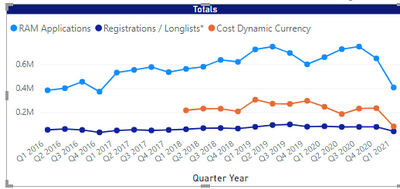
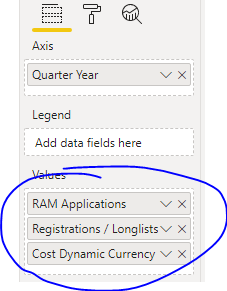
For example: I am using the values below. I would like to be able to choose from the filter, which values should show or not.
For example if i want to see: only VALUE 1 and VALUE 3 , i would like to make it, and DO NOT see the VALUE 2.
Hope it clarifies 🙂
Thanks!
- Mark as New
- Bookmark
- Subscribe
- Mute
- Subscribe to RSS Feed
- Permalink
- Report Inappropriate Content
@Anonymous , Take a measure slicer approach with a difference. Allow multi-select.
and create all measures like this
RAM Application new =
var _max = countx(filter(allselected(slicer), slicer[value] ="RAM"),slicer[value])
return
if(not(isblank(_max)),[RAM Application], blank())
Or use calculation groups. Refer examples of measure slicer(modify as suggested) and calculation groups
measure slicer
https://community.powerbi.com/t5/Desktop/Slicer-MTD-QTD-YTD-to-filter-dates-using-the-slicer/td-p/500115
https://radacad.com/change-the-column-or-measure-value-in-a-power-bi-visual-by-selection-of-the-slicer-parameter-table-pattern
calculation groups
https://www.youtube.com/watch?v=vlnx7QUVYME
https://www.sqlbi.com/blog/marco/2020/07/15/creating-calculation-groups-in-power-bi-desktop/
Helpful resources

Power BI Dataviz World Championships
The Power BI Data Visualization World Championships is back! It's time to submit your entry.

Power BI Monthly Update - December 2025
Check out the December 2025 Power BI Holiday Recap!

FabCon Atlanta 2026
Join us at FabCon Atlanta, March 16-20, for the ultimate Fabric, Power BI, AI and SQL community-led event. Save $200 with code FABCOMM.

| User | Count |
|---|---|
| 47 | |
| 45 | |
| 33 | |
| 33 | |
| 30 |


| User | Count |
|---|---|
| 138 | |
| 118 | |
| 59 | |
| 58 | |
| 56 |


