Hello,
I would be grateful if anyone could help with the following problem.
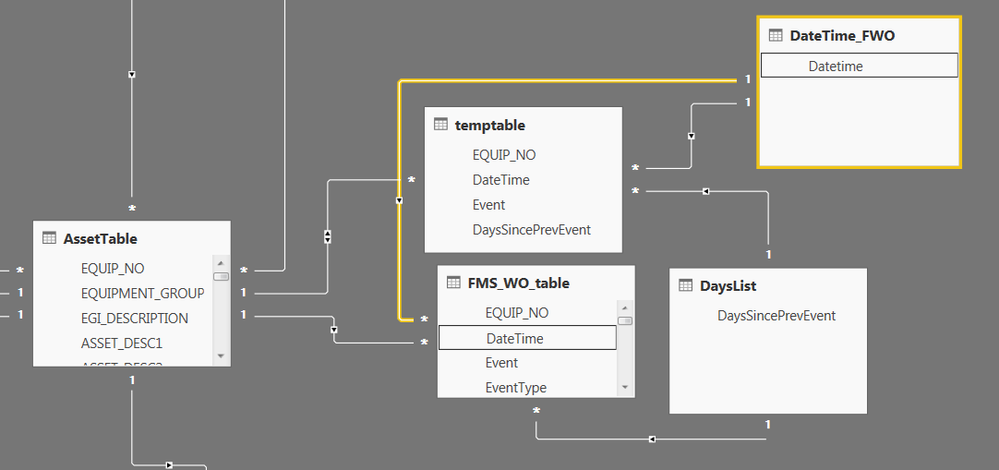
In the above report, the FMS_WO_table stores events affecting assets. Each row contains details about the event including the affected asset, event datetime, event type (see below). The “DaysSincePrevEvent” column is only populated for Event Type = 2 rows.
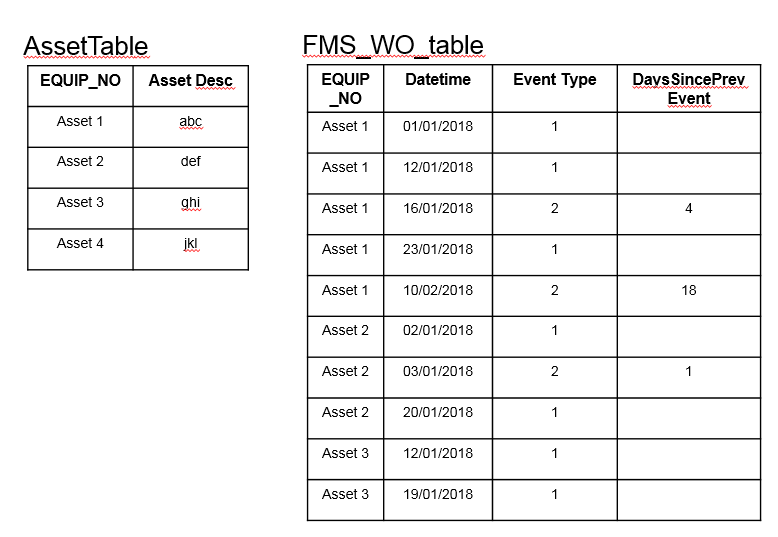
I would like to filter the FMS_WO_table based on the populated values in the “DaysSincePrevEvent” column but retain all the Event Type = 1 rows associated with the asset. In the table above for example, filtering based on DaysSincePrevEvent < 10 should yield the following result:

In the above example, one of the Asset 1 Event Type = 2 records are kept and the only Event Type = 2 record for Asset 2 is kept. Asset 3 has no Event Type = 2 records and is not present in the filtered results.
My attempt at implementing this filter has involved creating a temporary duplicate of the FMS_WO_table (temptable) where the “DaysSincePrevEvent” is set to 999 for all the records with Event Type = 1. I have then created two list tables, one containing all unique values of “DaysSincePrevEvent”, the other containing a list of unique datetimes (Datetime_FWO) (to allow filtering over a specific date range). These list tables are used in Slicers and are related to the event tables as depicted above. The other relationships to note are:
AssetTable[EQUIP_NO] to temptable[EQUIP_NO], 1:Many, Bi-directional
AssetTable[EQUIP_NO] to FMS_WO_table[EQUIP_NO], 1:Many, single direction
In the example above when filtering for DaysSincePrevEvent < 10, the temptable Event Type = 2 records do consequently filter the AssetTable via the bi-directional relationship. I would then expect the FMS_WO_table to be filtered based on the Equipment Number (indirectly via the temptable filtering) and the DaysSincePrevEvent < 10 (which should show all the Event Type = 1 records for the asset plus those Event Type = 2 records where DaysSincePrevEvent < 10).
In practice, I’m finding that the AssetTable is being filtered correctly but filtering of the EQUIP_NO in the FMS_WO_table does not seem to be working – there are additional assets listed in the FMS_WO_table which is not expected.
Any help would be much appreciated.
Many Thanks
Regards,
Lloyd


