cancel
Showing results for 
Search instead for 
Did you mean: 

The Power BI Data Visualization World Championships is back! Get ahead of the game and start preparing now! Learn more

Reply
mollig3
Frequent Visitor

Filtering Calculated Columns

I have created a mess of calculated columns that will show three lines when selected as "line values" on the graph. Here is an example of the calculated columns:

 FP Capacity 8 Hours

FP Capacity 10 Hours

 FP Capacity 12 Hours

Meat Capacity 8 Hours

Meat Capacity 10 Hours

Meat Capacity 12 Hours


I have a slicer on my dashboard from a different field that contains:

FP

Meat


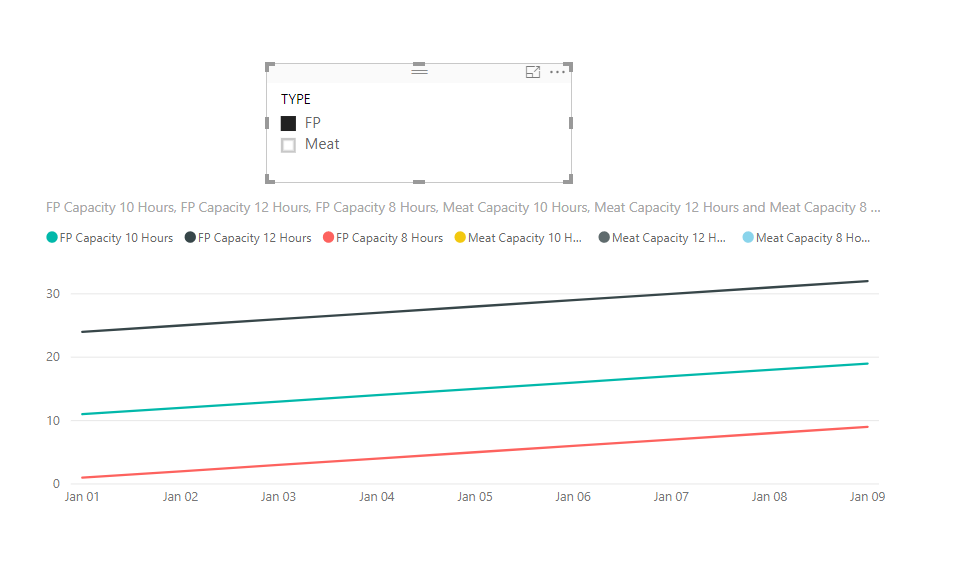
What I'm wanting is that when the user selects "FP" from the slicer, the combo chart will automatically graph the three Capacity calculated columns from above that say FP in the title.


Thanks in advance for the help 🙂


1 ACCEPTED SOLUTION
v-juanli-msft
Community Support
Community Support

Hi @mollig3

Not like measures, calculate columns are computed during database processing and then stored in the model, they do not response to user selections on the report.

So it is not possible to create a calculate column to change dynamically with user selections on the report.

Normally, we can create measures instead, then show the measures on the visual with the corresponding columns from your table.

For example,

FP Capacity 10 Hours =
IF ( SELECTEDVALUE ( Table5[TYPE] ) = "FP", MAX ( [FP Capacity 10 Hours2] ) )
Meat Capacity 10 Hours = IF(SELECTEDVALUE(Table5[TYPE])="Meat",MAX([Meat Capacity 10 Hours2]))

32.png


Best Regards

Maggie

View solution in original post

1 REPLY 1
v-juanli-msft
Community Support
Community Support

Hi @mollig3

Not like measures, calculate columns are computed during database processing and then stored in the model, they do not response to user selections on the report.

So it is not possible to create a calculate column to change dynamically with user selections on the report.

Normally, we can create measures instead, then show the measures on the visual with the corresponding columns from your table.

For example,

FP Capacity 10 Hours =
IF ( SELECTEDVALUE ( Table5[TYPE] ) = "FP", MAX ( [FP Capacity 10 Hours2] ) )
Meat Capacity 10 Hours = IF(SELECTEDVALUE(Table5[TYPE])="Meat",MAX([Meat Capacity 10 Hours2]))

32.png


Best Regards

Maggie

Helpful resources

Announcements
Power BI DataViz World Championships

Power BI Dataviz World Championships

The Power BI Data Visualization World Championships is back! Get ahead of the game and start preparing now!

December 2025 Power BI Update Carousel

Power BI Monthly Update - December 2025

Check out the December 2025 Power BI Holiday Recap!

FabCon Atlanta 2026 carousel

FabCon Atlanta 2026

Join us at FabCon Atlanta, March 16-20, for the ultimate Fabric, Power BI, AI and SQL community-led event. Save $200 with code FABCOMM.