
cancel
Showing results for 
Search instead for 
Did you mean: 

The Power BI Data Visualization World Championships is back! Get ahead of the game and start preparing now! Learn more

Reply
Anonymous
Not applicable

Filtering Between 2 Tables

Greetings datanauts! 


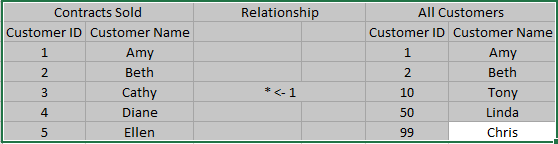
Please see screenshot below. 


Goal: I am trying to filter the All Customers table to remove any Customer ID's that are in the Contracts Sold table. 

Problem: I am not sure if I have this set up right relationship wise (All Customers table 1 -> * Contracts Sold). ALSO, how would you approach this? I was thinking that creating a measure would filter the tables as I hoped but that didnt work. My other attempt was to put the Contracts Sold[Customer ID] column in the visual level filters to advanced filter "IS NOT" but that didnt work also. 


I am sure this is probably a easy solution for you PowerBI ninjas but I am a noob. Any help from this great community is greatly appreciated! 


FilteringBetween2Tables.png

1 ACCEPTED SOLUTION
ssugar
Resolver III
Resolver III

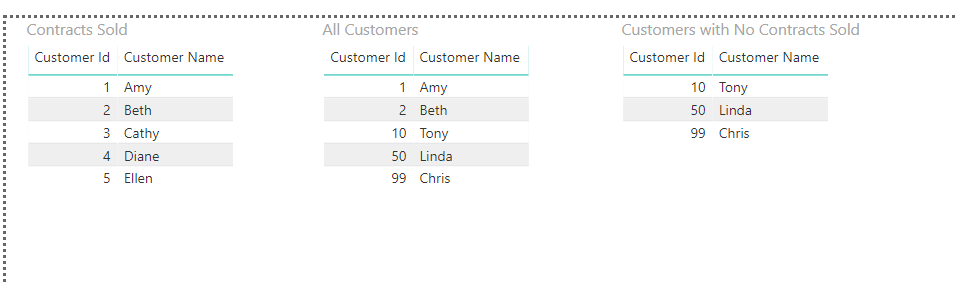
Using the sample data you provided, I was able to create a PATH of the company ids with contracts sold, and then create a calculated table that filters the all customers table to remove anything in the PATH of the company ids with contracts sold.


DAX measure to create the path:

Customer Id With Contract Sold = CONCATENATEX('Contracts Sold', 'Contracts Sold'[Customer Id], "|")


DAX calculated table to create a table that only shows customers with no contract sold:

Customers with No Contract Sold = FILTER('All Customers', PATHCONTAINS([Customer Id With Contract Sold], 'All Customers'[Customer Id]) = FALSE())


 community-sol-265075.png


PBIX file with this working: https://github.com/ssugar/PowerBICommunity/raw/master/community-sol-265075.pbix

View solution in original post

5 REPLIES 5
ssugar
Resolver III
Resolver III

Using the sample data you provided, I was able to create a PATH of the company ids with contracts sold, and then create a calculated table that filters the all customers table to remove anything in the PATH of the company ids with contracts sold.


DAX measure to create the path:

Customer Id With Contract Sold = CONCATENATEX('Contracts Sold', 'Contracts Sold'[Customer Id], "|")


DAX calculated table to create a table that only shows customers with no contract sold:

Customers with No Contract Sold = FILTER('All Customers', PATHCONTAINS([Customer Id With Contract Sold], 'All Customers'[Customer Id]) = FALSE())


 community-sol-265075.png


PBIX file with this working: https://github.com/ssugar/PowerBICommunity/raw/master/community-sol-265075.pbix

Anonymous
Not applicable

Stunning! I would have never thought of this on my own! Thank you! 

@Anonymous- no problem, happy to help 🙂

Anonymous
Not applicable

Would you be able to provide additional advice please? Lets say we want to filter by multiple tables and fields...how would you go about that? 


EX: We would need to filter for:

- any customer id not in contracts sold table

- which used payment method cash

- and bought cars


I have tried your initial suggestion and it worked fantastic! Only problem is that I tried to expand the search criteria to include multiple tables and fields but that made a complete mess. 


If you are able to help guide me to a solution, it will be so appreicated! 


Gratitude! 

FilteringBetween2Tables2.png

Sure 🙂


New Measure:

Customer Id With Payment Cash = CONCATENATEX(FILTER('Payment Method', 'Payment Method'[Payment] = "Cash"), 'Payment Method'[Customer Id], "|")


New Measure:

Customer Id With Product Cars = CONCATENATEX(FILTER('Product Type', 'Product Type'[Product] = "Cars"), 'Product Type'[Customer Id], "|")


New Calculated Table:

Customers with No Contract Sold With Paid Cash And Bought Cars = FILTER('All Customers', PATHCONTAINS([Customer Id With Contract Sold], 'All Customers'[Customer Id]) = FALSE() && PATHCONTAINS([Customer Id With Payment Cash], 'All Customers'[Customer Id]) = FALSE() && PATHCONTAINS([Customer Id With Product Cars], 'All Customers'[Customer Id]) = FALSE())


Updated pbix file - https://github.com/ssugar/PowerBICommunity/raw/master/community-sol-265075.pbix


Helpful resources

Announcements
Power BI DataViz World Championships

Power BI Dataviz World Championships

The Power BI Data Visualization World Championships is back! Get ahead of the game and start preparing now!

December 2025 Power BI Update Carousel

Power BI Monthly Update - December 2025

Check out the December 2025 Power BI Holiday Recap!

FabCon Atlanta 2026 carousel

FabCon Atlanta 2026

Join us at FabCon Atlanta, March 16-20, for the ultimate Fabric, Power BI, AI and SQL community-led event. Save $200 with code FABCOMM.