
cancel
Showing results for 
Search instead for 
Did you mean: 

The Power BI Data Visualization World Championships is back! It's time to submit your entry. Live now!

Reply
Anonymous
Not applicable

Filtering Between 2 Tables

Greetings datanauts! 


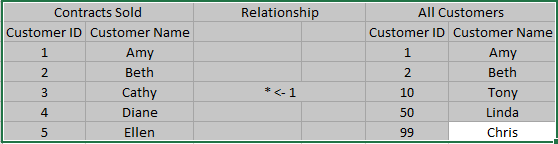
Please see screenshot below. 


Goal: I am trying to filter the All Customers table to remove any Customer ID's that are in the Contracts Sold table. 

Problem: I am not sure if I have this set up right relationship wise (All Customers table 1 -> * Contracts Sold). ALSO, how would you approach this? I was thinking that creating a measure would filter the tables as I hoped but that didnt work. My other attempt was to put the Contracts Sold[Customer ID] column in the visual level filters to advanced filter "IS NOT" but that didnt work also. 


I am sure this is probably a easy solution for you PowerBI ninjas but I am a noob. Any help from this great community is greatly appreciated! 


FilteringBetween2Tables.png

1 ACCEPTED SOLUTION
ssugar
Resolver III
Resolver III

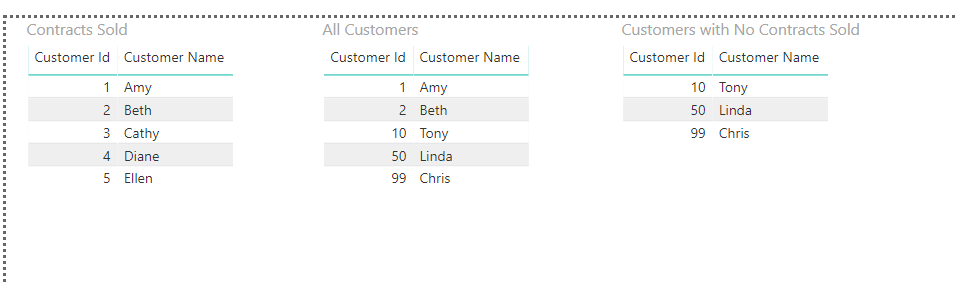
Using the sample data you provided, I was able to create a PATH of the company ids with contracts sold, and then create a calculated table that filters the all customers table to remove anything in the PATH of the company ids with contracts sold.


DAX measure to create the path:

Customer Id With Contract Sold = CONCATENATEX('Contracts Sold', 'Contracts Sold'[Customer Id], "|")


DAX calculated table to create a table that only shows customers with no contract sold:

Customers with No Contract Sold = FILTER('All Customers', PATHCONTAINS([Customer Id With Contract Sold], 'All Customers'[Customer Id]) = FALSE())


 community-sol-265075.png


PBIX file with this working: https://github.com/ssugar/PowerBICommunity/raw/master/community-sol-265075.pbix

View solution in original post

5 REPLIES 5
ssugar
Resolver III
Resolver III

Using the sample data you provided, I was able to create a PATH of the company ids with contracts sold, and then create a calculated table that filters the all customers table to remove anything in the PATH of the company ids with contracts sold.


DAX measure to create the path:

Customer Id With Contract Sold = CONCATENATEX('Contracts Sold', 'Contracts Sold'[Customer Id], "|")


DAX calculated table to create a table that only shows customers with no contract sold:

Customers with No Contract Sold = FILTER('All Customers', PATHCONTAINS([Customer Id With Contract Sold], 'All Customers'[Customer Id]) = FALSE())


 community-sol-265075.png


PBIX file with this working: https://github.com/ssugar/PowerBICommunity/raw/master/community-sol-265075.pbix

Anonymous
Not applicable

Stunning! I would have never thought of this on my own! Thank you! 

@Anonymous- no problem, happy to help 🙂

Anonymous
Not applicable

Would you be able to provide additional advice please? Lets say we want to filter by multiple tables and fields...how would you go about that? 


EX: We would need to filter for:

- any customer id not in contracts sold table

- which used payment method cash

- and bought cars


I have tried your initial suggestion and it worked fantastic! Only problem is that I tried to expand the search criteria to include multiple tables and fields but that made a complete mess. 


If you are able to help guide me to a solution, it will be so appreicated! 


Gratitude! 

FilteringBetween2Tables2.png

Sure 🙂


New Measure:

Customer Id With Payment Cash = CONCATENATEX(FILTER('Payment Method', 'Payment Method'[Payment] = "Cash"), 'Payment Method'[Customer Id], "|")


New Measure:

Customer Id With Product Cars = CONCATENATEX(FILTER('Product Type', 'Product Type'[Product] = "Cars"), 'Product Type'[Customer Id], "|")


New Calculated Table:

Customers with No Contract Sold With Paid Cash And Bought Cars = FILTER('All Customers', PATHCONTAINS([Customer Id With Contract Sold], 'All Customers'[Customer Id]) = FALSE() && PATHCONTAINS([Customer Id With Payment Cash], 'All Customers'[Customer Id]) = FALSE() && PATHCONTAINS([Customer Id With Product Cars], 'All Customers'[Customer Id]) = FALSE())


Updated pbix file - https://github.com/ssugar/PowerBICommunity/raw/master/community-sol-265075.pbix


Helpful resources

Announcements
FabCon Atlanta 2026 carousel

FabCon Atlanta 2026

Join us at FabCon Atlanta, March 16-20, for the ultimate Fabric, Power BI, AI and SQL community-led event. Save $200 with code FABCOMM.