cancel
Showing results for 
Search instead for 
Did you mean: 

Learn from the best! Meet the four finalists headed to the FINALS of the Power BI Dataviz World Championships! Register now

Reply
amelief
Frequent Visitor

Filtered calculation

Hi everyone, 

I don't anderstand why ont of my filter isn't working... 

I hope you will see something I can't ! 


I make this table calculated : 

assistance_access = 
ADDCOLUMNS(
    ADDCOLUMNS(
        SUMMARIZE(
            'Enquête';
            'Enquête'[Année];
            'Enquête'[Comment évalueriez-vous l'accessibilité de ce service ?];
            "total";
            SUM('Enquête'[Comment évalueriez-vous l'accessibilité de ce service ?])
        );
        "total_y";
        CALCULATE(sum('Enquête'[Comment évalueriez-vous l'accessibilité de ce service ?]);FILTER('Enquête';'Enquête'[Année]=[Année]))
   );
   "percent";DIVIDE([total]*100;[total_y])
   )

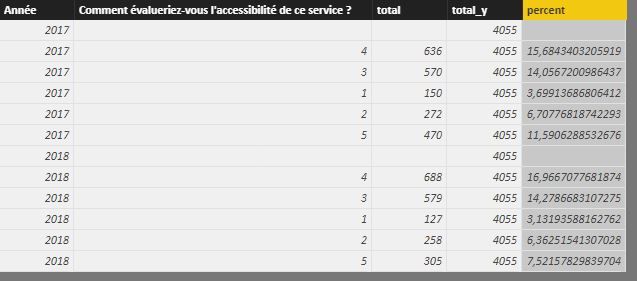
The red line working not well ! This the results :

Capturepbi.JPG


What I'm excpecting is to have in total_y the sum of the total per year. 


Have you an idea ?

thanks a lot for your help !

1 ACCEPTED SOLUTION
amelief
Frequent Visitor

I found a way ! 


assistance_access = ADDCOLUMNS(ADDCOLUMNS(SUMMARIZE('Enquête';'Enquête'[Année];
    'Enquête'[Comment évalueriez-vous l'accessibilité de ce service ?]
            ;"total";SUM(
    'Enquête'[Comment évalueriez-vous l'accessibilité de ce service ?]
            ));"total_y";CALCULATE(SUM(
    'Enquête'[Comment évalueriez-vous l'accessibilité de ce service ?]
            );ALL('Enquête');'Enquête'[Année]=EARLIER('Enquête'[Année])));"percent";DIVIDE([total]*100;[total_y]))

View solution in original post

1 REPLY 1
amelief
Frequent Visitor

I found a way ! 


assistance_access = ADDCOLUMNS(ADDCOLUMNS(SUMMARIZE('Enquête';'Enquête'[Année];
    'Enquête'[Comment évalueriez-vous l'accessibilité de ce service ?]
            ;"total";SUM(
    'Enquête'[Comment évalueriez-vous l'accessibilité de ce service ?]
            ));"total_y";CALCULATE(SUM(
    'Enquête'[Comment évalueriez-vous l'accessibilité de ce service ?]
            );ALL('Enquête');'Enquête'[Année]=EARLIER('Enquête'[Année])));"percent";DIVIDE([total]*100;[total_y]))

Helpful resources

Announcements
Join our Fabric User Panel

Join our Fabric User Panel

Share feedback directly with Fabric product managers, participate in targeted research studies and influence the Fabric roadmap.

February Power BI Update Carousel

Power BI Monthly Update - February 2026

Check out the February 2026 Power BI update to learn about new features.