We've captured the moments from FabCon & SQLCon that everyone is talking about, and we are bringing them to the community, live and on-demand. Starts on April 14th. Register now
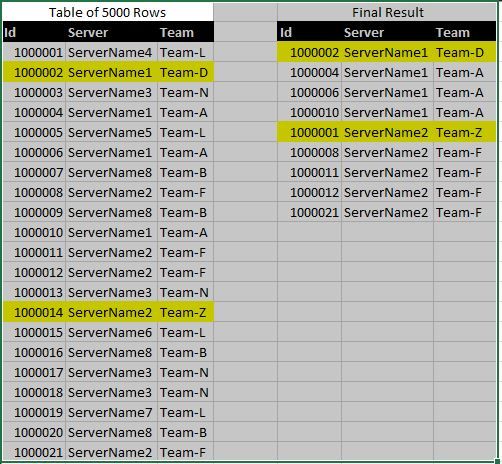
I have been using PivotTable from excel to find an incorrect data assignment, such as finding 2 teams assigned to the same server. There can be around 5000+ ticket entries. How can I produce a report/table in Power BI that will either show me if a server gets more than 1 team assigned OR show me if there is a duplicate server with a different team?
*Highlighted rows are the incorrect items
Solved! Go to Solution.
Hi @Wkbdrguy
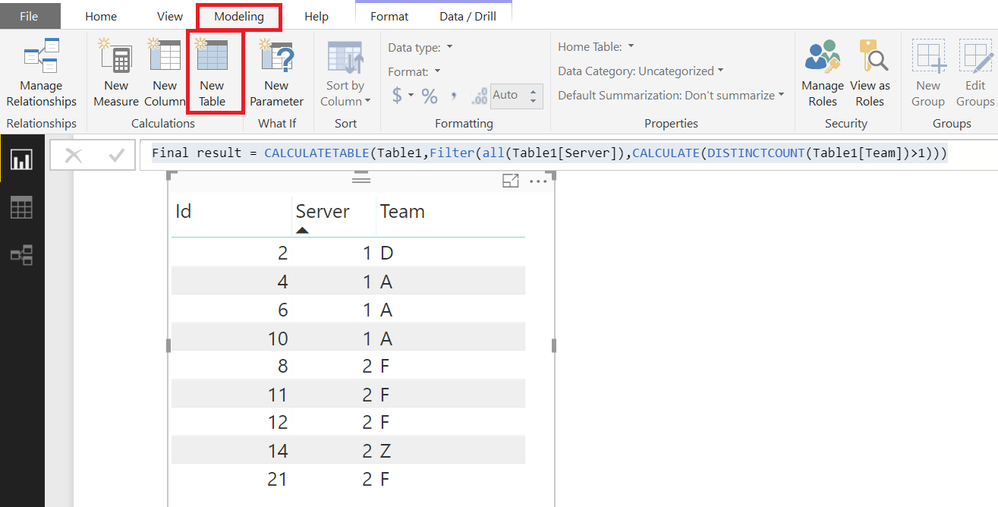
With PowerBI desktop, you can directly create a calculated table to get the Final Results
Go to Modelling Tab>>NEW TABLE and enter this code
Final result =
CALCULATETABLE (
Table1,
FILTER (
ALL ( Table1[Server] ),
CALCULATE ( DISTINCTCOUNT ( Table1[Team] ) > 1 )
)
)
Hi @Wkbdrguy
With PowerBI desktop, you can directly create a calculated table to get the Final Results
Go to Modelling Tab>>NEW TABLE and enter this code
Final result =
CALCULATETABLE (
Table1,
FILTER (
ALL ( Table1[Server] ),
CALCULATE ( DISTINCTCOUNT ( Table1[Team] ) > 1 )
)
)
Exactly what I was looking for. This worked out great.
Please see file attached as well
If you have recently started exploring Fabric, we'd love to hear how it's going. Your feedback can help with product improvements.
A new Power BI DataViz World Championship is coming this June! Don't miss out on submitting your entry.
Share feedback directly with Fabric product managers, participate in targeted research studies and influence the Fabric roadmap.
| User | Count |
|---|---|
| 54 | |
| 39 | |
| 32 | |
| 17 | |
| 15 |
| User | Count |
|---|---|
| 64 | |
| 63 | |
| 37 | |
| 34 | |
| 22 |