cancel
Showing results for 
Search instead for 
Did you mean: 

Learn from the best! Meet the four finalists headed to the FINALS of the Power BI Dataviz World Championships! Register now

Reply
Anonymous
Not applicable

Filtered Cumulative Graph Not Displaying Correctly

Hi PBI Community,


If this has already been solved and someone can point me to a post that I can review and model my equation after I'd appreciate it.

I'm graphing a cumulative total and my equation appears to be calculating correctly (I used a card visual to verify against the filtered table count) however, when I graph it and try to narrow the window down to only view a certain time period (say 9/11/22 - 12/31/2022) the totals on the graph change and I'm not sure why/how to fix this.


My cumulative total is:

zProjectedExpTotCum = 
VAR maxDate = MAX('table'[weekEndingExpire])

RETURN

CALCULATE(
    [zProjectedExpTotSum],
    'table'[weekEndingExpire] <= maxDate
)

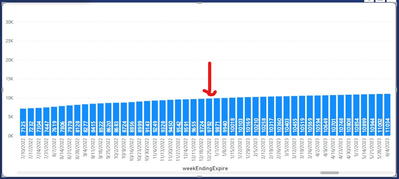
My data goes back to the '70s so I don't want to see every data point I just want to show the cumulative amount (up to my "maxDate") for what ever window/time frame I've selected.  Without a filter on my date my graph looks like this:
codestule_0-1664280215419.png

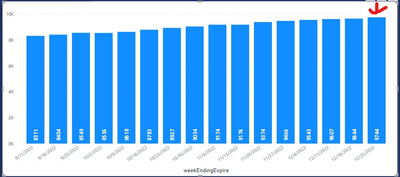
As you can see for week ending 12/25 it shows a value of 9792, when I filter to only show data to the end of the current year (12/31/2022) the graph now looks like this:
codestule_2-1664280758157.png

Now it shows a value of 9744 for week ending 12/25.  The correct value should be 9792 so I'm not sure how 48 are getting filtered out when I reduce the maxDate viewing down to 12/25/22 from 12/28/2025.  Thoughts on what I'm doing wrong?


1 ACCEPTED SOLUTION
Anonymous
Not applicable

Hi @Anonymous ,


Due to I don't know your data model, here I will give you some suggestions. Please try below code to create a measure.

zProjectedExpTotCum =
VAR maxDate =
    MAX ( 'table'[weekEndingExpire] )
RETURN
    CALCULATE (
        [zProjectedExpTotSum],
        FILTER ( ALL ( 'table' ), 'table'[weekEndingExpire] <= maxDate )
    )

As far as I know, this should be caused by your data model. If above code still couldn't help you solve your issue, please share a sample file with me.


Best Regards,
Rico Zhou


If this post helps, then please consider Accept it as the solution to help the other members find it more quickly.

View solution in original post

2 REPLIES 2
Anonymous
Not applicable

Hi @Anonymous ,


Due to I don't know your data model, here I will give you some suggestions. Please try below code to create a measure.

zProjectedExpTotCum =
VAR maxDate =
    MAX ( 'table'[weekEndingExpire] )
RETURN
    CALCULATE (
        [zProjectedExpTotSum],
        FILTER ( ALL ( 'table' ), 'table'[weekEndingExpire] <= maxDate )
    )

As far as I know, this should be caused by your data model. If above code still couldn't help you solve your issue, please share a sample file with me.


Best Regards,
Rico Zhou


If this post helps, then please consider Accept it as the solution to help the other members find it more quickly.

Anonymous
Not applicable

Thanks @Anonymous ,


I think I get tripped up on whether or not to use the filter call out and if I should use "ALL", "ALLSELECTED", etc.  I appreciate your time.


Regards,

Cody

Helpful resources

Announcements
Join our Fabric User Panel

Join our Fabric User Panel

Share feedback directly with Fabric product managers, participate in targeted research studies and influence the Fabric roadmap.

February Power BI Update Carousel

Power BI Monthly Update - February 2026

Check out the February 2026 Power BI update to learn about new features.