cancel
Showing results for 
Search instead for 
Did you mean: 

The Power BI Data Visualization World Championships is back! Get ahead of the game and start preparing now! Learn more

Reply
DianaT
Helper I
Helper I

Filter

Hi all,


I have a table with sales manager details recorded as below:


Abbey

AbbeyHazel

Peter

PeterAbbey

Hazel

PeterHazel


Is there any way I can create a filter which will allow me to filter all rows that contain the name "Abbey", "Hazel" and "Peter"?


Many thanks,

Diana

1 ACCEPTED SOLUTION
v-gizhi-msft
Community Support
Community Support

Hi,


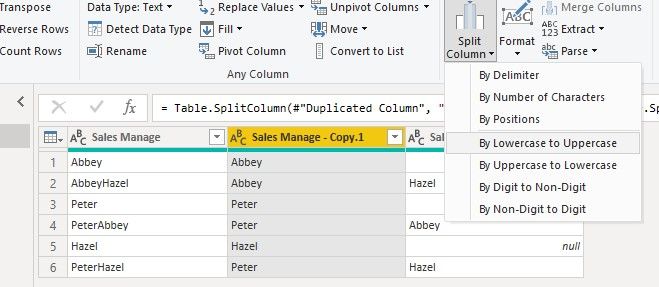
Please try to duplicate the original column and use 'Split Columns' function to split duplicated column in Query Editor:

11.jpg

After Apply&Close, create a Slicer table:

Table 2 = DISTINCT(UNION(SELECTCOLUMNS('Table',"A",'Table'[Sales Manage - Copy.1]),SELECTCOLUMNS('Table',"B",'Table'[Sales Manage - Copy.2])))

Then create a check measure:

Measure = IF(SELECTEDVALUE('Table 2'[A]) in FILTERS('Table'[Sales Manage - Copy.1])||SELECTEDVALUE('Table 2'[A]) in FILTERS('Table'[Sales Manage - Copy.2]),1,0)

Apply this measure=1 to the visual, when you choose a name in slicer, the result shows:

51.PNG

Here is my test pbix file:

https://microsoftapc-my.sharepoint.com/:u:/g/personal/v-gizhi_microsoft_com/EaRtvIw6e5tMnwQaqwfraOIB... 

Hope this helps.


Best Regards,

Giotto Zhi

View solution in original post

4 REPLIES 4
v-gizhi-msft
Community Support
Community Support

Hi,


Please try to duplicate the original column and use 'Split Columns' function to split duplicated column in Query Editor:

11.jpg

After Apply&Close, create a Slicer table:

Table 2 = DISTINCT(UNION(SELECTCOLUMNS('Table',"A",'Table'[Sales Manage - Copy.1]),SELECTCOLUMNS('Table',"B",'Table'[Sales Manage - Copy.2])))

Then create a check measure:

Measure = IF(SELECTEDVALUE('Table 2'[A]) in FILTERS('Table'[Sales Manage - Copy.1])||SELECTEDVALUE('Table 2'[A]) in FILTERS('Table'[Sales Manage - Copy.2]),1,0)

Apply this measure=1 to the visual, when you choose a name in slicer, the result shows:

51.PNG

Here is my test pbix file:

https://microsoftapc-my.sharepoint.com/:u:/g/personal/v-gizhi_microsoft_com/EaRtvIw6e5tMnwQaqwfraOIB... 

Hope this helps.


Best Regards,

Giotto Zhi

Hi Giotto,


I like this... Way leaner than the solution I have (which involves uploading seperate datalists for each manager...)


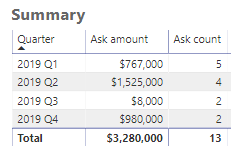
My next obstacle though is that I'm trying to have my visual looks like this:


Bi01.PNG

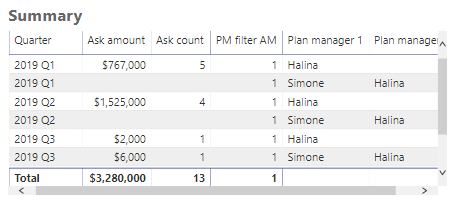
But for this filter to work, I have to include manager info in my table:


Bi02.PNG

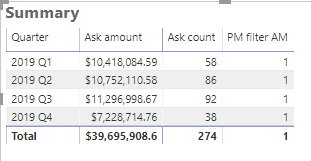
When I take away the Manager columns, the filter stops working and pulling in data from everyone...


Bi03.PNG


I would very much appreciate your insight on this.


Many thanks,
Diana


amitchandak
Super User
Super User

Are you going to select these values in a slicer?


If yes, then refer to this example. Not the same but when each value is selected you can use search and find and build the final result.


https://community.powerbi.com/t5/Desktop/Slicer-MTD-QTD-YTD-to-filter-dates-using-the-slicer/td-p/50...


Appreciate your Kudos. In case, this is the solution you are looking for, mark it as the Solution.
In case it does not help, please provide additional information and mark me with @

Thanks. My Recent Blogs -Decoding Direct Query - Time Intelligence, Winner Coloring on MAP, HR Analytics, Power BI Working with Non-Standard TimeAnd Comparing Data Across Date Ranges
Connect on Linkedin


Share with Power BI Enthusiasts: Full Power BI Video (20 Hours) YouTube
Microsoft Fabric Series 60+ Videos YouTube
Microsoft Fabric Hindi End to End YouTube

Thanks for your reply.


I'm still wrapping my head around on how I could apply this approach to my data and make it work... (Being a newbie certainly doesn't help...)


I'll let you if I make any progress on this 🙂


Diana

Helpful resources

Announcements
Power BI DataViz World Championships

Power BI Dataviz World Championships

The Power BI Data Visualization World Championships is back! Get ahead of the game and start preparing now!

November Power BI Update Carousel

Power BI Monthly Update - November 2025

Check out the November 2025 Power BI update to learn about new features.

FabCon Atlanta 2026 carousel

FabCon Atlanta 2026

Join us at FabCon Atlanta, March 16-20, for the ultimate Fabric, Power BI, AI and SQL community-led event. Save $200 with code FABCOMM.