cancel
Showing results for 
Search instead for 
Did you mean: 

The Power BI Data Visualization World Championships is back! Get ahead of the game and start preparing now! Learn more

Reply
BCGR
Frequent Visitor

Filter won't "fold out" - cant set filter value

Hi.

I am having a wierd error trying to create a dynamic Top N filter.


I have two tables, one with [Company Name] and one with [Operating Income]. I would like to filter the Top N companies with a slider on the Dashboard.


To achieve this, I have created a Numeric Range parameter, that I use for setting the value of N, then I have the following measure formula for evaluating each company.


RankMeasure = RANKX(ALL('dw dimBRREGEnheter'[Company Name]),SUMX(RELATEDTABLE('dw factBRREGRegnskapsdata'),[Operating Income]),,DESC) <= 'TopN'[TopN Value]


This evaluates to TRUE/FALSE and it works great, as one can see in the table.
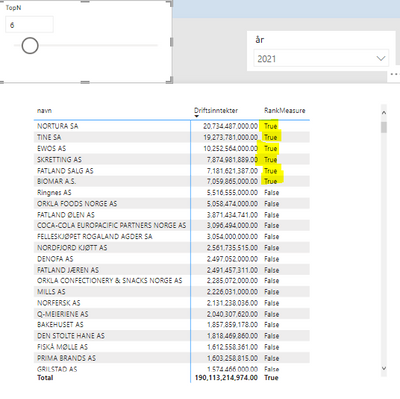
BCGR_0-1679324277637.png


However, when I try to add this measure (RankMeasure) to the filters, I cannot "fold out" the filter to set it to TRUE.BCGR_1-1679323753500.png
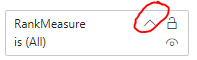

I cant set the value of it.  I tried adding it to a slicer, but I cant, it won't add itself to the slicer.

I assume that the problem is in the filter cannot evaluate the possible values of the measure when it is in a filter/slicer.

I followed a Youtube video, where the guy does exactly this, except he doesn't use a Numeric Range parameter and it works for him.

Does anyone know what is going on here?

1 ACCEPTED SOLUTION
lbendlin
Super User
Super User

change the measure result from True/False to 1/0

View solution in original post

3 REPLIES 3
BCGR
Frequent Visitor

That worked! Thanks!

Is that a general restriction? That filter fields can't be True/False?

Some say restriction, some say bug. Measures as visual filters work in mysterious ways.

lbendlin
Super User
Super User

change the measure result from True/False to 1/0

Helpful resources

Announcements
November Power BI Update Carousel

Power BI Monthly Update - November 2025

Check out the November 2025 Power BI update to learn about new features.

Fabric Data Days Carousel

Fabric Data Days

Advance your Data & AI career with 50 days of live learning, contests, hands-on challenges, study groups & certifications and more!

FabCon Atlanta 2026 carousel

FabCon Atlanta 2026

Join us at FabCon Atlanta, March 16-20, for the ultimate Fabric, Power BI, AI and SQL community-led event. Save $200 with code FABCOMM.

Top Kudoed Authors