cancel
Showing results for 
Search instead for 
Did you mean: 

The Power BI Data Visualization World Championships is back! Get ahead of the game and start preparing now! Learn more

Reply
Anonymous
Not applicable

Filter what data is imported by date

Hello all, I have a progress database connected via ODBC. I have a large table called diary with many rows and I want to speed up the time it takes to refresh this table. I have searched high and low on the forums for an answer and probably have come across the answer but due to my lack of knowledge not understood it but how do I bring less rows into power bi? I want to use the column dd-date to restrict to current month and anything in the future if possible. here is the code from the advance editor of 1 dashboard I am building


let
Source = Odbc.DataSource("dsn=moveware", [HierarchicalNavigation=true]),
MOVEWARE_Database = Source{[Name="MOVEWARE",Kind="Database"]}[Data],
PUB_Schema = MOVEWARE_Database{[Name="PUB",Kind="Schema"]}[Data],
diary_Table = PUB_Schema{[Name="diary",Kind="Table"]}[Data],
#"Changed Type" = Table.TransformColumnTypes(diary_Table,{{"dd-time", type time}}),
#"Duplicated Column" = Table.DuplicateColumn(#"Changed Type", "dd-date", "dd-date - Copy"),
#"Duplicated Column1" = Table.DuplicateColumn(#"Duplicated Column", "dd-time", "dd-time - Copy"),
#"Merged Columns" = Table.CombineColumns(Table.TransformColumnTypes(#"Duplicated Column1", {{"dd-date - Copy", type text}, {"dd-time - Copy", type text}}, "en-GB"),{"dd-date - Copy", "dd-time - Copy"},Combiner.CombineTextByDelimiter(" ", QuoteStyle.None),"datetime"),
#"Changed Type1" = Table.TransformColumnTypes(#"Merged Columns",{{"datetime", type datetime}}),
#"Removed Other Columns" = Table.SelectColumns(#"Changed Type1",{"dd-date", "dd-type", "ddID", "dd-brch", "rpid", "dd-desc", "dd-vehicles-act", "dd-labour-act", "dd-cancelled", "datetime"})
in
#"Removed Other Columns"

1 ACCEPTED SOLUTION
v-piga-msft
Resident Rockstar
Resident Rockstar

Hi @Anonymous ,

It seems that you want to import the data with date filter to get the most important data rather than all of the data.

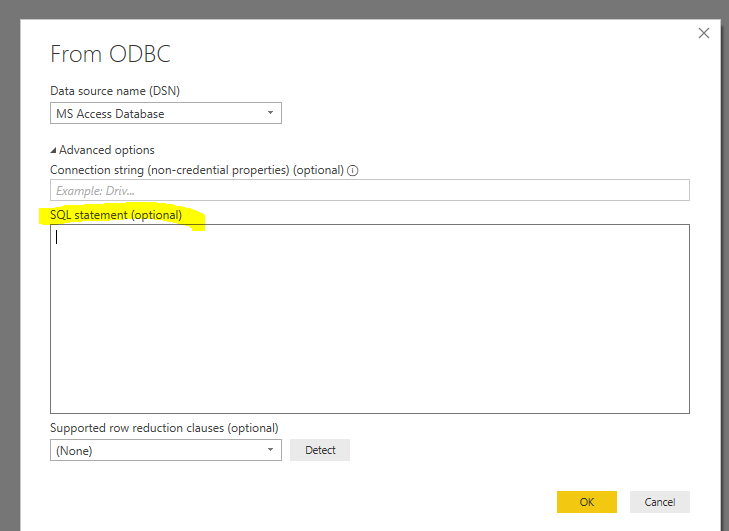
If so, you could enter the SQL Statement to select the data with date condition when you get data via ODBC like below.

Capture.PNG

Please refer to this similar thread.

Best  Regards,

Cherry


Community Support Team _ Cherry Gao
If this post helps, then please consider Accept it as the solution to help the other members find it more quickly.

View solution in original post

3 REPLIES 3
v-piga-msft
Resident Rockstar
Resident Rockstar

Hi @Anonymous ,

It seems that you want to import the data with date filter to get the most important data rather than all of the data.

If so, you could enter the SQL Statement to select the data with date condition when you get data via ODBC like below.

Capture.PNG

Please refer to this similar thread.

Best  Regards,

Cherry


Community Support Team _ Cherry Gao
If this post helps, then please consider Accept it as the solution to help the other members find it more quickly.
Anonymous
Not applicable

HI @v-piga-msft thanks for the response. I have zero knowledge of SQL: statements so wouldn't mind some help building what I need. how do I definae the table name, then the row and then specifiy the fact I only want stuff from current month and future dates?


thanks

Anonymous
Not applicable

don't worry I worked it out. thanks for pointing me in the right direction @v-piga-msft 

Helpful resources

Announcements
Power BI DataViz World Championships

Power BI Dataviz World Championships

The Power BI Data Visualization World Championships is back! Get ahead of the game and start preparing now!

December 2025 Power BI Update Carousel

Power BI Monthly Update - December 2025

Check out the December 2025 Power BI Holiday Recap!

FabCon Atlanta 2026 carousel

FabCon Atlanta 2026

Join us at FabCon Atlanta, March 16-20, for the ultimate Fabric, Power BI, AI and SQL community-led event. Save $200 with code FABCOMM.