cancel
Showing results for 
Search instead for 
Did you mean: 

The Power BI Data Visualization World Championships is back! Get ahead of the game and start preparing now! Learn more

Reply
maddypena07
Frequent Visitor

Filter visual by a total aggregated value

Hello, I search other topics and I can't seem to find a solution. 

I have a simple table, is a view and all metrics are already there. With those metrics I created three aggregated measures and created three visuals that are filtered by slicers. 


Everything works fine so far. One of the tables shows the availability% by machine by shift. With certain values in the slicers, the other visuals show only three machines, whereas the availability% table shows two more with availability% = 0 (this is expected due to the structure of the view)
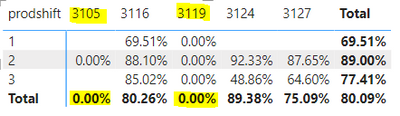
 

maddypena07_1-1689890786512.png


The thing is, when I want to filter the Availability% table to show only the result aggregated value different from zero, the filter of the visual doesn't work. I pretty new to powerbi and what I imagine powerBI is doing is filtering values at row level and not the aggregated result.
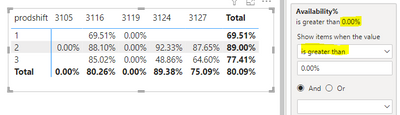
 

maddypena07_2-1689890856645.png


This is what I wanted to achieve:


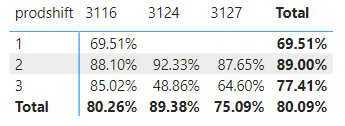
maddypena07_3-1689890905639.png


Is this the expected behavior? If so, how can I filter by the aggregated value? 


Edit: I cannot attached a file, but here's the direct link to it

https://drive.google.com/file/d/151_BNSKfKGdYOyfqlWw7Z41WXuyHeVsH/view?usp=drive_link


Thanks in advance!

1 ACCEPTED SOLUTION
lbendlin
Super User
Super User


what I imagine powerBI is doing is filtering values at row level and not the aggregated result.


Mostly Correct.  You usually need to create another filter measure that returns 0 or 1 (for example) based on aggregate calculations ( usually done via REMOVEFILTERS ) on each detail row.


In your case however the "False"  branch of the IF statement returned 0.  When you remove that you get the desired result.  


Availability% = IF(SUM('Sheet 15_Full Data'[Available_Prod_Dur_Machine ( uptime+downtime)]) <> 0, Divide(SUM('Sheet 15_Full Data'[Prod_Dur_Machine]),SUM('Sheet 15_Full Data'[Available_Prod_Dur_Machine ( uptime+downtime)]),0)) 


Also note that the use of DIVIDE  is preferred over "/" as it allows you to gracefully handle bad divisions.

View solution in original post

2 REPLIES 2
lbendlin
Super User
Super User


what I imagine powerBI is doing is filtering values at row level and not the aggregated result.


Mostly Correct.  You usually need to create another filter measure that returns 0 or 1 (for example) based on aggregate calculations ( usually done via REMOVEFILTERS ) on each detail row.


In your case however the "False"  branch of the IF statement returned 0.  When you remove that you get the desired result.  


Availability% = IF(SUM('Sheet 15_Full Data'[Available_Prod_Dur_Machine ( uptime+downtime)]) <> 0, Divide(SUM('Sheet 15_Full Data'[Prod_Dur_Machine]),SUM('Sheet 15_Full Data'[Available_Prod_Dur_Machine ( uptime+downtime)]),0)) 


Also note that the use of DIVIDE  is preferred over "/" as it allows you to gracefully handle bad divisions.

I see my error now!
Thanks a lot for your time and recommendations! 

Helpful resources

Announcements
Power BI DataViz World Championships

Power BI Dataviz World Championships

The Power BI Data Visualization World Championships is back! Get ahead of the game and start preparing now!

December 2025 Power BI Update Carousel

Power BI Monthly Update - December 2025

Check out the December 2025 Power BI Holiday Recap!

FabCon Atlanta 2026 carousel

FabCon Atlanta 2026

Join us at FabCon Atlanta, March 16-20, for the ultimate Fabric, Power BI, AI and SQL community-led event. Save $200 with code FABCOMM.