Join us at FabCon Atlanta from March 16 - 20, 2026, for the ultimate Fabric, Power BI, AI and SQL community-led event. Save $200 with code FABCOMM.
Register now!The Power BI Data Visualization World Championships is back! Get ahead of the game and start preparing now! Learn more
Hello!
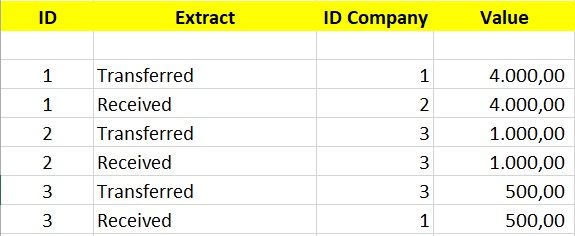
I'm having trouble solving the following problem: I need to create a filter and graph to demonstrate how much each company has transferred and received from each other. For example: company 1 transferred to the company 2 US $ 4,000.00 and received the 3 US $ 500.00.
Thank you.
Solved! Go to Solution.
My bad =oP applying Filter will solve the issue:
Regards
Abduvali
Hi @Gelain,
Just create 2 new calculated measures:
And drop them into your table chart.
Let me know if its what you were looking for.
Regards
Abduvali
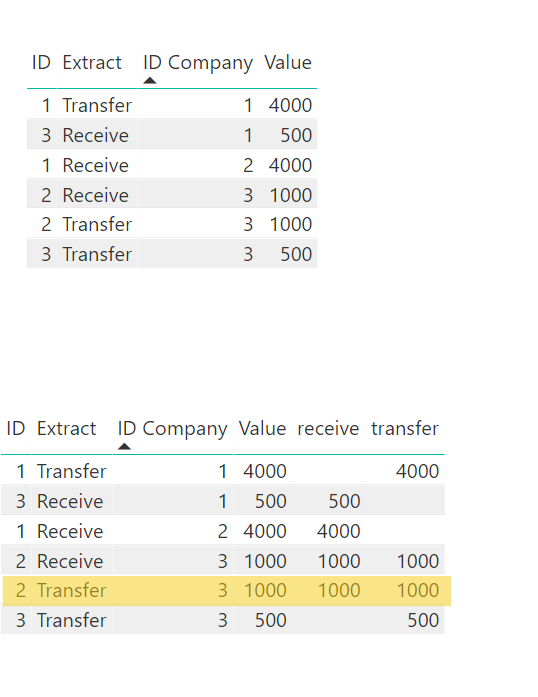
According to your solution I see some extra data. Looking at this below image
Table1 is raw data. By applying your formula and making the data into a table,
The yellow marked Row seems to be an extra one becuase, take an example with ID Company 3::
ID Compnay 3 has
Receive 1000 which is row #4 GOOD.
Transfer of 1000 and 500 which are row #4 and row #6 GOOD.
But I don't understand the Row#5 which says Receive 1000 and transfer 1000 NOT GOOD.
Hello @pxg08680 and @Abduvali!
Thank you for helping me.
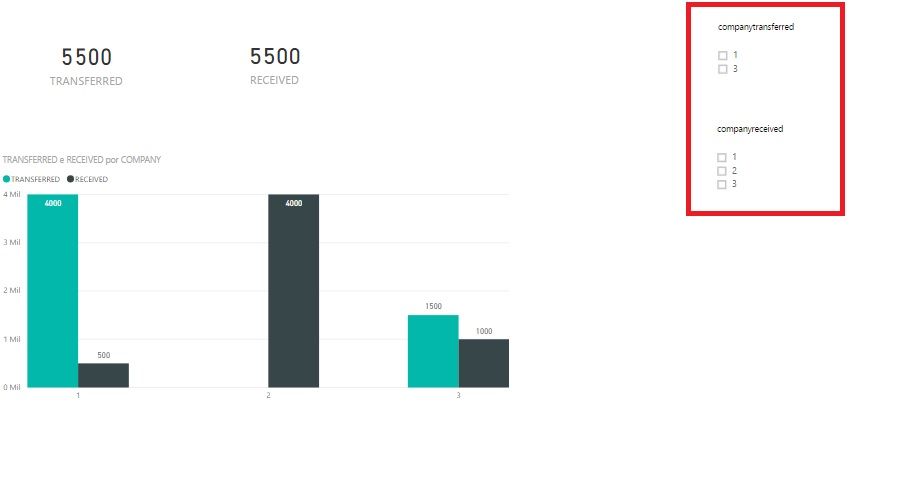
I was able to correctly generate the value sent and received by company. To finish, I need to create two filters: one for the company that transferred and another filter for the company that received the values, that is, to detail the destination of the resources transferred by company. I made a few attempts, but could not solve.
The Power BI Data Visualization World Championships is back! Get ahead of the game and start preparing now!
Check out the November 2025 Power BI update to learn about new features.
| User | Count |
|---|---|
| 59 | |
| 43 | |
| 42 | |
| 23 | |
| 17 |
| User | Count |
|---|---|
| 190 | |
| 122 | |
| 96 | |
| 66 | |
| 47 |