Get Fabric or SQL Certified for Free.
Get certified for free when you join Fabric Data Days 2026 and dive into Fabric, Power BI, SQL, AI, and other essential data skills.
Join now- Power BI forums
- Get Help with Power BI
- Desktop
- Service
- Report Server
- Power Query
- Mobile Apps
- Developer
- DAX Commands and Tips
- Custom Visuals Development Discussion
- Health and Life Sciences
- Power BI Spanish forums
- Translated Spanish Desktop
- Training and Consulting
- Instructor Led Training
- Dashboard in a Day for Women, by Women
- Galleries
- Data Stories Gallery
- Themes Gallery
- Contests Gallery
- QuickViz Gallery
- Quick Measures Gallery
- Visual Calculations Gallery
- Notebook Gallery
- Translytical Task Flow Gallery
- TMDL Gallery
- R Script Showcase
- Webinars and Video Gallery
- Ideas
- Custom Visuals Ideas (read-only)
- Issues
- Issues
- Events
- Upcoming Events
July 7 - July 17 | Round 2 of the Power BI Dataviz World Championships. Don't miss your chance! Learn more
- Power BI forums
- Forums
- Get Help with Power BI
- Desktop
- Re: Filter value based on multiple criteria
- Subscribe to RSS Feed
- Mark Topic as New
- Mark Topic as Read
- Float this Topic for Current User
- Bookmark
- Subscribe
- Printer Friendly Page

- Mark as New
- Bookmark
- Subscribe
- Mute
- Subscribe to RSS Feed
- Permalink
- Report Inappropriate Content
Filter value based on multiple criteria
Hi,
Can you please help me filter value of the last year for each company in the table below?
The result in the last column should be 4 for company A, 200 for company C, and 4 for company B.
I tried to use lookupvalue, filter, and max but I couldn't figureout the arrangement in the formula.
| Year | Value | Company | Value in the final year |
| 2019 | 10 | A | |
| 2020 | 4 | A | |
| 2021 | 5 | A | |
| 2022 | 4 | A | |
| 2019 | 8 | C | |
| 2020 | 9 | C | |
| 2021 | 7 | C | |
| 2022 | 200 | C | |
| 2019 | 10 | B | |
| 2020 | 4 | B | |
| 2021 | 5 | B | |
| 2022 | 4 | B |
Solved! Go to Solution.


- Mark as New
- Bookmark
- Subscribe
- Mute
- Subscribe to RSS Feed
- Permalink
- Report Inappropriate Content
Hi @Anonymous ,
Measure way:
Measure =
VAR maxyear =
    CALCULATE ( MAX ( 'Table'[Year] ), ALLEXCEPT ( 'Table', 'Table'[Company] ) )
RETURN
    CALCULATE (
        MAX ( 'Table'[Value] ),
        FILTER ( ALLEXCEPT ( 'Table', 'Table'[Company] ), 'Table'[Year] = maxyear )
    )
Alternatively,to use a calculated column as below.
in the final year =
VAR maxyear =
    CALCULATE (
        MAX ( 'Table'[Year] ),
        FILTER ( 'Table', 'Table'[Company] = EARLIER ( 'Table'[Company] ) )
    )
RETURN
    CALCULATE (
        SUM ( 'Table'[Value] ),
        FILTER (
            'Table',
            'Table'[Year] = maxyear
                && 'Table'[Company] = EARLIER ( 'Table'[Company] )
        )
    )
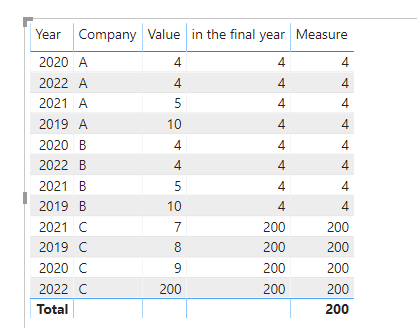
Pbix as attached.
If this post helps, then please consider Accept it as the solution to help the others find it more quickly.
- Mark as New
- Bookmark
- Subscribe
- Mute
- Subscribe to RSS Feed
- Permalink
- Report Inappropriate Content
Hi @Anonymous ,
Measure way:
Measure =
VAR maxyear =
    CALCULATE ( MAX ( 'Table'[Year] ), ALLEXCEPT ( 'Table', 'Table'[Company] ) )
RETURN
    CALCULATE (
        MAX ( 'Table'[Value] ),
        FILTER ( ALLEXCEPT ( 'Table', 'Table'[Company] ), 'Table'[Year] = maxyear )
    )
Alternatively,to use a calculated column as below.
in the final year =
VAR maxyear =
    CALCULATE (
        MAX ( 'Table'[Year] ),
        FILTER ( 'Table', 'Table'[Company] = EARLIER ( 'Table'[Company] ) )
    )
RETURN
    CALCULATE (
        SUM ( 'Table'[Value] ),
        FILTER (
            'Table',
            'Table'[Year] = maxyear
                && 'Table'[Company] = EARLIER ( 'Table'[Company] )
        )
    )
Pbix as attached.
If this post helps, then please consider Accept it as the solution to help the others find it more quickly.


- Mark as New
- Bookmark
- Subscribe
- Mute
- Subscribe to RSS Feed
- Permalink
- Report Inappropriate Content
Hi @Anonymous
try a measure
Value in the final year=
var _lastYear = calculate(max('Table'[Year]),ALLEXCEPT('Table','Table'[Company]))

RETURN
LOOKUPVALUE('Table'[Value], 'Table'[Company],SELECTEDVALUE('Table'[Company]), 'Table'[Year],_lastYear)
do not hesitate to give a kudo to useful posts and mark solutions as solution
- Mark as New
- Bookmark
- Subscribe
- Mute
- Subscribe to RSS Feed
- Permalink
- Report Inappropriate Content
It gave me an Error in the SelectedValue portion. Is there a way we can fix it?
- Mark as New
- Bookmark
- Subscribe
- Mute
- Subscribe to RSS Feed
- Permalink
- Report Inappropriate Content
Sorry @Anonymous
it must be comma
Value in the final year=
var _lastYear = calculate(max('Table'[Year]),ALLEXCEPT('Table','Table'[Company]))

RETURN
LOOKUPVALUE('Table'[Value], 'Table'[Company],SELECTEDVALUE('Table'[Company]), 'Table'[Year],_lastYear)
do not hesitate to give a kudo to useful posts and mark solutions as solution
- Mark as New
- Bookmark
- Subscribe
- Mute
- Subscribe to RSS Feed
- Permalink
- Report Inappropriate Content
Thanks for your quick reply.
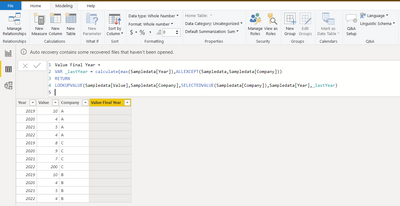
The error is gone but the column now has no value in it.
Is it because PowerBI do not understand which ticker we are selecting?
FYI, The result will be used as an input for another calculation.
- Mark as New
- Bookmark
- Subscribe
- Mute
- Subscribe to RSS Feed
- Permalink
- Report Inappropriate Content
@Anonymous
where do yo try to see the result?
table visual based on your data sample

do not hesitate to give a kudo to useful posts and mark solutions as solution
- Mark as New
- Bookmark
- Subscribe
- Mute
- Subscribe to RSS Feed
- Permalink
- Report Inappropriate Content
I added as a column for my current table
Helpful resources

FabCon & SQLCon – Barcelona 2026
Join us in Barcelona for FabCon and SQLCon, the Fabric, Power BI, SQL, and AI community event. Save €200 with code FABCMTY200.

Data Days 2026
Join Fabric Data Days 2026: 60 days of free live/on-demand sessions, challenges, study groups, and certification opportunities.

Power BI DataViz World Championships - June 2026
A new Power BI DataViz World Championship is coming this June! Don't miss out on submitting your entry.

| User | Count |
|---|---|
| 22 | |
| 22 | |
| 18 | |
| 16 | |
| 13 |


| User | Count |
|---|---|
| 63 | |
| 42 | |
| 40 | |
| 40 | |
| 38 |


