A new Data Days event is coming soon!
This time we’re going bigger than ever. Fabric, Power BI, SQL, AI and more. We're covering it all. You won't want to miss it.
Learn more- Power BI forums
- Get Help with Power BI
- Desktop
- Service
- Report Server
- Power Query
- Mobile Apps
- Developer
- DAX Commands and Tips
- Custom Visuals Development Discussion
- Health and Life Sciences
- Power BI Spanish forums
- Translated Spanish Desktop
- Training and Consulting
- Instructor Led Training
- Dashboard in a Day for Women, by Women
- Galleries
- Data Stories Gallery
- Themes Gallery
- Contests Gallery
- QuickViz Gallery
- Quick Measures Gallery
- Visual Calculations Gallery
- Notebook Gallery
- Translytical Task Flow Gallery
- TMDL Gallery
- R Script Showcase
- Webinars and Video Gallery
- Ideas
- Custom Visuals Ideas (read-only)
- Issues
- Issues
- Events
- Upcoming Events
Did you hear? There's a new SQL AI Developer certification (DP-800). Start preparing now and be one of the first to get certified. Register now
- Power BI forums
- Forums
- Get Help with Power BI
- Desktop
- Filter two columns lookup
- Subscribe to RSS Feed
- Mark Topic as New
- Mark Topic as Read
- Float this Topic for Current User
- Bookmark
- Subscribe
- Printer Friendly Page

- Mark as New
- Bookmark
- Subscribe
- Mute
- Subscribe to RSS Feed
- Permalink
- Report Inappropriate Content
Filter two columns lookup
Hi.
Could someone advise please correct approach to this data model:
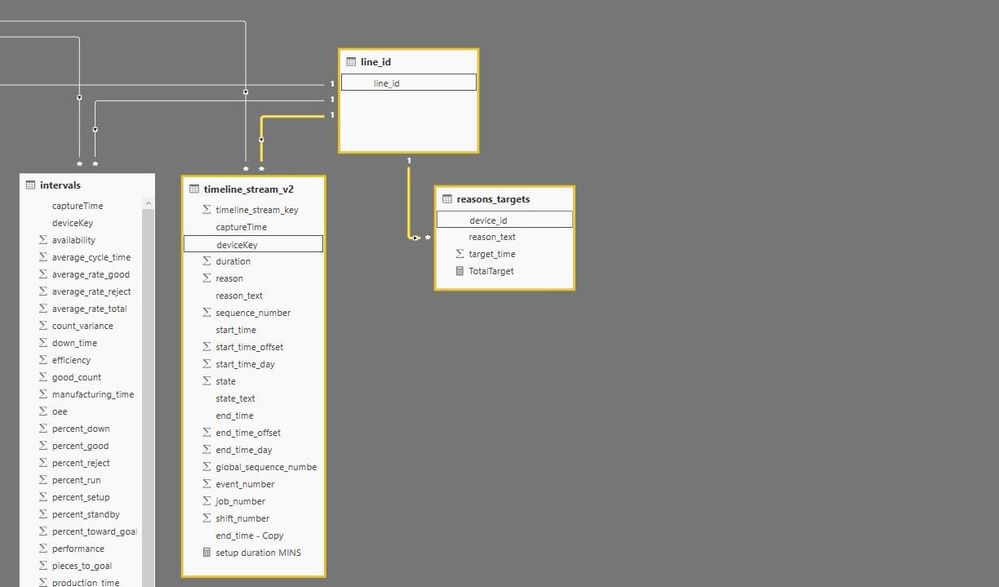

Both tables are direct query from local sql server. Data are received from production lines A101 and A102.
In timeline_stream table I have actual data which are setups durations and I would like to compare it with target setup times from table reasons_target. Every line has defined different target times for "flush" and "break", so what I would like to achieve is this kind of visual:
Line ID setup type actual setup time target diff date
A101 flush 28 15 13 28/10/2017
A102 flush 19 18 1 28/10/2017
I tried relationship in both direction from reasons_target table to line_id table but couldnt get it working.
I`m fairly new to power bi and data modeling so I would really appreciate if someone could help me.
Thanks
Dom
Solved! Go to Solution.


- Mark as New
- Bookmark
- Subscribe
- Mute
- Subscribe to RSS Feed
- Permalink
- Report Inappropriate Content
Hi @dom,
According to your descriptions above, you should be able to use the formulas below to create two measures to calculate target and diff in your scenario. 
target =
CALCULATE (
    MAX ( reasons_target[target_time] ),
    FILTER (
        ALL ( reasons_target ),
        reasons_target[divice_id] = FIRSTNONBLANK ( timeline_stream[line_id], 1 )
            && reasons_target[reason_text] = FIRSTNONBLANK ( timeline_stream[reason_text], 1 )
    )
)
diff = MAX(timeline_stream[setup duration MINS])-[target]
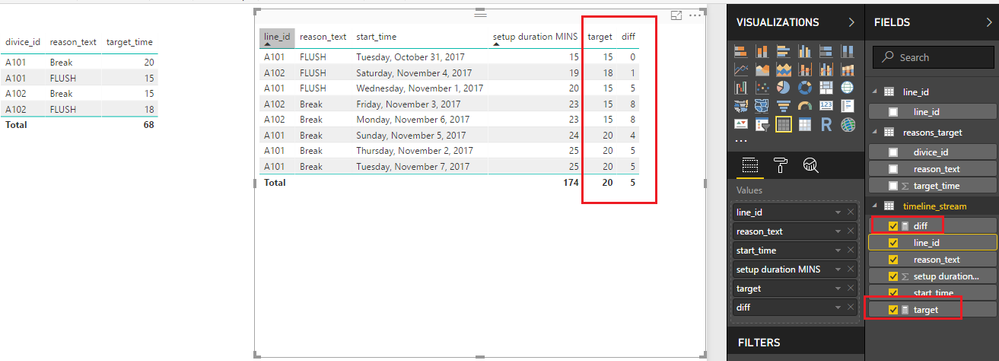
Regards
- Mark as New
- Bookmark
- Subscribe
- Mute
- Subscribe to RSS Feed
- Permalink
- Report Inappropriate Content
Hi @dom,
According to your descriptions above, you should be able to use the formulas below to create two measures to calculate target and diff in your scenario.
target =
CALCULATE (
    MAX ( reasons_target[target_time] ),
    FILTER (
        ALL ( reasons_target ),
        reasons_target[divice_id] = FIRSTNONBLANK ( timeline_stream[line_id], 1 )
            && reasons_target[reason_text] = FIRSTNONBLANK ( timeline_stream[reason_text], 1 )
    )
)
diff = MAX(timeline_stream[setup duration MINS])-[target]
Regards
- Mark as New
- Bookmark
- Subscribe
- Mute
- Subscribe to RSS Feed
- Permalink
- Report Inappropriate Content
thank you so much v-ljerr-msft
This is exactly what I was looking for.
Would you mind explaining step by step how it works please
Regards
Dom
- Mark as New
- Bookmark
- Subscribe
- Mute
- Subscribe to RSS Feed
- Permalink
- Report Inappropriate Content
Hi @dom,
The formula could be easy to understand if you understand row context and filter context in DAX. The follow articles are for your reference.
https://www.sqlbi.com/articles/filter-arguments-in-calculate/
https://www.sqlbi.com/articles/row-context-and-filter-context-in-dax/
If you have any question, feel free to post back or in new thread.
Regards
- Mark as New
- Bookmark
- Subscribe
- Mute
- Subscribe to RSS Feed
- Permalink
- Report Inappropriate Content
Thanks, i will definately look at it
Regards Dom


- Mark as New
- Bookmark
- Subscribe
- Mute
- Subscribe to RSS Feed
- Permalink
- Report Inappropriate Content
If you want to filter on setup type and date, you need common lookup tables for these too - just like line ID
* Matt is an 8 times Microsoft MVP (Power BI) and author of the Power BI Book Supercharge Power BI.
I will not give you bad advice, even if you unknowingly ask for it.
- Mark as New
- Bookmark
- Subscribe
- Mute
- Subscribe to RSS Feed
- Permalink
- Report Inappropriate Content
thanks for your reply
What I want to achieve and I`m struggling is:
for example in timeline_stream table I have different lines, different setup types and actual setup time and I would like to return setup target time depending of setup type (flush, break, etc) and line id. My challenge is different targets for the same setup type on different lines. Would I need lookup table for every single line?
many thanks
- Mark as New
- Bookmark
- Subscribe
- Mute
- Subscribe to RSS Feed
- Permalink
- Report Inappropriate Content
Basically what I need is this kind of logical statement:
IF(timeline_stream[devieKey]=“A101” AND time_line[reason_text] = “flush” THEN RETURN
reasons_targets[target_time] WHERE reasons_targets[device_id] = “A101”
AND reasons_targets[reson_text]=“flush”
repeated for all lines_id and reasons

Helpful resources

Power BI Monthly Update - April 2026
Check out the April 2026 Power BI update to learn about new features.

Data Days 2026 coming soon!
Sign up to receive a private message when registration opens and key events begin.

New to Fabric Survey
If you have recently started exploring Fabric, we'd love to hear how it's going. Your feedback can help with product improvements.

Power BI DataViz World Championships - June 2026
A new Power BI DataViz World Championship is coming this June! Don't miss out on submitting your entry.

| User | Count |
|---|---|
| 35 | |
| 32 | |
| 27 | |
| 23 | |
| 16 |


| User | Count |
|---|---|
| 65 | |
| 50 | |
| 30 | |
| 25 | |
| 24 |


