cancel
Showing results for 
Search instead for 
Did you mean: 

The Power BI Data Visualization World Championships is back! It's time to submit your entry. Live now!

Reply
markjhillier
Frequent Visitor

Filter text value differences between date periods

Hi,


I'd like to be able to filter a table based on differences in the text value of equivalent fields across two different date periods.


For example, if I have a table containing item (text based) values over different periods:


Date

Item

Value

01/06/2018

1

No

01/06/2018

2

No

01/06/2018

3

No

01/07/2018

1

No

01/07/2018

2

Yes

01/07/2018

3

Yes


I'd want to be able to filter and return just the records that have different values from their equivalent records in a previous date period.  In the example above it would be the records changing from No to Yes (highlighted in bold)


If possible, I'd also like to be able to allow dynamic selection of the comparison periods, e.g. via a slicer.


Any help with this greatly appreciated.


Thanks,

Mark

4 REPLIES 4
v-juanli-msft
Community Support
Community Support

Hi @markjhillier

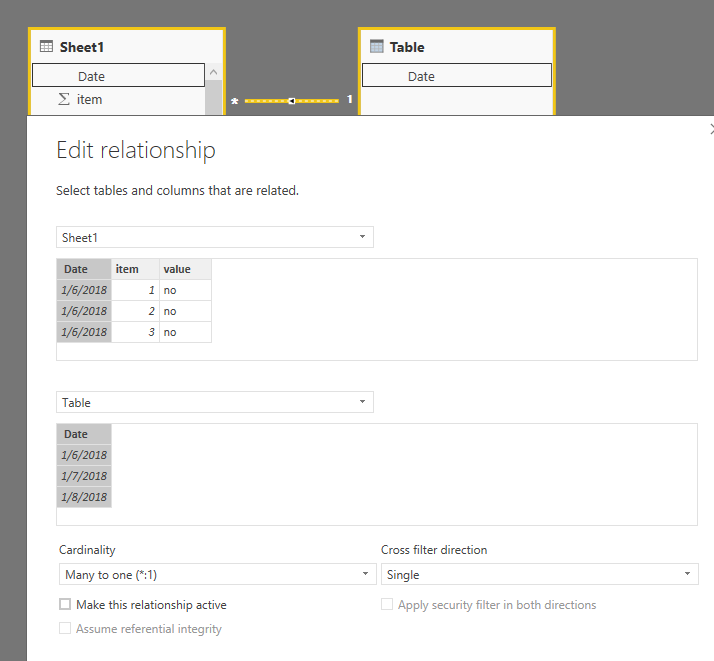
1. create a new data table and edit relationship with your table

Table = VALUES(Sheet1[Date])

2.png

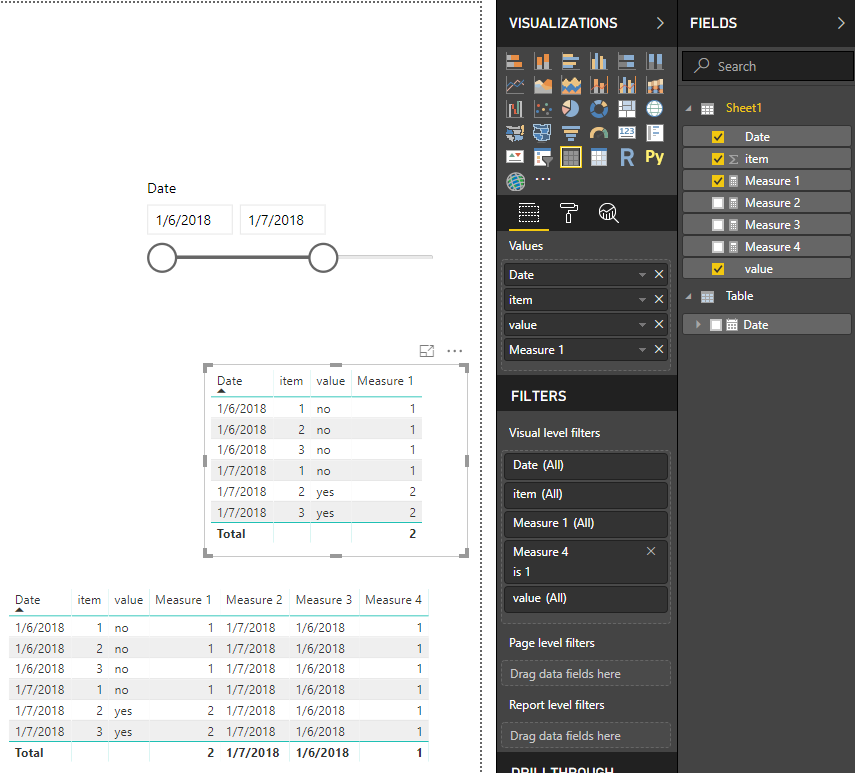
2. create measures in your table

Measure 1 =
CALCULATE (
    DISTINCTCOUNT ( Sheet1[value] ),
    FILTER (
        ALLSELECTED ( Sheet1 ),
        [Date] <= MAX ( [Date] )
            && [item] = MAX ( [item] )
    )
)


Measure 2 = MAX('Table'[Date])

Measure 3 = MIN('Table'[Date])

Measure 4 = IF([Measure 3]<=MAX([Date])&&[Measure 2]>=MAX([Date]),1,0)

3. add [measure 4] to the visual level filter and set "show items when value is" 1

    add 'Table'[date] column to the slicer

 1.png


Best Regards

Maggie

Hi @v-juanli-msft,


Thank you for replying with this suggestion and providing a pbix file.  It's very close to doing what I need, but there's something that's not quite as I'd like.


In the example we used - the outcome for item 2 is the issue: 


(Assuming the data filter is set from 1/6/2018 to 1/8/2018...) 

1/6/2018 - Item 2 correctly has measure 1 set to "1" - i.e. it hasn't changed since this is the first occurence in the time sequence.

1/7/2018 - Item 2 correctly has measure 1 set to "2" - i.e it has now changed to "yes" from original value "no".

1/8/2018 - Item 2 incorrectly has measure 1 set to "2" - i.e. even though the value changed back to "no", which is the same as the first occurence in 1/6/2018.  So ideally I'd like it to NOT consider this as a difference during this period, as the filtered start and end period value has remained the same - i.e. "no" (even though it may have changed at some point between).


I hope that makes sense?  Would you happen to know how your solution could be changed to factor that in?


Many thanks again for your help with this.
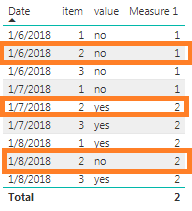
 

table.png

Hi @v-juanli-msft - I'm not sure if you saw my previous reply?  Would it be possible to help me with this final point?


Many thanks,

Mark

Greg_Deckler
Community Champion
Community Champion

I may have time to look at this in more detail, but it looks like you are going to need to use EARLIER in a measure.  See my article on Mean Time Before Failure (MTBF) which uses EARLIER: http://community.powerbi.com/t5/Community-Blog/Mean-Time-Between-Failure-MTBF-and-Power-BI/ba-p/3395...


Follow on LinkedIn
@ me in replies or I'll lose your thread!!!
Instead of a Kudo, please vote for this idea
Become an expert!: Enterprise DNA
External Tools: MSHGQM
YouTube Channel!: Microsoft Hates Greg
Latest book!:
DAX For Humans

DAX is easy, CALCULATE makes DAX hard...

Helpful resources

Announcements
Power BI DataViz World Championships

Power BI Dataviz World Championships

The Power BI Data Visualization World Championships is back! It's time to submit your entry.

January Power BI Update Carousel

Power BI Monthly Update - January 2026

Check out the January 2026 Power BI update to learn about new features.

FabCon Atlanta 2026 carousel

FabCon Atlanta 2026

Join us at FabCon Atlanta, March 16-20, for the ultimate Fabric, Power BI, AI and SQL community-led event. Save $200 with code FABCOMM.