

cancel
Showing results for 
Search instead for 
Did you mean: 

Get Fabric Certified for FREE during Fabric Data Days. Don't miss your chance! Request now

Reply
Godfather3300
New Member

Filter tables by DAX formula results

Hi 


I have a formula that I would like to use to create a visual slicer, the formula returns estimated value brackets and I want to create a visual slicer for the end-user to be able to filter the entire report based on those brackets.


The formula looks like this:


EstimateValueRange =
IF(
SUM(opportunitystats[calcd_Current_value_LCY])>-1 && SUM(opportunitystats[calcd_Current_value_LCY])<=200000,"<=200k",
IF(
SUM(opportunitystats[calcd_Current_value_LCY])>200001 && SUM(opportunitystats[calcd_Current_value_LCY])<=1000000,"200k - 1M",
IF(
SUM(opportunitystats[calcd_Current_value_LCY])>1000001 && SUM(opportunitystats[calcd_Current_value_LCY])<=2000000,"1M- 2M",
IF(
SUM(opportunitystats[calcd_Current_value_LCY])>2000001 && SUM(opportunitystats[calcd_Current_value_LCY])<=99000000,"<=2M"))))
 
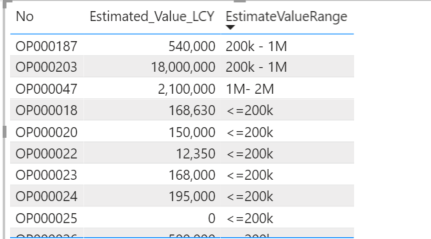
And it returns this
 
image.png
 
How can I use that last column to create a new table or feed a visual slicer?
 
When I try to add a new column to opportunitystats table and use that formula, I only get that first bracket <=200k
image.png
 
Thank you in advance
1 ACCEPTED SOLUTION
ryan_mayu
Super User
Super User

@Godfather3300 


Are you creating a measure or column for this?


Are there any duplicated values in No column? If yes, you can't create a column in the table.

If there are all unique values, you can use switch value, which is easier to write.

Something like below.

column = SWITCH(TRUE(),[LCY]<500,"1-500",[LCY]<1000,"501-1000"))


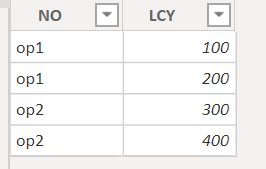
If there are duplicated values in the No column ,you can transform the table.

1.PNG

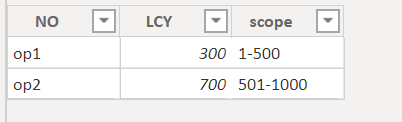
Try below to creating a new table

Table 2 = ADDCOLUMNS(SUMMARIZE('Sheet5',Sheet5[NO],"LCY",sum(Sheet5[LCY])),"scope",SWITCH(TRUE(),[LCY]<500,"1-500",[LCY]<1000,"501-1000"))

2.PNG

hope this is helpful.


Did I answer your question? Mark my post as a solution!

Proud to be a Super User!


View solution in original post

5 REPLIES 5
ryan_mayu
Super User
Super User

@Godfather3300 


Are you creating a measure or column for this?


Are there any duplicated values in No column? If yes, you can't create a column in the table.

If there are all unique values, you can use switch value, which is easier to write.

Something like below.

column = SWITCH(TRUE(),[LCY]<500,"1-500",[LCY]<1000,"501-1000"))


If there are duplicated values in the No column ,you can transform the table.

1.PNG

Try below to creating a new table

Table 2 = ADDCOLUMNS(SUMMARIZE('Sheet5',Sheet5[NO],"LCY",sum(Sheet5[LCY])),"scope",SWITCH(TRUE(),[LCY]<500,"1-500",[LCY]<1000,"501-1000"))

2.PNG

hope this is helpful.


Did I answer your question? Mark my post as a solution!

Proud to be a Super User!


Thanks, that worked perfectly, the No column is unique and the Switch formula to add a column did the trick.


Thank you so much!!

amitchandak
Super User
Super User
Pragati11
Super User
Super User

Hi @Godfather3300 ,


Can you try modifying your DAX as follows:


EstimateValueRange =
IF(
(opportunitystats[calcd_Current_value_LCY])>-1 && (opportunitystats[calcd_Current_value_LCY])<=200000,"<=200k",
IF(
(opportunitystats[calcd_Current_value_LCY])>200001 && (opportunitystats[calcd_Current_value_LCY])<=1000000,"200k - 1M",
IF(
(opportunitystats[calcd_Current_value_LCY])>1000001 && (opportunitystats[calcd_Current_value_LCY])<=2000000,"1M- 2M",
IF(
(opportunitystats[calcd_Current_value_LCY])>2000001 && M(opportunitystats[calcd_Current_value_LCY])<=99000000,"<=2M"))))
 
Thanks,
Pragati

Best Regards,

Pragati Jain


MVP logo


LinkedIn | Twitter | Blog YouTube 

Did I answer your question? Mark my post as a solution! This will help others on the forum!

Appreciate your Kudos!!

Proud to be a Super User!!

Thank you for the quick response


I tried that first, This is what I get


image.png


A single value for column 'calcd_Current_value_LCY' in table 'opportunitystats' cannot be determined. This can happen when a measure formula refers to a column that contains many values without specifying an aggregation such as min, max, count, or sum to get a single result.

Helpful resources

Announcements
November Power BI Update Carousel

Power BI Monthly Update - November 2025

Check out the November 2025 Power BI update to learn about new features.

Fabric Data Days Carousel

Fabric Data Days

Advance your Data & AI career with 50 days of live learning, contests, hands-on challenges, study groups & certifications and more!

FabCon Atlanta 2026 carousel

FabCon Atlanta 2026

Join us at FabCon Atlanta, March 16-20, for the ultimate Fabric, Power BI, AI and SQL community-led event. Save $200 with code FABCOMM.

Top Solution Authors
Top Kudoed Authors