

Join us at FabCon Atlanta from March 16 - 20, 2026, for the ultimate Fabric, Power BI, AI and SQL community-led event. Save $200 with code FABCOMM.
Register now!The Power BI Data Visualization World Championships is back! Get ahead of the game and start preparing now! Learn more
Hi
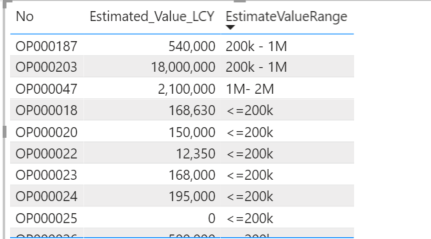
I have a formula that I would like to use to create a visual slicer, the formula returns estimated value brackets and I want to create a visual slicer for the end-user to be able to filter the entire report based on those brackets.
The formula looks like this:
Solved! Go to Solution.
Are you creating a measure or column for this?
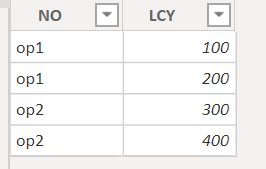
Are there any duplicated values in No column? If yes, you can't create a column in the table.
If there are all unique values, you can use switch value, which is easier to write.
Something like below.
column = SWITCH(TRUE(),[LCY]<500,"1-500",[LCY]<1000,"501-1000"))
If there are duplicated values in the No column ,you can transform the table.
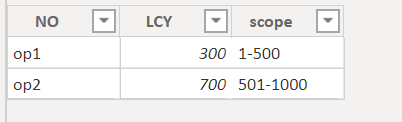
Try below to creating a new table
Table 2 = ADDCOLUMNS(SUMMARIZE('Sheet5',Sheet5[NO],"LCY",sum(Sheet5[LCY])),"scope",SWITCH(TRUE(),[LCY]<500,"1-500",[LCY]<1000,"501-1000"))hope this is helpful.
Proud to be a Super User!
Are you creating a measure or column for this?
Are there any duplicated values in No column? If yes, you can't create a column in the table.
If there are all unique values, you can use switch value, which is easier to write.
Something like below.
column = SWITCH(TRUE(),[LCY]<500,"1-500",[LCY]<1000,"501-1000"))
If there are duplicated values in the No column ,you can transform the table.
Try below to creating a new table
Table 2 = ADDCOLUMNS(SUMMARIZE('Sheet5',Sheet5[NO],"LCY",sum(Sheet5[LCY])),"scope",SWITCH(TRUE(),[LCY]<500,"1-500",[LCY]<1000,"501-1000"))hope this is helpful.
Proud to be a Super User!
Thanks, that worked perfectly, the No column is unique and the Switch formula to add a column did the trick.
Thank you so much!!
refer if these can help
https://www.daxpatterns.com/dynamic-segmentation/
https://radacad.com/grouping-and-binning-step-towards-better-data-visualization
https://www.daxpatterns.com/static-segmentation/
https://www.poweredsolutions.co/2020/01/11/dax-vs-power-query-static-segmentation-in-power-bi-dax-po...
Hi @Godfather3300 ,
Can you try modifying your DAX as follows:
Thank you for the quick response
I tried that first, This is what I get
A single value for column 'calcd_Current_value_LCY' in table 'opportunitystats' cannot be determined. This can happen when a measure formula refers to a column that contains many values without specifying an aggregation such as min, max, count, or sum to get a single result.
The Power BI Data Visualization World Championships is back! Get ahead of the game and start preparing now!
Check out the November 2025 Power BI update to learn about new features.
| User | Count |
|---|---|
| 59 | |
| 43 | |
| 42 | |
| 23 | |
| 17 |
| User | Count |
|---|---|
| 190 | |
| 122 | |
| 96 | |
| 66 | |
| 47 |