Join us at FabCon Atlanta from March 16 - 20, 2026, for the ultimate Fabric, Power BI, AI and SQL community-led event. Save $200 with code FABCOMM.
Register now!The Power BI Data Visualization World Championships is back! Get ahead of the game and start preparing now! Learn more
Hi,
I have a table like this:
| Job | Hours | Start Date | Finish Date |
| j1 | 20 | 2021.10 | 2021.15 |
| j2 | 30 | 2021.11 | 2021.16 |
| j3 | 15 | 2021.14 | 2021.18 |
| ... | ... | ... | ... |
(Noticed the dates are "Year.WorkWeek" - decimal number, not dates)
And I have a bar chart for "hours" with its "shared axis" being other "Year.WorkWeek" column (from calendar table).
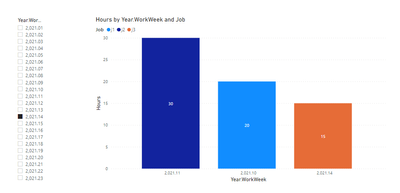
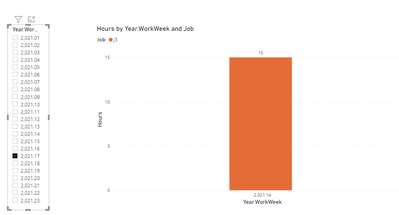
What I'm trying to achive is - when a user clicks on a bar (selecting a "Year.WorkWeek" value), I want the table visual to show all jobs that the selected date is between their "start" and "finish" dates.
For example -
if the user clicks on "2021.14" - the table will show all 3 jobs.
if the user clicks on "2021.17" - the table will show only j3.
I've tried a lot of different options with no luck...
Is it possible?
Thank you.
Solved! Go to Solution.
Hi @Anonymous ,
Extract the Year.Week column from the calendar table as a single calculated table to use it as the slicer:
Year.WorkWeek = DISTINCT('Calendar'[Year.WorkWeek])
Create a measure like this, put it in the visual filter and set its value as 1:
visual control =
IF (
NOT ( ISFILTERED ( 'Year.WorkWeek'[Year.WorkWeek] ) ),
1,
IF (
SELECTEDVALUE ( 'Year.WorkWeek'[Year.WorkWeek] )
>= SELECTEDVALUE ( 'Table'[Start Date] )
&& SELECTEDVALUE ( 'Year.WorkWeek'[Year.WorkWeek] )
<= SELECTEDVALUE ( 'Table'[Finish Date] ),
1
)
)
Best Regards,
Community Support Team _ Yingjie Li
If this post helps, then please consider Accept it as the solution to help the other members find it more quickly.
Hi @Anonymous ,
Extract the Year.Week column from the calendar table as a single calculated table to use it as the slicer:
Year.WorkWeek = DISTINCT('Calendar'[Year.WorkWeek])
Create a measure like this, put it in the visual filter and set its value as 1:
visual control =
IF (
NOT ( ISFILTERED ( 'Year.WorkWeek'[Year.WorkWeek] ) ),
1,
IF (
SELECTEDVALUE ( 'Year.WorkWeek'[Year.WorkWeek] )
>= SELECTEDVALUE ( 'Table'[Start Date] )
&& SELECTEDVALUE ( 'Year.WorkWeek'[Year.WorkWeek] )
<= SELECTEDVALUE ( 'Table'[Finish Date] ),
1
)
)
Best Regards,
Community Support Team _ Yingjie Li
If this post helps, then please consider Accept it as the solution to help the other members find it more quickly.
I just saw the notification...sorry for the late response - but it works great! thank you very much!
@Anonymous
It seems you have linked your calendar table to the data table. I am not sure how your model looks like. I would suggest you convert the year.Weeknumber column to a propper date as follows. I did it just for Sart Date, you can repeat the same for the End Date.
SartDate =
var __year = int(LEFT(Table1[Start Date],4))
var __week = int(MID(Table1[Start Date],5,2))
return
DATE(__year,1,-2)-WEEKDAY(DATE(__year,1,3))+__week*7
⭕ Subscribe and learn Power BI from these videos
⚪ Website ⚪ LinkedIn ⚪ PBI User Group
I have a proper date columns for both of them...we're using the "Year.WeekNumber" just for convenience.
But I still don't see how it is solves the problem...can you elaborate?
Thanks
The Power BI Data Visualization World Championships is back! Get ahead of the game and start preparing now!
Check out the November 2025 Power BI update to learn about new features.
| User | Count |
|---|---|
| 59 | |
| 43 | |
| 42 | |
| 23 | |
| 17 |
| User | Count |
|---|---|
| 190 | |
| 122 | |
| 96 | |
| 66 | |
| 47 |