cancel
Showing results for 
Search instead for 
Did you mean: 

Get Fabric Certified for FREE during AI Skills Fest. This week only. Secure your voucher now.

Reply
Anonymous
Not applicable

Filter report based on slicer start and end date and multiple conditions

Hello All,
I have two tables:
Calendar Table: Consist of Date Column
Employee Detail Table: Consist of Emp Name, Project Start Date, Project End Date, Skills, Experience, Manager name

I have created one slicer with a Date Column from the Calendar Table.
Suppose if I have selected a Date Range from Slicer say 1-1-2022 and 1-4-22,
Then I want to show all employees' details from Employee Detail Table in the visuals such that it shows all the records such that
  1. The Project Start date is before the slicer date range and ends within the slicer date range.
  2. The Project Start date and Project End date lies within the slicer date range.
  3. The Project Start date is after the slicer start date and the Project end date is after the slicer end date.
  4. The Project Start date is before the slicer start date and the Project End date is after the slicer end date.

 
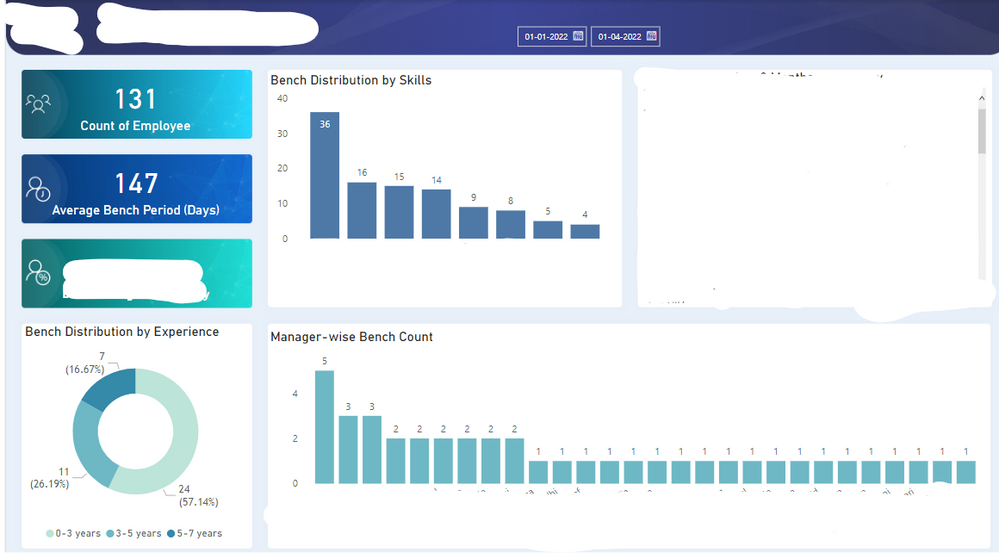
Can you please write the required measure to obtain the result? Please find the screenshot below:
Slicer conditions needs to be implemented on dashboard elementsSlicer conditions needs to be implemented on dashboard elements

1 ACCEPTED SOLUTION
Anonymous
Not applicable

Hi  @Anonymous ,

I created some data:
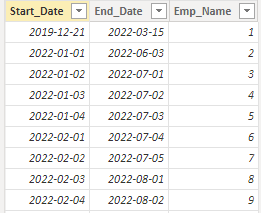
vyangliumsft_0-1660723209581.png

Here are the steps you can follow:

1. Use Enter data to create a Table as a slicer.
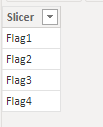
vyangliumsft_1-1660723209582.png

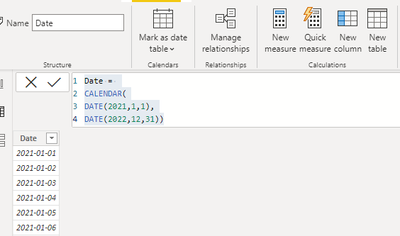
2. Create a calendar table

Date =
CALENDAR(
DATE(2021,1,1),
DATE(2022,12,31))
vyangliumsft_2-1660723209587.png

3. Create measure.

Flag1 =
var _min=MINX(ALLSELECTED('Date'),[Date])
var _max=MAXX(ALLSELECTED('Date'),[Date])
return
IF(
MAX('True_Table'[Start_Date]) >=_min&&MAX('True_Table'[Start_Date])<=_max,1,0)
Flag2 =
var _min=MINX(ALLSELECTED('Date'),[Date])
var _max=MAXX(ALLSELECTED('Date'),[Date])
return
IF(
AND(
MAX('True_Table'[Start_Date]) >=_min,MAX('True_Table'[Start_Date])<=_max)
||
AND(
MAX('True_Table'[End_Date])>=_min,MAX('True_Table'[End_Date])<=_max)
,1,0)
Flag3 =
var _min=MINX(ALLSELECTED('Date'),[Date])
var _max=MAXX(ALLSELECTED('Date'),[Date])
return
IF(
MAX('True_Table'[Start_Date])>=_min&&MAX('True_Table'[End_Date])>=_max,1,0)
Flag4 =
var _min=MINX(ALLSELECTED('Date'),[Date])
var _max=MAXX(ALLSELECTED('Date'),[Date])
return
IF(
MAX('True_Table'[Start_Date])<=_min&&MAX('True_Table'[End_Date])>=_max,1,0)
Flag =
SWITCH(
TRUE(),
MAX('Slicer_Table'[Slicer])="Flag1",[Flag1],
MAX('Slicer_Table'[Slicer])="Flag2",[Flag2],
MAX('Slicer_Table'[Slicer])="Flag3",[Flag3],
MAX('Slicer_Table'[Slicer])="Flag4",[Flag4])

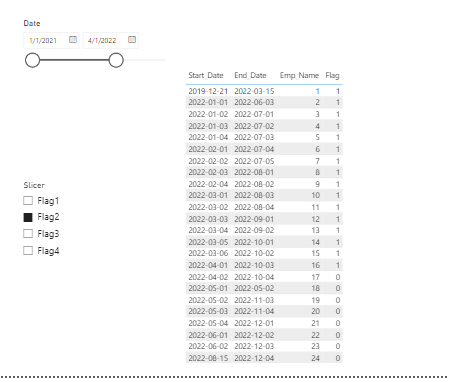
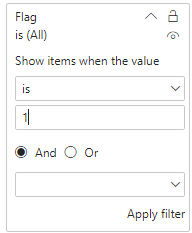
4. Place [Flag]in Filters, set is=1, apply filter.
vyangliumsft_3-1660723209588.png

5. Result:

vyangliumsft_4-1660723209594.png


Best Regards,

Liu Yang

If this post helps, then please consider Accept it as the solution to help the other members find it more quickly

View solution in original post

2 REPLIES 2
Anonymous
Not applicable

Hi  @Anonymous ,

I created some data:

vyangliumsft_0-1660723209581.png

Here are the steps you can follow:

1. Use Enter data to create a Table as a slicer.

vyangliumsft_1-1660723209582.png

2. Create a calendar table

Date =
CALENDAR(
DATE(2021,1,1),
DATE(2022,12,31))

vyangliumsft_2-1660723209587.png

3. Create measure.

Flag1 =
var _min=MINX(ALLSELECTED('Date'),[Date])
var _max=MAXX(ALLSELECTED('Date'),[Date])
return
IF(
MAX('True_Table'[Start_Date]) >=_min&&MAX('True_Table'[Start_Date])<=_max,1,0)
Flag2 =
var _min=MINX(ALLSELECTED('Date'),[Date])
var _max=MAXX(ALLSELECTED('Date'),[Date])
return
IF(
AND(
MAX('True_Table'[Start_Date]) >=_min,MAX('True_Table'[Start_Date])<=_max)
||
AND(
MAX('True_Table'[End_Date])>=_min,MAX('True_Table'[End_Date])<=_max)
,1,0)
Flag3 =
var _min=MINX(ALLSELECTED('Date'),[Date])
var _max=MAXX(ALLSELECTED('Date'),[Date])
return
IF(
MAX('True_Table'[Start_Date])>=_min&&MAX('True_Table'[End_Date])>=_max,1,0)
Flag4 =
var _min=MINX(ALLSELECTED('Date'),[Date])
var _max=MAXX(ALLSELECTED('Date'),[Date])
return
IF(
MAX('True_Table'[Start_Date])<=_min&&MAX('True_Table'[End_Date])>=_max,1,0)
Flag =
SWITCH(
TRUE(),
MAX('Slicer_Table'[Slicer])="Flag1",[Flag1],
MAX('Slicer_Table'[Slicer])="Flag2",[Flag2],
MAX('Slicer_Table'[Slicer])="Flag3",[Flag3],
MAX('Slicer_Table'[Slicer])="Flag4",[Flag4])

4. Place [Flag]in Filters, set is=1, apply filter.

vyangliumsft_3-1660723209588.png

5. Result:

vyangliumsft_4-1660723209594.png


Best Regards,

Liu Yang

If this post helps, then please consider Accept it as the solution to help the other members find it more quickly

amitchandak
Super User
Super User

@Anonymous , To me, seems very similar to my HR blog, and file the files attached. See if they can help

https://community.powerbi.com/t5/Community-Blog/HR-Analytics-Active-Employee-Hire-and-Termination-tr...


Share with Power BI Enthusiasts: Full Power BI Video (20 Hours) YouTube
Microsoft Fabric Series 60+ Videos YouTube
Microsoft Fabric Hindi End to End YouTube

Helpful resources

Announcements
May Power BI Update Carousel

Power BI Monthly Update - May 2026

Check out the May 2026 Power BI update to learn about new features.

Fabric SQL PBI Data Days

Data Days 2026 coming soon!

Sign up to receive a private message when registration opens and key events begin.

New to Fabric survey Carousel

New to Fabric Survey

If you have recently started exploring Fabric, we'd love to hear how it's going. Your feedback can help with product improvements.

Power BI DataViz World Championships carousel

Power BI DataViz World Championships - June 2026

A new Power BI DataViz World Championship is coming this June! Don't miss out on submitting your entry.