This time we’re going bigger than ever. Fabric, Power BI, SQL, AI and more. We're covering it all. You won't want to miss it.
Learn moreDid you hear? There's a new SQL AI Developer certification (DP-800). Start preparing now and be one of the first to get certified. Register now
Hi,
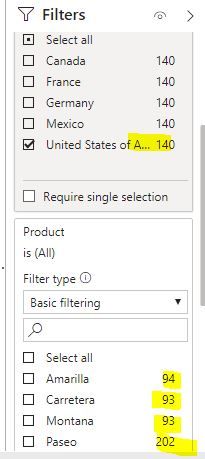
I am getting count issue in filters (new filter pane). I have Country ,Product and Sales. Country and Product are in filter pane as filter.
When I select one country (USA), count in Product filter not reflecting based on USA, it's showing total for all countries only.
When I collapse and expand Product filter then only it shows count for USA country.
Could you please help if this can be resolved or its product issue.
Thanks
Please provide screenshots of the issue you are facing. That will help in easily diagnosing and understanding the problem. Would be really helpful if a sample file can be shared too.
My understanding is that, the filter pane shows the number of members in the dimension and necessarily does not filter it out and show number of members in the other dimensions based on selections you make within other dimension members in the filter pane. When you apply the filter, the data gets reflected in the output views.
Thanks for the reply.
If we collapse and expand the other filter (Product), its showing up correct count based on Country filter.
@Anonymous wrote:Thanks for the reply.
If we collapse and expand the other filter (Product), its showing up correct count based on Country filter.
Will need more details as to the tables, their relations (if any) etc. to come up with the right finding.
If you could share the sample pbix, can take a look and get back. Cheers!
Check out the April 2026 Power BI update to learn about new features.
Sign up to receive a private message when registration opens and key events begin.
If you have recently started exploring Fabric, we'd love to hear how it's going. Your feedback can help with product improvements.
| User | Count |
|---|---|
| 34 | |
| 31 | |
| 25 | |
| 20 | |
| 16 |
| User | Count |
|---|---|
| 61 | |
| 49 | |
| 28 | |
| 23 | |
| 23 |