Join us at FabCon Atlanta from March 16 - 20, 2026, for the ultimate Fabric, Power BI, AI and SQL community-led event. Save $200 with code FABCOMM.
Register now!The Power BI Data Visualization World Championships is back! Get ahead of the game and start preparing now! Learn more
Hi Guys
Any easier way to filter multi value in the same column in dax? I have more than 20 values that consist of %CSH% and %CRT% which i want to filter out. Currently I'm using Calculate(Count)). Below is an example of what i did.
FILTER(TableA,TableA[ColumnA] <> "%CSH%"),FILTER(TableA,TableA[ColumnA] <> "%CRT%"))
Solved! Go to Solution.
Hi @Anonymous ,
You could try to add filter condition like this: && NOT ( 'Table'[Column] IN { 1000005,1000006,1000007 } )
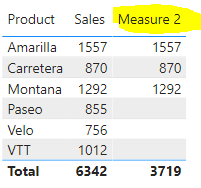
My sample:
Measure 2 =
CALCULATE (
SUM ( 'Table'[Sales] ),
FILTER ( 'Table', NOT ( 'Table'[Product] IN { "Paseo", "Velo", "VTT" } ) )
)
@Anonymous , You need to use search find or containsstring
Like
FILTER(TableA,search("CSH",TableA[ColumnA],,0)<=0 && search("CRT",TableA[ColumnA],,0)<=0)
Here =0 means it does not have that string
Thank you! I have another question. in SQL where they have where in and NOT IN operator, how can dax be applied? if I want to exclude below 1000005,1000006,1000007 in my filter. Appreciate your help!
Thanks! I have another question. in SQL where have where IN and NOT IN operator, how can it apply it dax? if i want to exclude below 1000005,1000006,1000007 in my filter. Appreciate your help!
Thanks! I have another question. in SQL they have where IN and NOT IN operator, how can we apply it in dax? if I want to exclude below 1000005,1000006,1000007 in my filter. Appreciate your help!
** Sorry for the previous message typo.
Hi @Anonymous ,
You could try to add filter condition like this: && NOT ( 'Table'[Column] IN { 1000005,1000006,1000007 } )
My sample:
Measure 2 =
CALCULATE (
SUM ( 'Table'[Sales] ),
FILTER ( 'Table', NOT ( 'Table'[Product] IN { "Paseo", "Velo", "VTT" } ) )
)
Hi XueDing,
Thanks alot! Cheers!
The Power BI Data Visualization World Championships is back! Get ahead of the game and start preparing now!
| User | Count |
|---|---|
| 44 | |
| 40 | |
| 33 | |
| 30 | |
| 23 |
| User | Count |
|---|---|
| 125 | |
| 119 | |
| 90 | |
| 75 | |
| 69 |