We've captured the moments from FabCon & SQLCon that everyone is talking about, and we are bringing them to the community, live and on-demand. Starts on April 14th. Register now
Hi Power BI community!
I hope someone can point me in the right direction on this. My situation is as following:
I have two tables with product names. One of them is a table with all the available products and the other is the actual bought products by customers.
I want to show within a certain time frame which products were not bought by customers. So basically text values that are available in table 1 but not in table 2. I'm a bit stuck on which filter to use and I'm not googleing the right question. Can anyone point me in the right direction? Much appreciated!!
Solved! Go to Solution.
Hi @Susan12344 ,
Please try below steps:
1. below is my test table
Table1:
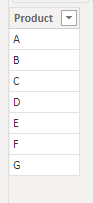
Table2:
Table3:
create with below dax formula
Table3 = CALENDAR(FIRSTDATE(Table2[Date]),LASTDATE(Table2[Date]))
2. below is the model
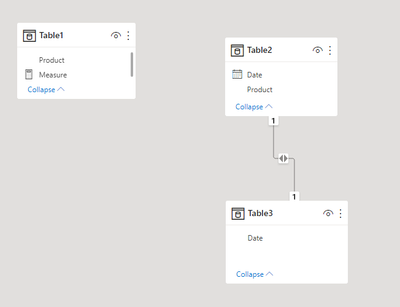
3. create a measure with below dax formula
Measure =
VAR min_date =
MIN ( Table3[Date] )
VAR max_date =
MAX ( Table3[Date] )
VAR tmp =
CALCULATETABLE (
VALUES ( Table2[Product] ),
Table2[Date] >= min_date,
Table2[Date] <= max_date
)
VAR cur_pt =
SELECTEDVALUE ( Table1[Product] )
RETURN
IF ( cur_pt IN tmp, 0, 1 )
3. add a slicer with Table3[Date], add two table visual with Table1 field and Table2 fields, add measure to a table visual filter pane that created with Table1 field
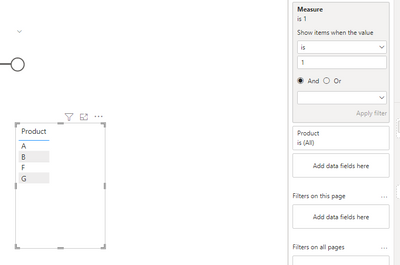
4. below is output
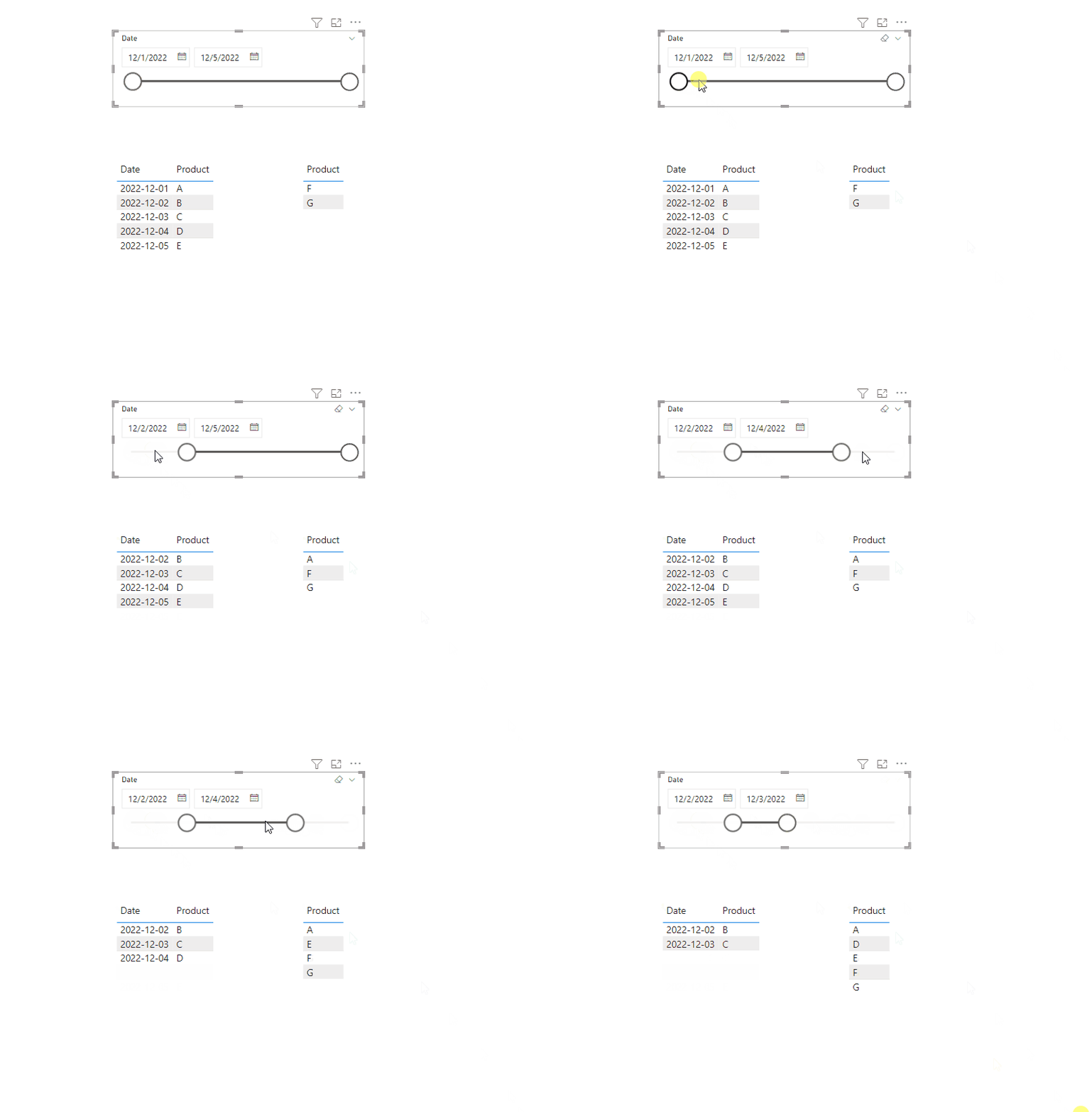
Please refer the attached .pbix file.
Best regards,
Community Support Team_Binbin Yu
If this post helps, then please consider Accept it as the solution to help the other members find it more quickly.
Hi @Susan12344 ,
Please try below steps:
1. below is my test table
Table1:
Table2:
Table3:
create with below dax formula
Table3 = CALENDAR(FIRSTDATE(Table2[Date]),LASTDATE(Table2[Date]))
2. below is the model
3. create a measure with below dax formula
Measure =
VAR min_date =
MIN ( Table3[Date] )
VAR max_date =
MAX ( Table3[Date] )
VAR tmp =
CALCULATETABLE (
VALUES ( Table2[Product] ),
Table2[Date] >= min_date,
Table2[Date] <= max_date
)
VAR cur_pt =
SELECTEDVALUE ( Table1[Product] )
RETURN
IF ( cur_pt IN tmp, 0, 1 )
3. add a slicer with Table3[Date], add two table visual with Table1 field and Table2 fields, add measure to a table visual filter pane that created with Table1 field
4. below is output
Please refer the attached .pbix file.
Best regards,
Community Support Team_Binbin Yu
If this post helps, then please consider Accept it as the solution to help the other members find it more quickly.
If you have recently started exploring Fabric, we'd love to hear how it's going. Your feedback can help with product improvements.
A new Power BI DataViz World Championship is coming this June! Don't miss out on submitting your entry.
Share feedback directly with Fabric product managers, participate in targeted research studies and influence the Fabric roadmap.
| User | Count |
|---|---|
| 57 | |
| 38 | |
| 33 | |
| 19 | |
| 16 |
| User | Count |
|---|---|
| 67 | |
| 66 | |
| 40 | |
| 34 | |
| 25 |