Join us at FabCon Atlanta from March 16 - 20, 2026, for the ultimate Fabric, Power BI, AI and SQL community-led event. Save $200 with code FABCOMM.
Register now!The Power BI Data Visualization World Championships is back! It's time to submit your entry. Live now!
Solved! Go to Solution.
Hi, @jatpola
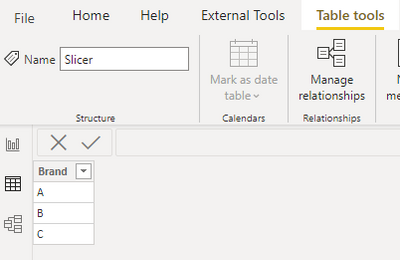
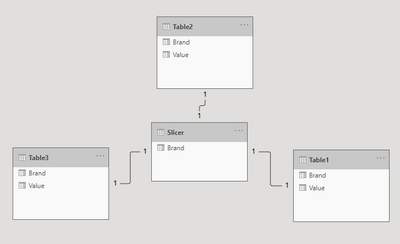
According to your description, I think you can try to create a ‘Slicer’ table that can be used to place into the slicer. Then you can go to the relationship view to link each table which contains the [Brand] column to the ‘Slicer’ table, then the Slicer can filter data in each table, like this:
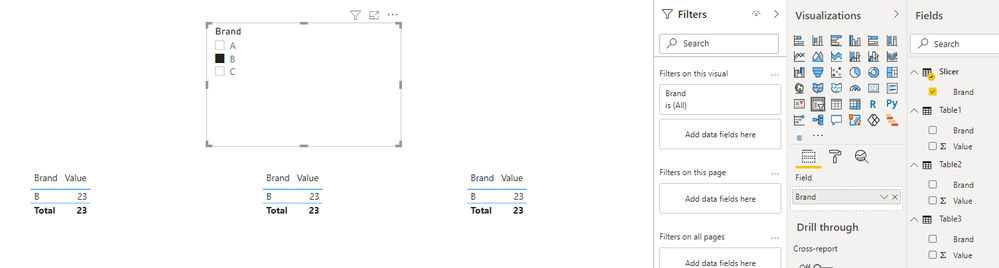
And you can get what you want.
You can download my test pbix file here
If this result is not what you want, you can post some sample data(without sensitive data) and your expected result.
How to Get Your Question Answered Quickly
Best Regards,
Community Support Team _Robert Qin
If this post helps, then please consider Accept it as the solution to help the other members find it more quickly.
Hi, @jatpola
According to your description, I think you can try to create a ‘Slicer’ table that can be used to place into the slicer. Then you can go to the relationship view to link each table which contains the [Brand] column to the ‘Slicer’ table, then the Slicer can filter data in each table, like this:
And you can get what you want.
You can download my test pbix file here
If this result is not what you want, you can post some sample data(without sensitive data) and your expected result.
How to Get Your Question Answered Quickly
Best Regards,
Community Support Team _Robert Qin
If this post helps, then please consider Accept it as the solution to help the other members find it more quickly.
The Power BI Data Visualization World Championships is back! It's time to submit your entry.
Check out the January 2026 Power BI update to learn about new features.
| User | Count |
|---|---|
| 71 | |
| 45 | |
| 34 | |
| 28 | |
| 23 |
| User | Count |
|---|---|
| 143 | |
| 121 | |
| 59 | |
| 40 | |
| 33 |