cancel
Showing results for 
Search instead for 
Did you mean: 

Try your skills in the Power BI Dataviz World Championship! Round one ends June 26. Join now

Reply
Anonymous
Not applicable

Filter multiple Fields

Hi Power BI Community - I was wondering if you could help figure out how I can filter two columns with one table.


example.PNG


So I used the below formula to filter the SubRpDate and it's working fine. 

Total Sub Award Dollar = CALCULATE([Total FedOrigSubAmtNonDBE]+[Total Sub DBEs Dollars], USERELATIONSHIP('Sub List'[SubRptDate], 'Calendar Table'[Date]))
 
But when I tried to use this formula to filter both SubRpDate and DateStart, I get an error message saying that there's an ambigous relationship
Total Sub Award Dollar = CALCULATE([Total FedOrigSubAmtNonDBE]+[Total Sub DBEs Dollars], USERELATIONSHIP('Sub List'[SubRptDate], 'Calendar Table'[Date]),USERELATIONSHIP('Sub List'[SubRptDate], 'Calendar Table'[Date]))
 
What I wanted to do is to be able to filter both SubRpDate and DateStart using the date from the calendar Table.
 
Thank you in advanced. 


1 REPLY 1
Anonymous
Not applicable

Hi @mbenjelloun,


Please Use SELECTEDVALUE() instead of USERELATIONSHIP():
Total Sub Award Dollar =

VAR sv =

    FORMAT ( SELECTEDVALUE ( 'Calendar Table'[Date].[Year] ), "" )

RETURN

       IF (

           NOT ( ISFILTERED ( 'Calendar Table'[Date].[Year] ) ),

            MAX ( 'Sub List'[Total FedOrigSubAmtNonDBE] )

               + MAX ( 'Sub List'[Total Sub DBEs Dollars] ),

               IF (

               FORMAT ( MAX ( 'Sub List'[SubRptDate] ), "YYYY" ) = sv

                   || FORMAT ( MAX ( 'Sub List'[DateStart] ), "YYYY" ) = sv,

               MAX ( 'Sub List'[Total FedOrigSubAmtNonDBE] )

                   + MAX ( 'Sub List'[Total Sub DBEs Dollars] ),

               BLANK ()

               )

    )

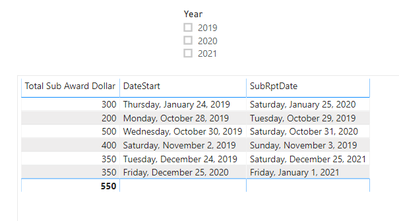
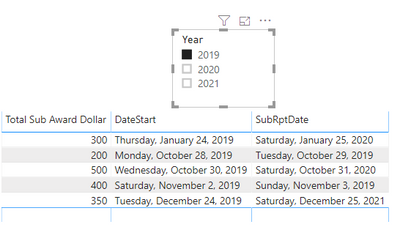
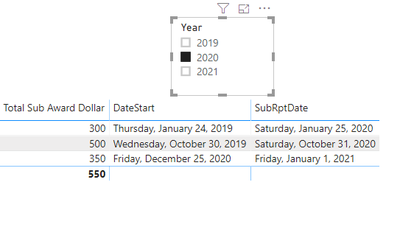
Result would be shown as below:

1.PNG

2.PNG

3.PNG

BTW, Pbix as attached. Hopefully works for you.


Best Regards,

Jay


Community Support Team _ Jay Wang

If this post helps, then please consider Accept it as the solution to help the other members find it more quickly.

Helpful resources

Announcements
Fabric Data Days is here Carousel

Fabric Data Days 2026

Don't miss out on Data Days, June 15 through August 7. Learn Fabric, Power BI, SQL, AI and more.

Power BI DataViz World Championships carousel

Power BI DataViz World Championships - June 2026

A new Power BI DataViz World Championship is coming this June! Don't miss out on submitting your entry.