Join us at FabCon Atlanta from March 16 - 20, 2026, for the ultimate Fabric, Power BI, AI and SQL community-led event. Save $200 with code FABCOMM.
Register now!The Power BI Data Visualization World Championships is back! Get ahead of the game and start preparing now! Learn more
Hi,
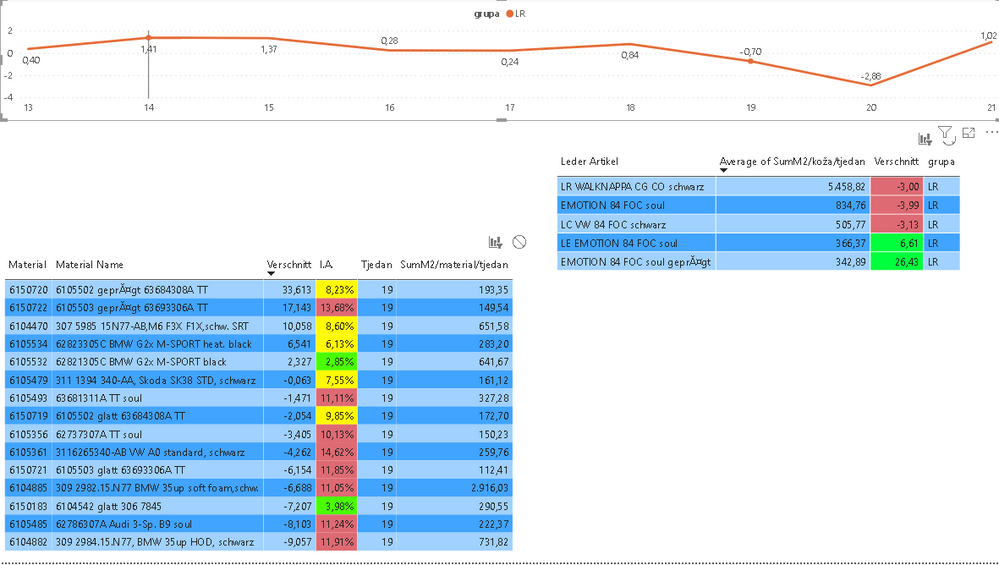
i have line chart with weeks on x axis. When i select one week on line chart values in tables chenge correspondingly. Now after i select one week on line chart and i want to select one of the rows in smaller table (because i want to see detailed data in table 3), values in smaller table doesn't stay the same (filtered by line chart), but they return to values of all weeks together.
Is there a way to lock filter (in this case line chart) so that i can select values in smaller table without them chenge to overall (summed for all weeks).
Interactions are set up in the way that selectiong anything in any table dont change line chart (black filled circle in Edit interactions mode)
tnx
Solved! Go to Solution.
Hi @Anonymous ,
Press Ctrl key when you wanna make and keep a second or more selections, it's a useful trick.
As you see below: My selections in the table below is kept in the small table above.
Hi @Anonymous ,
Press Ctrl key when you wanna make and keep a second or more selections, it's a useful trick.
As you see below: My selections in the table below is kept in the small table above.
@Anonymous Try holding down the Ctrl key when making your second selection. Totally read that title wrong the first time...
@Anonymous ,The information you have provided is not making the problem clear to me. Can you please explain with an example.
But are try to click on two visuals and keep both values. Try click after pressing ctrl
The Power BI Data Visualization World Championships is back! Get ahead of the game and start preparing now!
| User | Count |
|---|---|
| 39 | |
| 38 | |
| 38 | |
| 28 | |
| 27 |
| User | Count |
|---|---|
| 124 | |
| 88 | |
| 73 | |
| 66 | |
| 65 |