This is best Fabric, Power BI, SQL and AI community event. How do we know? The last event sold out! Save €200 with code FABCMTY200.
Register nowA new Data Days event is coming soon! This time we’re going bigger than ever. Fabric, Power BI, SQL, AI and more. Don't miss out.
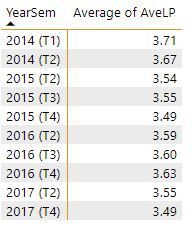
I have some values and I find the average of these values over a field called YearSem
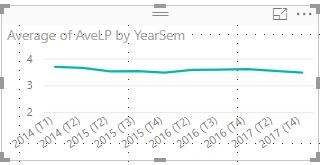
I use a line graph to visualise this. See below.
How can I pick out the last value (3.49) and put it into a card?
At the moment I find the last value in the YearSem column by creating this measure:
Last LP Period = CALCULATE(MAX(AveLPs[YearSem]))
This works and I get a value which is 2017 (T4).
Then I use this in a measure like this:
Last LP Ave = CALCULATE(AVERAGE(AveLPs[AveLP]),FILTER(AveLPs,AveLPs[YearSem]=[Last LP Period]))
However, I still get the average for all the years (3.58), NOT that last value (3.49) when I put this measure into a card.
What am I doing wrong? Any help would be appreciated.
Solved! Go to Solution.
This would also work. The issue with your query is when you bring a calculated measure through to the CALCULATE you change the filter context (which sometimes is what you want - but not in your case)
Last LP Ave =
CALCULATE(
AVERAGE(AveLPs[Average of AveLP]),
FILTER(AveLPs,AveLPs[YearSem]=MAX(AveLPs[YearSem]))
)
Hi @dphillips
You have a filter context problem that can be solved by re-arranging your measure to be as follows
Last LP Ave =
var d = CALCULATE(MAX(AveLPs[YearSem]))
return
CALCULATE(
AVERAGE(AveLPs[Average of AveLP]),
FILTER(AveLPs,AveLPs[YearSem]=d))
Brilliant - thanks for your help
This would also work. The issue with your query is when you bring a calculated measure through to the CALCULATE you change the filter context (which sometimes is what you want - but not in your case)
Last LP Ave =
CALCULATE(
AVERAGE(AveLPs[Average of AveLP]),
FILTER(AveLPs,AveLPs[YearSem]=MAX(AveLPs[YearSem]))
)
Sign up to receive a private message when registration opens and key events begin.
If you have recently started exploring Fabric, we'd love to hear how it's going. Your feedback can help with product improvements.
| User | Count |
|---|---|
| 33 | |
| 25 | |
| 23 | |
| 20 | |
| 15 |
| User | Count |
|---|---|
| 64 | |
| 41 | |
| 27 | |
| 22 | |
| 20 |