cancel
Showing results for 
Search instead for 
Did you mean: 

The Power BI Data Visualization World Championships is back! Get ahead of the game and start preparing now! Learn more

Reply
jibran
Helper II
Helper II

Filter data monthly

Hi All,

I am working on to show data on monthly basis but struggling to create a DAX function.

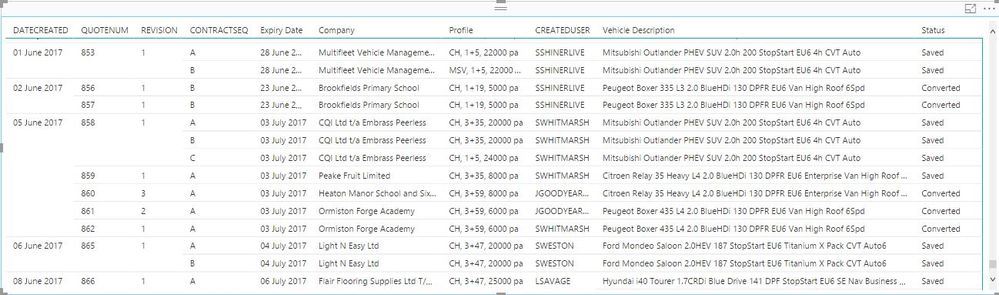
I have a date created column that is in this format 01/01/2017 and I want to see how many quotes been created on that particular

month as shown below. For example on month of June we create 15 quotes want to see that. I did create a date table with data, month name, month number and year and link date to this table but no result. 


 Second Table.JPG


Here is my working query


Measure = CALCULATE(COUNT(Quotes[QUOTEID]),Filter(All(Quotes[DATECREATED]),MONTH(Quotes[DATECREATED]) <= MONTH(MAX(Quotes[DATECREATED]))))

But above code is not working can someone help me on this.


Regards


Jibran 

2 ACCEPTED SOLUTIONS
v-haibl-msft
Microsoft Employee
Microsoft Employee

@jibran


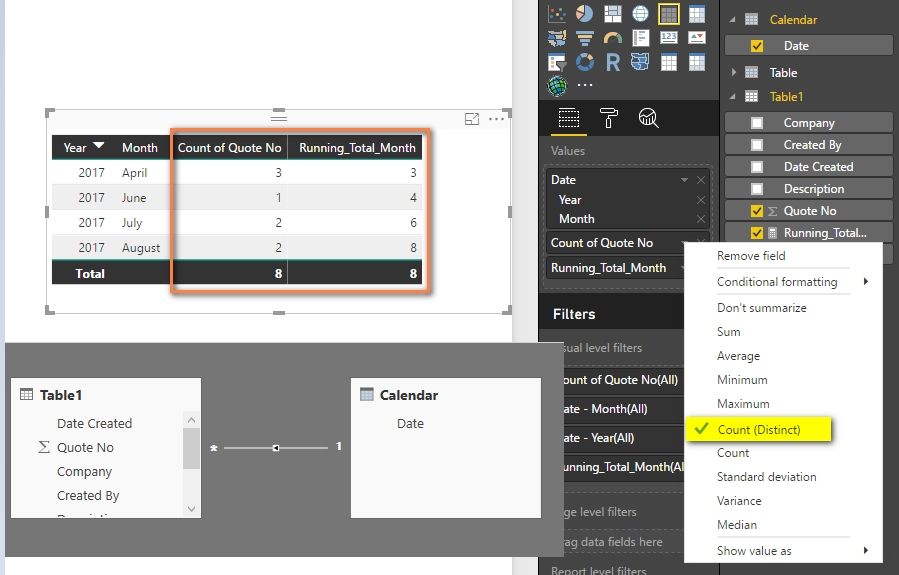
Do you want to get the total quote amount for each month? If yes, after create relationship with the calendar table, you should be able to show the result with a Table visual like below.


If you want to get the running total, you can create a measure with following formula.


Running_Total_Month = 
CALCULATE (
    DISTINCTCOUNT ( Table1[Quote No] ),
    FILTER (
        ALL ( Table1 ),
        MONTH ( Table1[Date Created] ) <= MONTH ( MAX ( Table1[Date Created] ) )
    )
)


Filter data monthly_1.jpg


Best Regards,
Herbert

View solution in original post

@jibran


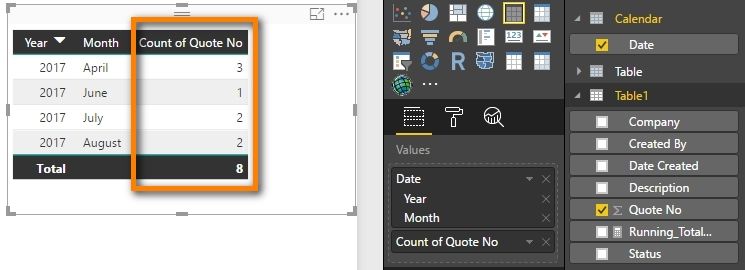
Just remove the Running_Total meansure from the Table visual should be OK. 


Filter data monthly_2.jpg


Best Regards,
Herbert

View solution in original post

3 REPLIES 3
v-haibl-msft
Microsoft Employee
Microsoft Employee

@jibran


Do you want to get the total quote amount for each month? If yes, after create relationship with the calendar table, you should be able to show the result with a Table visual like below.


If you want to get the running total, you can create a measure with following formula.


Running_Total_Month = 
CALCULATE (
    DISTINCTCOUNT ( Table1[Quote No] ),
    FILTER (
        ALL ( Table1 ),
        MONTH ( Table1[Date Created] ) <= MONTH ( MAX ( Table1[Date Created] ) )
    )
)


Filter data monthly_1.jpg


Best Regards,
Herbert

Hi Herbert,

How can I see just the total number of quotes raised each month.

Becuase this solution adds the total number of quotes to the next month and so.

Our aim to show total number of quotes raised per month.


Can you please help on this?


Thanks for your help in advance


Many Thanks 


Jibran Ishtiaq

@jibran


Just remove the Running_Total meansure from the Table visual should be OK. 


Filter data monthly_2.jpg


Best Regards,
Herbert

Helpful resources

Announcements
Power BI DataViz World Championships

Power BI Dataviz World Championships

The Power BI Data Visualization World Championships is back! Get ahead of the game and start preparing now!

December 2025 Power BI Update Carousel

Power BI Monthly Update - December 2025

Check out the December 2025 Power BI Holiday Recap!

FabCon Atlanta 2026 carousel

FabCon Atlanta 2026

Join us at FabCon Atlanta, March 16-20, for the ultimate Fabric, Power BI, AI and SQL community-led event. Save $200 with code FABCOMM.