cancel
Showing results for 
Search instead for 
Did you mean: 

The Power BI Data Visualization World Championships is back! Get ahead of the game and start preparing now! Learn more

Reply
Josepatwentysix
Frequent Visitor

Filter data, difference

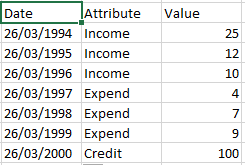
Hello, I'm trying to make a new measure with my data, but I can't understand how to filter my data based on the attribute of the other column. For example I have one column of Values, where is my numerical data, so I have another one where I have the attribute's. In the presente case I need to filter Income and Expends respectively and make a differences between these two values.


Untitled.png

4 REPLIES 4
Anonymous
Not applicable

You need to make use of the Filter function within your measure.  Something like:

My Measure = SumX(Filter('The Table', 'The Table'[Attribute] = "AttributeFilter"), [Value])

'The Table' is the name of the table you are looking at
[Attribute] is the column with the attribute data to filter on
"AttributeFilter" is the string you want to filter by (i.e. Income)
[Value] is the column with the values to sum total.


Ross,


That works when you have known attributes. In my case I have ten different attributes(Attribute names are Scenario 1, Scenario 2...). I want to calculate the difference between two selected scenarios while using a slicer. So if the slicer has Scenario 2 and Scenario 10 selected I need a column which does Scenario 2.Value - Scenario 10.Value


Don't mean to hijack the thread but I believe my query is an extension of the original problem.


I solved it. This is how I did it.


As mentioned above I have upto ten different attributes ranging from Scenario 1 to Scenario 10 which are basically different forecasting models. My condundrum was to get the difference between any two selected Scenarios (ex: Scenario 1.Value - Scenario 2.Value) when those values are picked from a slicer. The scenario names are in the 'ScenariosModels' table under the 'Scenario' column and are called "Scenario 1", "Scenario 2" etc.


I created two tables first, called the first table 'First Pick' and called the second table 'Second Pick'. Both the tables have ten rows of data from 1 - 10 as text values and have column names 'First Pick' for the first table and 'Second Pick' for the second table.


I then calculated my switches as follows (I have only added two Scenarios for brevity)


First Pick switch = Switch(Values('FirstPick'[First Pick]),"1","Scenario 1","2","Scenario 2")


Second Pick switch = Switch(Values('SecondPick'[Second Pick]),"1","Scenario 1","2","Scenario 2")


I then calculated the variance between two difference scenarios as a measure


Variance of scenarios= sumx(Filter('ScenarioModels','ScenarioModels'[Scenarios]=[First Pick switch]),[Total Quantity]) - sumx(Filter('ScenarioModels','ScenarioModels'[Scenarios]=[Second Pick switch]),[Total Quantity])


I then dragged 'FirstPick'[First Pick] and 'SecondPick'[Second Pick] columns into the canvas and converted them into a slicer. I then selected my relevant scenarios and plotted 'Variance of scenarios'.


This method works and easy to set up if you have a few scenarios, in my case the most I will be dealing with is about 10. If it is more (say 50) than then it is not an elegant solution as you have to manually update the logic in the switches for 50 of them. Maybe some one has a more elegant solution ?

Capstone
Resolver I
Resolver I

I'm in a similar situation and need the solution as well. If I manage to solve it, I will post the result here, please do the same if you find any solutions. Cheers.

Helpful resources

Announcements
Power BI DataViz World Championships

Power BI Dataviz World Championships

The Power BI Data Visualization World Championships is back! Get ahead of the game and start preparing now!

December 2025 Power BI Update Carousel

Power BI Monthly Update - December 2025

Check out the December 2025 Power BI Holiday Recap!

FabCon Atlanta 2026 carousel

FabCon Atlanta 2026

Join us at FabCon Atlanta, March 16-20, for the ultimate Fabric, Power BI, AI and SQL community-led event. Save $200 with code FABCOMM.