Join us at FabCon Atlanta from March 16 - 20, 2026, for the ultimate Fabric, Power BI, AI and SQL community-led event. Save $200 with code FABCOMM.
Register now!The Power BI Data Visualization World Championships is back! Get ahead of the game and start preparing now! Learn more
Hi all.
I've got this data:
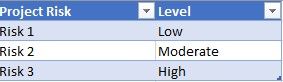
Project RiskLevel
| Risk 1 | Low |
| Risk 2 | Moderate |
| Risk 3 | High |
| Risk 4 | Moderate |
| Risk 5 | High |
| Risk 6 | Low |
| Risk 7 | Moderate |
| Risk 8 | High |
| Risk 9 | High |
| Risk 10 | Moderate |
How can I create 3 for each level filtering values ?
Solved! Go to Solution.
Hi, @Anonymous
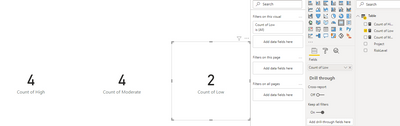
According to your description, you want to get the count number of three different numbers and display them in card charts, you can try this method:
Count of High = COUNTX(FILTER('Table',[RiskLevel]="High"),[Project] )Count of Moderate = COUNTX(FILTER('Table',[RiskLevel]="Moderate"),[Project] )Count of Low = COUNTX(FILTER('Table',[RiskLevel]="Low"),[Project] )
And you can get what you want.
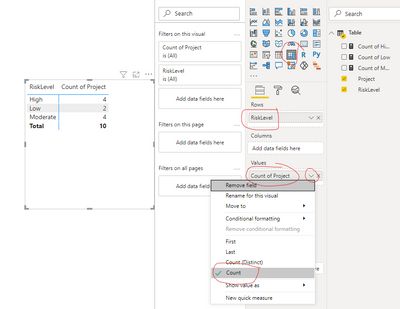
What’s more, I think that to get the count number based on different levels, using Matrix may be a more convenient method to achieve this, you can take a look:
Create a Matrix and place it like this, then set the value summarized type to “Count”:
You can download my test pbix file here
Best Regards,
Community Support Team _Robert Qin
If this post helps, then please consider Accept it as the solution to help the other members find it more quickly.
Hi, @Anonymous
According to your description, you want to get the count number of three different numbers and display them in card charts, you can try this method:
Count of High = COUNTX(FILTER('Table',[RiskLevel]="High"),[Project] )Count of Moderate = COUNTX(FILTER('Table',[RiskLevel]="Moderate"),[Project] )Count of Low = COUNTX(FILTER('Table',[RiskLevel]="Low"),[Project] )
And you can get what you want.
What’s more, I think that to get the count number based on different levels, using Matrix may be a more convenient method to achieve this, you can take a look:
Create a Matrix and place it like this, then set the value summarized type to “Count”:
You can download my test pbix file here
Best Regards,
Community Support Team _Robert Qin
If this post helps, then please consider Accept it as the solution to help the other members find it more quickly.
I found the solution. It's just use filters and I've tried to use DAX. Tks all!
@Anonymous ,The information you have provided is not making the problem clear to me. Can you please explain with an example.
Appreciate your Kudos.
My table (data source)
I need 3 card for each level type:
High must be 1, Moderate 1 and Low 1
The Power BI Data Visualization World Championships is back! Get ahead of the game and start preparing now!
| User | Count |
|---|---|
| 38 | |
| 38 | |
| 37 | |
| 28 | |
| 25 |
| User | Count |
|---|---|
| 124 | |
| 87 | |
| 70 | |
| 66 | |
| 65 |