cancel
Showing results for 
Search instead for 
Did you mean: 

Get Fabric Certified for FREE during Fabric Data Days. Don't miss your chance! Request now

Reply
Anonymous
Not applicable

Filter by datediff in Analysis Services

Hello, 
I have created a calculation 

Measure = CALCULATE(
                    DISTINCTCOUNT([Supplier Name]),
                        DATEDIFF(max([Creation Date]),
                                      TODAY(),year)==1
)


with the hope that I will get the the suppliers that were created last year etc. 
Unfortunately i am working on analysis services so it does pop an error :A function 'MAX' has been used in a True/False expression that is used as a table filter expression. This is not allowed. 
Unfortunately i can make no tables or go back to the model itself. 
Any ideas?

1 ACCEPTED SOLUTION

@Anonymous , Try like

Measure = CALCULATE(
COUNTX(values(Table[Supplier Name]),table[Supplier Name]),
filter(table, DATEDIFF(max([Creation Date]),
TODAY(),year)=1
))

OR

Measure = countx(summarize(Table , Table[Supplier Name], "_1",
calculate(lDISTINCTCOUNT([Supplier Name]),
filter(table, DATEDIFF(max([Creation Date]),
TODAY(),year)=1
))),[_1])

Share with Power BI Enthusiasts: Full Power BI Video (20 Hours) YouTube
Microsoft Fabric Series 60+ Videos YouTube
Microsoft Fabric Hindi End to End YouTube

View solution in original post

4 REPLIES 4
amitchandak
Super User
Super User

@Anonymous , try like

Measure = CALCULATE(
DISTINCTCOUNT([Supplier Name]),
filter(table, DATEDIFF(max([Creation Date]),
TODAY(),year)=1
))

Share with Power BI Enthusiasts: Full Power BI Video (20 Hours) YouTube
Microsoft Fabric Series 60+ Videos YouTube
Microsoft Fabric Hindi End to End YouTube
Anonymous
Not applicable

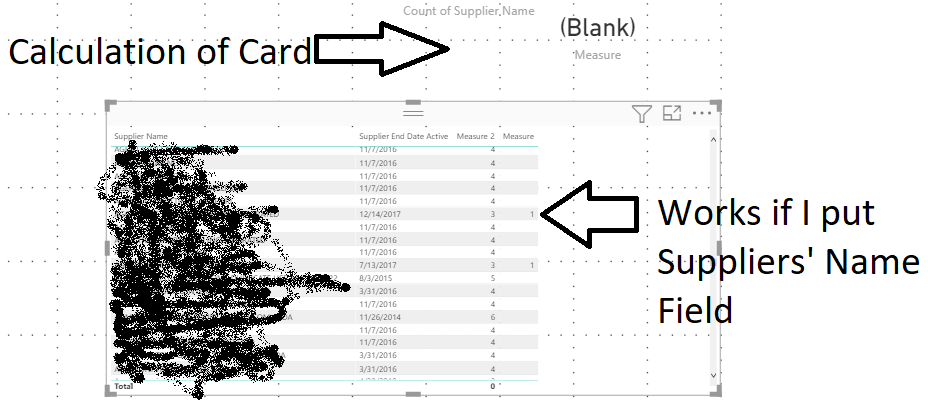
Seems like a plausible solution @amitchandak but this is what I got when I tried to use itUntitled.png

SO it works only when I have the field of suppliers in the view, not in the card, isn't it strange?

@Anonymous , Try like

Measure = CALCULATE(
COUNTX(values(Table[Supplier Name]),table[Supplier Name]),
filter(table, DATEDIFF(max([Creation Date]),
TODAY(),year)=1
))

OR

Measure = countx(summarize(Table , Table[Supplier Name], "_1",
calculate(lDISTINCTCOUNT([Supplier Name]),
filter(table, DATEDIFF(max([Creation Date]),
TODAY(),year)=1
))),[_1])

Share with Power BI Enthusiasts: Full Power BI Video (20 Hours) YouTube
Microsoft Fabric Series 60+ Videos YouTube
Microsoft Fabric Hindi End to End YouTube
Anonymous
Not applicable

Thanks! I was thinking of an addition of an "or" operator something like

Measure = countx(summarize(Table , Table[Supplier Name], "_1",
calculate(lDISTINCTCOUNT([Supplier Name]),or(
filter(table, DATEDIFF(max([Creation Date]),
TODAY(),year)=1),max([Creation Date]=Blank())
))),[_1])

but it doesn't seem that or works in analysis services that way, so I have solved this issue with creating and adding the different measures. Any better idea on this @amitchandak ?
Thanks again!

Helpful resources

Announcements
November Power BI Update Carousel

Power BI Monthly Update - November 2025

Check out the November 2025 Power BI update to learn about new features.

Fabric Data Days Carousel

Fabric Data Days

Advance your Data & AI career with 50 days of live learning, contests, hands-on challenges, study groups & certifications and more!

FabCon Atlanta 2026 carousel

FabCon Atlanta 2026

Join us at FabCon Atlanta, March 16-20, for the ultimate Fabric, Power BI, AI and SQL community-led event. Save $200 with code FABCOMM.

Top Solution Authors
Top Kudoed Authors