cancel
Showing results for 
Search instead for 
Did you mean: 

Level up your Power BI skills this month - build one visual each week and tell better stories with data! Get started

Reply
Anonymous
Not applicable

Filter by concatenated columns for RLS

Hi everyone

I have the following security table(sql) for my rls, I want to filter a table based on this 

UserPrincipalNameSite
usu1@example.coms1,s3,s6
usu2@example.coms2,s19,s23
usu3@example.coms3,s4

but, I couldn't filter by this Site column

and the next table is what i want to filter based on this security table

RegionCountrySite
Aas2
Abs1
Bcs19
Bds3
Ces4


 I think I was getting an error due I am using an IN operator but what my Site is returning me is kind of this "s1,s2,s3", so which will be the best option to do it?


Thank you in advance.


2 ACCEPTED SOLUTIONS
jdbuchanan71
Super User
Super User

@Anonymous 

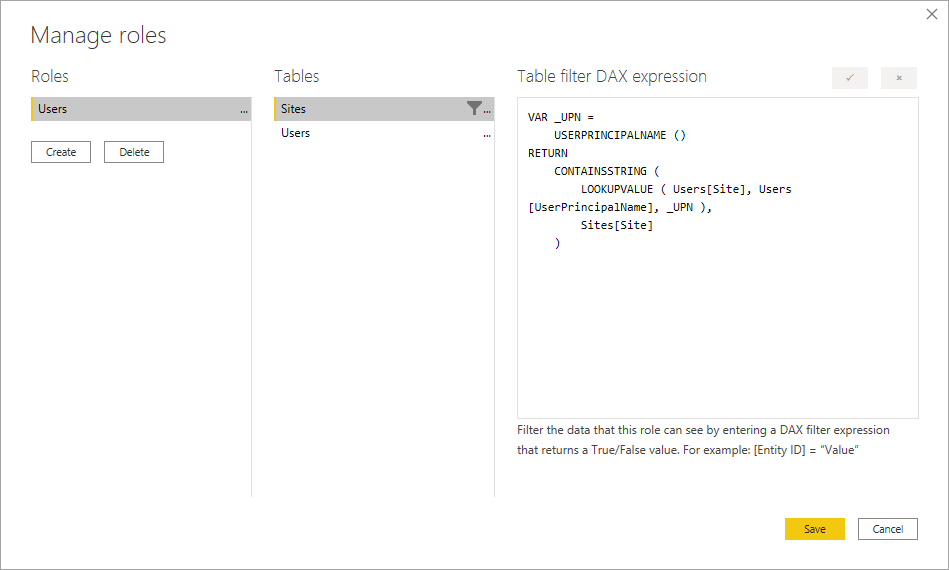
Your filter expression could be something like this (you will need to change the names of the tables to match your model).


VAR _UPN =
    USERPRINCIPALNAME ()
RETURN
    CONTAINSSTRING (
        LOOKUPVALUE ( Users[Site], Users[UserPrincipalName], _UPN ),
        Sites[Site]
    )


And you would apply that to the Sites table.


jdbuchanan71_1-1602172154584.png

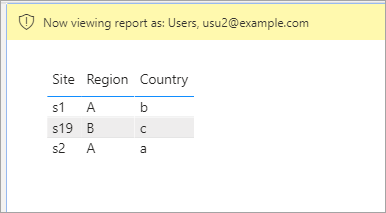
jdbuchanan71_3-1602172190230.png

Although there is a weakness in doing it this way because PowerBI sees s2 in 's1,s23' so it is giving a false match.

If that is really how your site ID's are you may need to put in leading 0's  's02' instead of 's2' or you could split the sites in the users table then unpivot them to get 1 row per user/site pair.


View solution in original post

Anonymous
Not applicable

Hi @Anonymous 

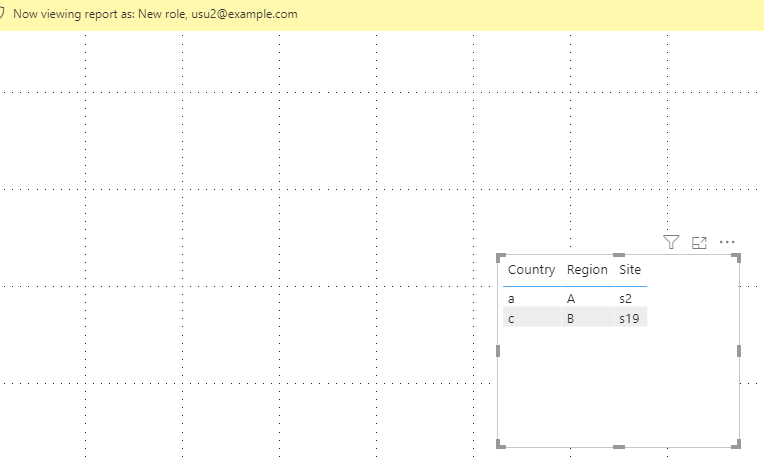
When  we see the result as usu2@example.com,we should see S2,S19 and S23, however in 's reply we can see S1.

You may try my way, transform your User Table and build an RLS.

Splite Site column in rows in Power Query Editor.

Build a relationship between two site columns in two tables.

Try this Dax expression.

[Site] = 
CALCULATE (
    MAX(Data[Site]),
    FILTER (
        Users,
        Users[UserPrincipalName] = USERPRINCIPALNAME()
            && Users[Site] = Data[Site]
    )
)

 See the result as usu2@example.com.

Result:

1.png

You can download the pbix file from this link: Filter by concatenated columns for RLS


Best Regards,

Rico Zhou


If this post helps, then please consider Accept it as the solution to help the other members find it more quickly. 


View solution in original post

2 REPLIES 2
Anonymous
Not applicable

Hi @Anonymous 

When  we see the result as usu2@example.com,we should see S2,S19 and S23, however in 's reply we can see S1.

You may try my way, transform your User Table and build an RLS.

Splite Site column in rows in Power Query Editor.

Build a relationship between two site columns in two tables.

Try this Dax expression.

[Site] = 
CALCULATE (
    MAX(Data[Site]),
    FILTER (
        Users,
        Users[UserPrincipalName] = USERPRINCIPALNAME()
            && Users[Site] = Data[Site]
    )
)

 See the result as usu2@example.com.

Result:

1.png

You can download the pbix file from this link: Filter by concatenated columns for RLS


Best Regards,

Rico Zhou


If this post helps, then please consider Accept it as the solution to help the other members find it more quickly. 


jdbuchanan71
Super User
Super User

@Anonymous 

Your filter expression could be something like this (you will need to change the names of the tables to match your model).


VAR _UPN =
    USERPRINCIPALNAME ()
RETURN
    CONTAINSSTRING (
        LOOKUPVALUE ( Users[Site], Users[UserPrincipalName], _UPN ),
        Sites[Site]
    )


And you would apply that to the Sites table.


jdbuchanan71_1-1602172154584.png

jdbuchanan71_3-1602172190230.png

Although there is a weakness in doing it this way because PowerBI sees s2 in 's1,s23' so it is giving a false match.

If that is really how your site ID's are you may need to put in leading 0's  's02' instead of 's2' or you could split the sites in the users table then unpivot them to get 1 row per user/site pair.


Helpful resources

Announcements
April Power BI Update Carousel

Power BI Monthly Update - April 2026

Check out the April 2026 Power BI update to learn about new features.

Fabric SQL PBI Data Days

Data Days 2026 coming soon!

Sign up to receive a private message when registration opens and key events begin.

New to Fabric survey Carousel

New to Fabric Survey

If you have recently started exploring Fabric, we'd love to hear how it's going. Your feedback can help with product improvements.

Power BI DataViz World Championships carousel

Power BI DataViz World Championships - June 2026

A new Power BI DataViz World Championship is coming this June! Don't miss out on submitting your entry.