cancel
Showing results for 
Search instead for 
Did you mean: 

The Power BI Data Visualization World Championships is back! Get ahead of the game and start preparing now! Learn more

Reply
elflakoconk
Helper II
Helper II

Filter blank rows in visuals


Hello all

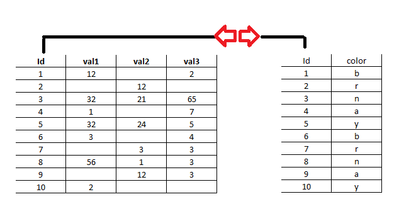
I have meny tables with a one on one relation using id field, for example this 2:

duda_pt1.png


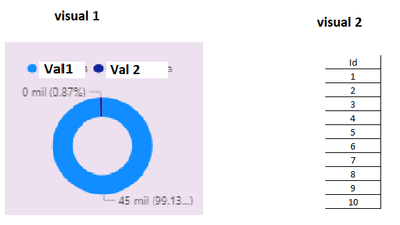
and I have 2 visuals, 1 donut chart and 1 table data


duda_pt2.png
I need to by clicking the donut chart on value 2, filter the table like this:

Id
2
3
5
7
8
9


but it's not happening. One more thing, I don't want to create a table for each field without blank rows.

I hoppe this explanation has been clear. Thanks a lot!

1 ACCEPTED SOLUTION
amitchandak
Super User
Super User

@elflakoconk , as val2 is column(aggregated) means measure, it will not filter data on click.


You can unpivot three columns val1, val2, val3, that will make the dimensions/parameter and then you can drill


refer

https://radacad.com/pivot-and-unpivot-with-power-bi

Share with Power BI Enthusiasts: Full Power BI Video (20 Hours) YouTube
Microsoft Fabric Series 60+ Videos YouTube
Microsoft Fabric Hindi End to End YouTube

View solution in original post

3 REPLIES 3
v-henryk-mstf
Community Support
Community Support

Hi @elflakoconk ,


For donut chart visual, the added field of Values is a specific field type, such as max, min, average, etc., so clicking any part of donut chart visual will not interact with the table and affect it. If you really need this requirement, you can post your idea here: Ideas - Microsoft Power BI Community


Best Regards,
Henry

If this post helps, then please consider Accept it as the solution to help the other members find it more quickly.

amitchandak
Super User
Super User

@elflakoconk , as val2 is column(aggregated) means measure, it will not filter data on click.


You can unpivot three columns val1, val2, val3, that will make the dimensions/parameter and then you can drill


refer

https://radacad.com/pivot-and-unpivot-with-power-bi

Share with Power BI Enthusiasts: Full Power BI Video (20 Hours) YouTube
Microsoft Fabric Series 60+ Videos YouTube
Microsoft Fabric Hindi End to End YouTube

Thanks for your contribution, don't you know if there's another way to do this? Is kind of complicated to unpivot all my columns and get functional atributtes, names are too long and there are a lot of different values, for my donut chart's I can change the label to display to "Yes/No", "Vacant/No vacant", etc. but with this solution I need to transform all the data, is almost the same to have a table for each classification.

Helpful resources

Announcements
Power BI DataViz World Championships

Power BI Dataviz World Championships

The Power BI Data Visualization World Championships is back! Get ahead of the game and start preparing now!

December 2025 Power BI Update Carousel

Power BI Monthly Update - December 2025

Check out the December 2025 Power BI Holiday Recap!

FabCon Atlanta 2026 carousel

FabCon Atlanta 2026

Join us at FabCon Atlanta, March 16-20, for the ultimate Fabric, Power BI, AI and SQL community-led event. Save $200 with code FABCOMM.