
Don't miss your chance to take exam DP-600 or DP-700 on us!
Request nowLearn from the best! Meet the four finalists headed to the FINALS of the Power BI Dataviz World Championships! Register now
Is it possible to filter a page between two different dates? I need my page to show data that is in the last 31-60 days. The slicer and relative date filter does not allow me to enter an inbetween time without using specific dates.
Solved! Go to Solution.
Hi, @walker21
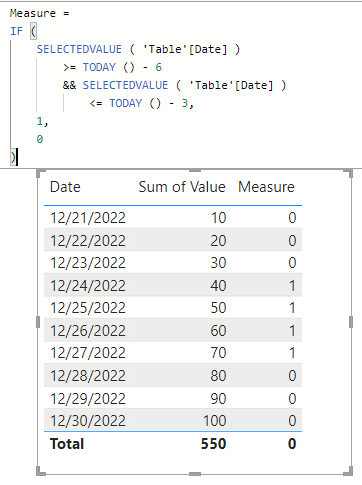
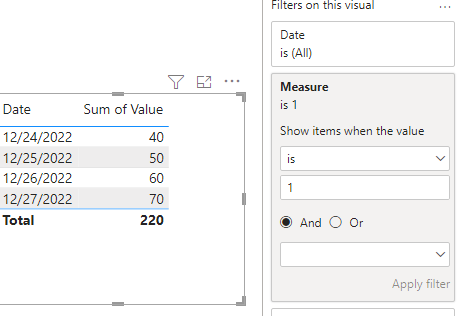
For example, I want to filter data for the last 3-6 days.
Hope this method helps you.
Best Regards,
Community Support Team _Charlotte
If this post helps, then please consider Accept it as the solution to help the other members find it more quickly.
Hi, @walker21
For example, I want to filter data for the last 3-6 days.
Hope this method helps you.
Best Regards,
Community Support Team _Charlotte
If this post helps, then please consider Accept it as the solution to help the other members find it more quickly.
I didnt get any errors when i tried the same formula.
How are you creating the table?
Do you go to Home Tab --> Modelling --> New Table
@themistoklis yes. Home - modeling - New Table.
Then I receive the error saying I have too few arguments for some reason.
Maybe you can create a custom date slicer.
See linke below:
https://www.youtube.com/watch?v=fKygF7VEJnQ
In your case you can use the following formula
ADDCOLUMNS(
DATESBETWEEN('Date'[Date], TODAY()-60, TODAY()-30),
"Selection", "30-60"
)
Share feedback directly with Fabric product managers, participate in targeted research studies and influence the Fabric roadmap.
Check out the February 2026 Power BI update to learn about new features.
| User | Count |
|---|---|
| 51 | |
| 40 | |
| 37 | |
| 14 | |
| 14 |
| User | Count |
|---|---|
| 84 | |
| 69 | |
| 38 | |
| 29 | |
| 27 |