Join us at FabCon Atlanta from March 16 - 20, 2026, for the ultimate Fabric, Power BI, AI and SQL community-led event. Save $200 with code FABCOMM.
Register now!The Power BI Data Visualization World Championships is back! It's time to submit your entry. Live now!
Hi everyone.
I'm working on a Sales Table like this one below:
DATE PRODUCT ID Revenue
1/1/2015 AA 100
2/2/2015 AB 200
3/3/2015 AA 300
4/4/2015 BA 400
5/5/2015 BB 500
It is easy to plot Revenue vs. Date, no problems so far.
But what I really want to do is the following:
I want to use a filter by date (available for user - through the Dashboard), i.e., I want to let the the user choose one of the dates (01/01, 02/02/ 03/03,... ) as a Reference for the Revenue Column.
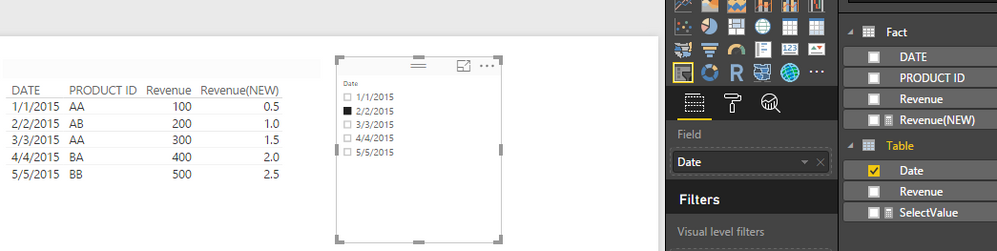
In other words, if the user selects "02/02/2015" on a filter, the value "200" is the new reference and others values of this Column (Revenue) is now referenced as below:
obs: it doesn't need to change the values of the table. I just want to use these values to plot the graph descibed below.
DATE PRODUCT ID Revenue [NEW]
1/1/2015 AA 0.5 (i.e., 100/200)
2/2/2015 AB 1.0 (i.e., 200/200)
3/3/2015 AA 1.5 (i.e., 300/200)
4/4/2015 BA 2.0 (i.e., 400/200)
5/5/2015 BB 2.5 (i.e., 500/200)
And then, finnaly, I want a Graph Date vs. Revenue [New], using these new values (0.5, 1.0, 1.5 ...).
Does anyone know how to solve it?
It seems do be quite easy, but I don't get the answer.
Regards,
Matheus.
Solved! Go to Solution.
Hi @Matheus_bnm,
In your scenario, you can create another table which has the DATE and Revenue columns. Make sure there is no relationship between this new table and the original one.
Table = SELECTCOLUMNS('Fact',"Date",'Fact'[Date],"Revenue",'Fact'[Revenue])
Then create a measure in this new table:
SelectValue = IF(HASONEVALUE('Table'[Date]),VALUES('Table'[Revenue]),BLANK())
Create a measure in original table:
Revenue(NEW) = DIVIDE(SUM(Fact[Revenue]),'Table'[SelectValue],0)
Then drag the Date column from the new table into a slicer visual,
Best Regards,
Qiuyun Yu
Hi @Matheus_bnm,
In your scenario, you can create another table which has the DATE and Revenue columns. Make sure there is no relationship between this new table and the original one.
Table = SELECTCOLUMNS('Fact',"Date",'Fact'[Date],"Revenue",'Fact'[Revenue])
Then create a measure in this new table:
SelectValue = IF(HASONEVALUE('Table'[Date]),VALUES('Table'[Revenue]),BLANK())
Create a measure in original table:
Revenue(NEW) = DIVIDE(SUM(Fact[Revenue]),'Table'[SelectValue],0)
Then drag the Date column from the new table into a slicer visual,
Best Regards,
Qiuyun Yu
The Power BI Data Visualization World Championships is back! It's time to submit your entry.
Check out the January 2026 Power BI update to learn about new features.
| User | Count |
|---|---|
| 61 | |
| 48 | |
| 35 | |
| 25 | |
| 23 |
| User | Count |
|---|---|
| 134 | |
| 110 | |
| 59 | |
| 39 | |
| 32 |