
Join us at FabCon Atlanta from March 16 - 20, 2026, for the ultimate Fabric, Power BI, AI and SQL community-led event. Save $200 with code FABCOMM.
Register now!Get Fabric Certified for FREE during Fabric Data Days. Don't miss your chance! Request now
Hi all,
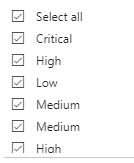
I have come across a bit of an oddity. Recently, I have noticed that one column, when used as a slicer or filter, is showing duplicate values.
However, if I explore the data in Table view, it shows 4 distinct values:
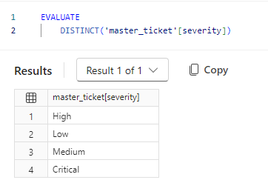
Additionally, if I run a DAX query on the column, it also shows only 4 values:
I have tried trimming and cleaning the column. I have also tried replacing some hex characters at the suggestion of another thread, but none of these seem to have any impact.
I'm at a bit of a loss here, so any suggestions or insight are greatly appreciated!
Did you ever solve this? I am having the same exact issue and am befuddled. My model shows now duplicates, and yet there are duplicates in the slicer; some of which aren't fully selectable.
If you have not done so already, go into Power Query and get a distinct list of values from the column in question.
One of the easiest ways of doing that is populating a blank query with
= Table.Distinct(Table.SelectColumns(tableName, {"ColumnName"}))
Proud to be a Super User! | |
Check out the November 2025 Power BI update to learn about new features.
Advance your Data & AI career with 50 days of live learning, contests, hands-on challenges, study groups & certifications and more!