
cancel
Showing results for 
Search instead for 
Did you mean: 

Get Fabric Certified for FREE during Fabric Data Days. Don't miss your chance! Request now

Reply
Anonymous
Not applicable

Filter active IF another filter is active?

Hi!


I have a table of employees with their employee status, and I have some filters based on a DimDate table for selecting time periods. 


time status.PNG


Is there a way to create a filter that says

if Year or Quarter or Month or Week is not blank,

then Employee status = Active


?

1 ACCEPTED SOLUTION
v-piga-msft
Resident Rockstar
Resident Rockstar

Hi @Anonymous ,

For your logic, you could create the measure like below.

Measure =
VAR y =
    SELECTEDVALUE ( 'Date'[Date].[Year] )
VAR qua =
    SELECTEDVALUE ( 'Date'[Quarter] )
VAR m =
    SELECTEDVALUE ( 'Date'[Month] )
VAR w =
    SELECTEDVALUE ( 'Date'[Week] )
RETURN
    IF ( y || m || qua || w <> BLANK (), "Active", BLANK () )

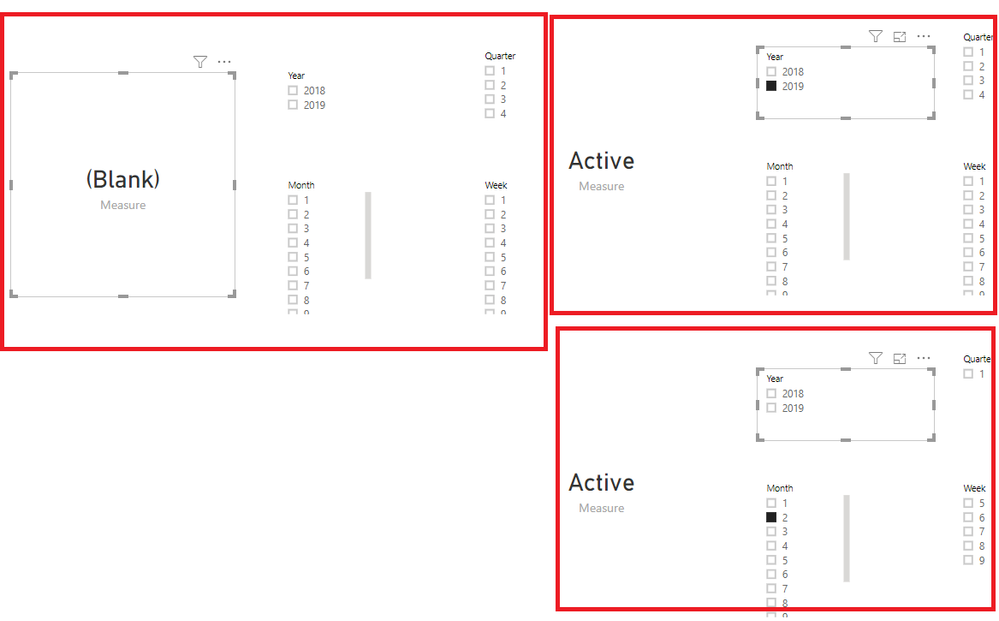
Here is the output.

Untitled.png

In addition, you could refer to my test attachment.

If you still need help, please share your desired output.

Best  Regards,

Cherry

Community Support Team _ Cherry Gao
If this post helps, then please consider Accept it as the solution to help the other members find it more quickly.

View solution in original post

2 REPLIES 2
v-piga-msft
Resident Rockstar
Resident Rockstar

Hi @Anonymous ,

Have you solved your problem?

If you have solved, please always accept the replies making sense as solution to your question so that people who may have the same question can get the solution directly.

If you still need help, please share your desired output so that we could help further on it.

Best Regards,

Cherry

Community Support Team _ Cherry Gao
If this post helps, then please consider Accept it as the solution to help the other members find it more quickly.
v-piga-msft
Resident Rockstar
Resident Rockstar

Hi @Anonymous ,

For your logic, you could create the measure like below.

Measure =
VAR y =
    SELECTEDVALUE ( 'Date'[Date].[Year] )
VAR qua =
    SELECTEDVALUE ( 'Date'[Quarter] )
VAR m =
    SELECTEDVALUE ( 'Date'[Month] )
VAR w =
    SELECTEDVALUE ( 'Date'[Week] )
RETURN
    IF ( y || m || qua || w <> BLANK (), "Active", BLANK () )

Here is the output.

Untitled.png

In addition, you could refer to my test attachment.

If you still need help, please share your desired output.

Best  Regards,

Cherry

Community Support Team _ Cherry Gao
If this post helps, then please consider Accept it as the solution to help the other members find it more quickly.

Helpful resources

Announcements
November Power BI Update Carousel

Power BI Monthly Update - November 2025

Check out the November 2025 Power BI update to learn about new features.

Fabric Data Days Carousel

Fabric Data Days

Advance your Data & AI career with 50 days of live learning, contests, hands-on challenges, study groups & certifications and more!

FabCon Atlanta 2026 carousel

FabCon Atlanta 2026

Join us at FabCon Atlanta, March 16-20, for the ultimate Fabric, Power BI, AI and SQL community-led event. Save $200 with code FABCOMM.

Top Solution Authors
Top Kudoed Authors