Join us at FabCon Atlanta from March 16 - 20, 2026, for the ultimate Fabric, Power BI, AI and SQL community-led event. Save $200 with code FABCOMM.
Register now!The Power BI Data Visualization World Championships is back! Get ahead of the game and start preparing now! Learn more
Hi ,
With Power Bi on SSAS Tabular , live , It s possible to filter a date , with the date filed , but no filter the graphs ? without adding another date table
Sample :
Filter : 30-09-2017
and thats the graphs ( like stacked column chart ) goes from January to September 30 , with the date field ?
Thanks for your help.
Solved! Go to Solution.
@Cobra77,
You are able to use other filters to filter the graph, only when you select values in the Date slicer, the graph will not be affected.
Regards,
Lydia
@Cobra77,
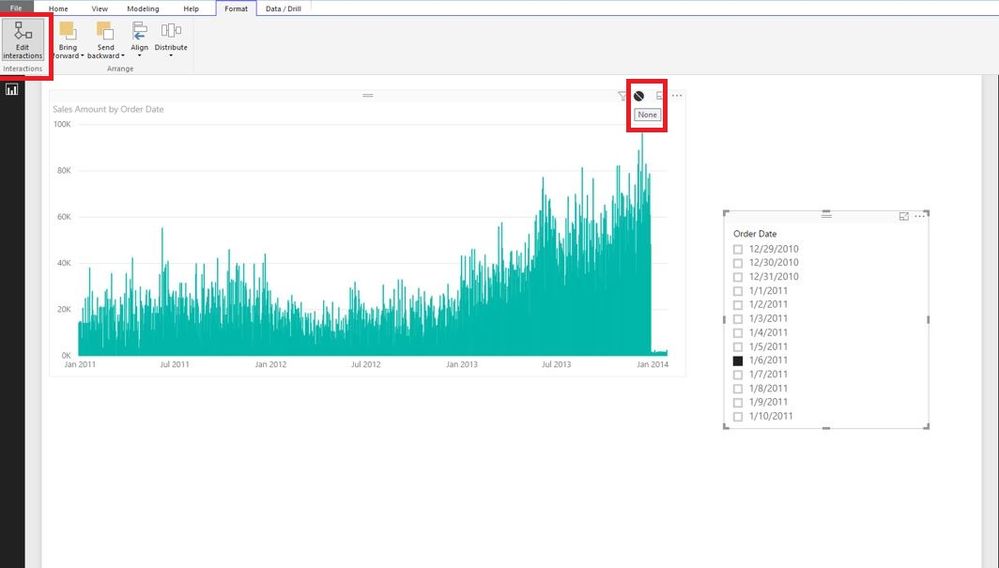
Based on your description, it seems that you don’t want to apply date filter on the graphs, right? If so, you can use “Edit interactions” feature in Power BI Desktop.
Create a date slicer, click on the date slicer, then turn on “Edit interactions” under Format ribbon, select “None” in the stacked column chart. This way, when you select values in the date slicer, the chart will not be filtered.
Regards,
Lydia
Thanks for your answer lydia.
But if i have others filters ? i lose interaction with ?
@Cobra77,
You are able to use other filters to filter the graph, only when you select values in the Date slicer, the graph will not be affected.
Regards,
Lydia
Its ok 😉
Thanks Lydia.
Check out the November 2025 Power BI update to learn about new features.
Advance your Data & AI career with 50 days of live learning, contests, hands-on challenges, study groups & certifications and more!
| User | Count |
|---|---|
| 58 | |
| 45 | |
| 40 | |
| 21 | |
| 18 |