Join us at FabCon Atlanta from March 16 - 20, 2026, for the ultimate Fabric, Power BI, AI and SQL community-led event. Save $200 with code FABCOMM.
Register now!Get Fabric Certified for FREE during Fabric Data Days. Don't miss your chance! Request now
Hi everybody,
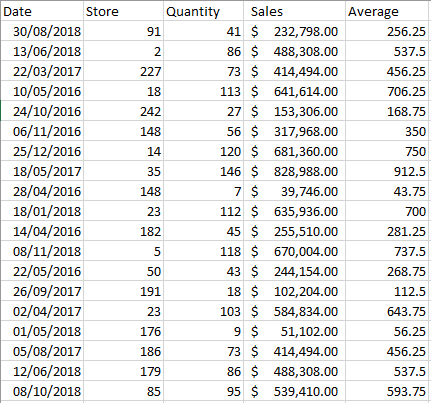
I have the following information in the database:
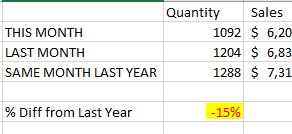
I need to generate a report, which filters by row in the following way:
And also that I can extract that data to make a calculation in its variation in the following way:
Help me please,
Edwin
And also that I can extract that data to make a calculation in its variation in the following way:
Solved! Go to Solution.
HI, @Anonymous
After my research, you could do these steps as below:
Step1:
Create a date table then create the relationship between it with data table
Step2:
Use Time Intelligence Functions to add measures for
This moths = CALCULATE(SUM('Table'[Store]))
last month = CALCULATE(SUM('Table'[Store]),PREVIOUSMONTH('Date'[Date]))
same month last year = CALCULATE(SUM('Table'[Store]),SAMEPERIODLASTYEAR('Date'[Date]) )
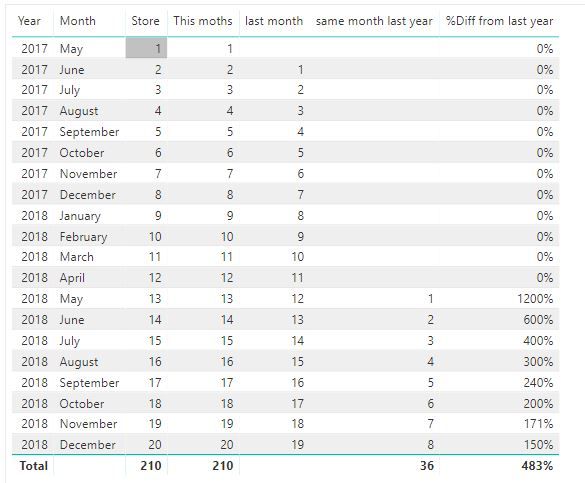
%Diff from last year = DIVIDE([This moths]-[same month last year],[same month last year],0)Result:Best Regards,
Lin
HI, @Anonymous
After my research, you could do these steps as below:
Step1:
Create a date table then create the relationship between it with data table
Step2:
Use Time Intelligence Functions to add measures for
This moths = CALCULATE(SUM('Table'[Store]))
last month = CALCULATE(SUM('Table'[Store]),PREVIOUSMONTH('Date'[Date]))
same month last year = CALCULATE(SUM('Table'[Store]),SAMEPERIODLASTYEAR('Date'[Date]) )
%Diff from last year = DIVIDE([This moths]-[same month last year],[same month last year],0)Result:Best Regards,
Lin
Check out the November 2025 Power BI update to learn about new features.
Advance your Data & AI career with 50 days of live learning, contests, hands-on challenges, study groups & certifications and more!