FabCon is coming to Atlanta
Join us at FabCon Atlanta from March 16 - 20, 2026, for the ultimate Fabric, Power BI, AI and SQL community-led event. Save $200 with code FABCOMM.
Register now!- Power BI forums
- Get Help with Power BI
- Desktop
- Service
- Report Server
- Power Query
- Mobile Apps
- Developer
- DAX Commands and Tips
- Custom Visuals Development Discussion
- Health and Life Sciences
- Power BI Spanish forums
- Translated Spanish Desktop
- Training and Consulting
- Instructor Led Training
- Dashboard in a Day for Women, by Women
- Galleries
- Data Stories Gallery
- Themes Gallery
- Contests Gallery
- QuickViz Gallery
- Quick Measures Gallery
- Visual Calculations Gallery
- Notebook Gallery
- Translytical Task Flow Gallery
- TMDL Gallery
- R Script Showcase
- Webinars and Video Gallery
- Ideas
- Custom Visuals Ideas (read-only)
- Issues
- Issues
- Events
- Upcoming Events
The Power BI Data Visualization World Championships is back! Get ahead of the game and start preparing now! Learn more
- Power BI forums
- Forums
- Get Help with Power BI
- Desktop
- Re: Filter YTD calculation
- Subscribe to RSS Feed
- Mark Topic as New
- Mark Topic as Read
- Float this Topic for Current User
- Bookmark
- Subscribe
- Printer Friendly Page


- Mark as New
- Bookmark
- Subscribe
- Mute
- Subscribe to RSS Feed
- Permalink
- Report Inappropriate Content
Filter YTD calculation
Hi
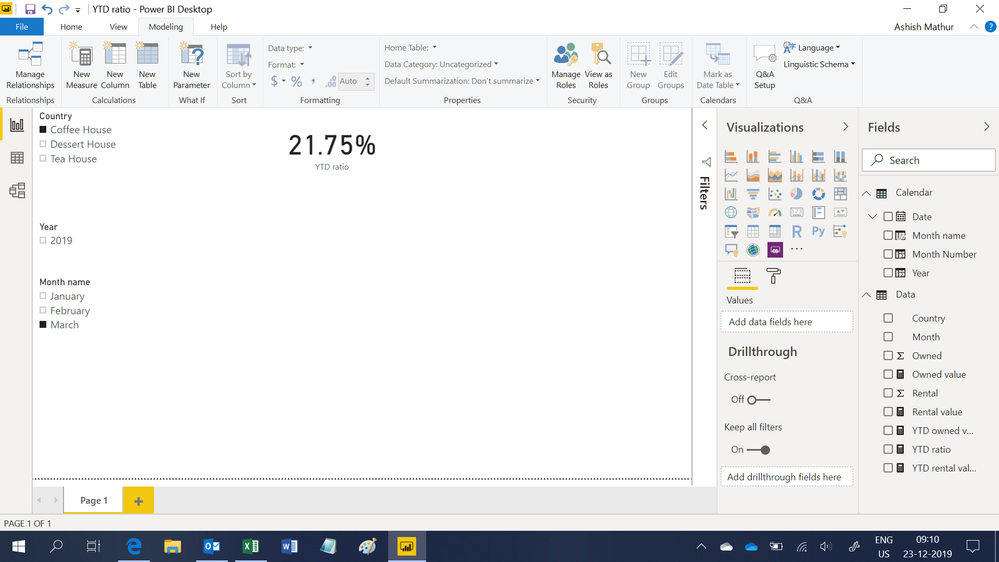
How can i create a filter with YTD calculation of Ratio. For example :
If i filter Coffee House , it will show YTD ratio of Coffee House only.
If i filter Coffee House & Tea House, it will take the (sum of Rental / sum of Owned) of 2 houses to get the YTD ratio.
Thank you
| Country | Month | Rental | Owned | Ratio |
| Coffee House | Jan-19 | $42,331.00 | $324,762.00 | 13% |
| Tea House | Jan-19 | $1,352.00 | $37,591.00 | 4% |
| Dessert House | Jan-19 | $4,764.00 | $169,344.00 | 3% |
| Coffee House | Feb-19 | $190,319.55 | $1,351,742.84 | 14% |
| Tea House | Feb-19 | $3,084.00 | $134,903.31 | 2% |
| Dessert House | Feb-19 | $10,590.00 | $295,266.45 | 4% |
| Coffee House | Mar-19 | $556,248.18 | $1,950,677.00 | 29% |
| Tea House | Mar-19 | $21,057.22 | $250,320.19 | 8% |
| Dessert House | Mar-19 | $41,134.13 | $440,702.01 | 9% |
Solved! Go to Solution.


- Mark as New
- Bookmark
- Subscribe
- Mute
- Subscribe to RSS Feed
- Permalink
- Report Inappropriate Content
Hi,
You may download my PBI file from here.
Hope this helps.
Regards,
Ashish Mathur
http://www.ashishmathur.com
https://www.linkedin.com/in/excelenthusiasts/
- Mark as New
- Bookmark
- Subscribe
- Mute
- Subscribe to RSS Feed
- Permalink
- Report Inappropriate Content
Hi,
You may download my PBI file from here.
Hope this helps.
Regards,
Ashish Mathur
http://www.ashishmathur.com
https://www.linkedin.com/in/excelenthusiasts/
- Mark as New
- Bookmark
- Subscribe
- Mute
- Subscribe to RSS Feed
- Permalink
- Report Inappropriate Content
Great! Thanks, Ashish
- Mark as New
- Bookmark
- Subscribe
- Mute
- Subscribe to RSS Feed
- Permalink
- Report Inappropriate Content
You are welcome.
Regards,
Ashish Mathur
http://www.ashishmathur.com
https://www.linkedin.com/in/excelenthusiasts/
- Mark as New
- Bookmark
- Subscribe
- Mute
- Subscribe to RSS Feed
- Permalink
- Report Inappropriate Content
Hi , sorry i have another problem.
I only try to update dashboard by refresh data but there is an error:
The column 'System: Production Report: Current Stock Report.rdl Version:1.0.0' of the table wasn't found.
I don't know what is going on. I do not change anything and data format is the same.
Here is my advanced editor
Source = Folder.Files("C:\Users\xxx\Current Stock Report"),
#"Filtered Hidden Files1" = Table.SelectRows(Source, each [Attributes]?[Hidden]? <> true),
#"Invoke Custom Function1" = Table.AddColumn(#"Filtered Hidden Files1", "Transform File from Current Stock Report", each #"Transform File from Current Stock Report"([Content])),
#"Renamed Columns1" = Table.RenameColumns(#"Invoke Custom Function1", {"Name", "Source.Name"}),
#"Removed Other Columns1" = Table.SelectColumns(#"Renamed Columns1", {"Source.Name", "Transform File from Current Stock Report"}),
#"Expanded Table Column1" = Table.ExpandTableColumn(#"Removed Other Columns1", "Transform File from Current Stock Report", Table.ColumnNames(#"Transform File from Current Stock Report"(#"Sample File"))),
#"Changed Type" = Table.TransformColumnTypes(#"Expanded Table Column1",{{"Source.Name", type text}, {"System: Production Report: Current Stock Report.rdl Version:1.0.0", type text}, {"Column2", type text}, {"Column3", type text}, {"Column4", type text}, {"Column5", type text}, {"Column6", type text}, {"Column7", type any}, {"Column8", type any}, {"Column9", type text}, {"Column10", type text}, {"Column11", type any}, {"Column12", type text}, {"Column13", type text}, {"Column14", type any}, {"Column15", type text}, {"Column16", type any}, {"Column17", type any}, {"Column18", type any}, {"Column19", type text}, {"Column20", type text}, {"Column21", type any}, {"Column22", type text}, {"Column23", type any}, {"Column24", type any}, {"Column25", type any}, {"Column26", type any}, {"Column27", type any}, {"Column28", type any}, {"Column29", type any}, {"Column30", type any}}),
#"Removed Top Rows" = Table.Skip(#"Changed Type",4),
#"Promoted Headers" = Table.PromoteHeaders(#"Removed Top Rows", [PromoteAllScalars=true]),
#"Changed Type1" = Table.TransformColumnTypes(#"Promoted Headers",{{"Current Stock Report.xlsx", type text}, {"Region", type text}, {"Location", type text}, {"Column4", type text}, {"Warehouse Name", type text}, {"Product Category Name", type text}, {"Product Sub Category Name", type text}, {"Column8", type any}, {"Column9", type any}, {"Product Code", type text}, {"Product Name", type text}, {"Column12", type any}, {"Specification", type text}, {"Batch Number", type text}, {"Expiry Date", type date}, {"SOF", Int64.Type}, {"SOF End Date", type date}, {"Effective End Date", type date}, {"Final Posting Date", type date}, {"DEA Code", Int64.Type}, {"Project Code", Int64.Type}, {"Quantity On Hand", Int64.Type}, {"Currency Name", type text}, {"Unit Value", type number}, {"Unit Value (Dollars)", type number}, {"GIK", type logical}, {"Program / Admin Stock", type logical}, {"Pre Positioned", type logical}, {"In Transit", type logical}, {"Updated Date Time", type datetime}, {"Total Value (Dollars)", type number}}),
#"Removed Columns" = Table.RemoveColumns(#"Changed Type1",{"Column4", "Column8", "Column9", "Column12"}),
#"Changed Type2" = Table.TransformColumnTypes(#"Removed Columns",{{"DEA Code", type text}, {"SOF", type text}}),
#"Replaced Errors" = Table.ReplaceErrorValues(#"Changed Type2", {{"SOF", null}, {"SOF End Date", null}, {"Effective End Date", null}, {"Final Posting Date", null}, {"DEA Code", null}, {"Project Code", null}, {"Quantity On Hand", null}, {"Currency Name", null}, {"Unit Value", null}, {"Unit Value (Dollars)", null}, {"GIK", null}, {"Program / Admin Stock", null}, {"Pre Positioned", null}, {"In Transit", null}, {"Updated Date Time", null}, {"Total Value (Dollars)", null}})
in
#"Replaced Errors"
any idea what is happening :D?
Thank you
- Mark as New
- Bookmark
- Subscribe
- Mute
- Subscribe to RSS Feed
- Permalink
- Report Inappropriate Content
Hi,
I do not know whom you are replying to and neither can i understand your question. Please describe your question and show the expected result.
Regards,
Ashish Mathur
http://www.ashishmathur.com
https://www.linkedin.com/in/excelenthusiasts/

Helpful resources

Power BI Dataviz World Championships
The Power BI Data Visualization World Championships is back! Get ahead of the game and start preparing now!

Power BI Monthly Update - December 2025
Check out the December 2025 Power BI Holiday Recap!

FabCon Atlanta 2026
Join us at FabCon Atlanta, March 16-20, for the ultimate Fabric, Power BI, AI and SQL community-led event. Save $200 with code FABCOMM.

| User | Count |
|---|---|
| 40 | |
| 35 | |
| 34 | |
| 31 | |
| 28 |


| User | Count |
|---|---|
| 136 | |
| 102 | |
| 68 | |
| 66 | |
| 58 |


