Join us in Barcelona for FabCon and SQLCon, September 28 - October 1, 2026.
This is best Fabric, Power BI, SQL and AI community event. How do we know? The last event sold out! Save €200 with code FABCMTY200.
Register now- Power BI forums
- Get Help with Power BI
- Desktop
- Service
- Report Server
- Power Query
- Mobile Apps
- Developer
- DAX Commands and Tips
- Custom Visuals Development Discussion
- Health and Life Sciences
- Power BI Spanish forums
- Translated Spanish Desktop
- Training and Consulting
- Instructor Led Training
- Dashboard in a Day for Women, by Women
- Galleries
- Data Stories Gallery
- Themes Gallery
- Contests Gallery
- QuickViz Gallery
- Quick Measures Gallery
- Visual Calculations Gallery
- Notebook Gallery
- Translytical Task Flow Gallery
- TMDL Gallery
- R Script Showcase
- Webinars and Video Gallery
- Ideas
- Custom Visuals Ideas (read-only)
- Issues
- Issues
- Events
- Upcoming Events
A new Data Days event is coming soon! This time we’re going bigger than ever. Fabric, Power BI, SQL, AI and more. Don't miss out.
- Power BI forums
- Forums
- Get Help with Power BI
- Desktop
- Re: Filter Table visual based on strings
- Subscribe to RSS Feed
- Mark Topic as New
- Mark Topic as Read
- Float this Topic for Current User
- Bookmark
- Subscribe
- Printer Friendly Page


- Mark as New
- Bookmark
- Subscribe
- Mute
- Subscribe to RSS Feed
- Permalink
- Report Inappropriate Content
Filter Table visual based on strings
Hello, everyone.
Is it possible to filter rows in a Table visual (or similar) based on text strings, preferably multiple strings? I have the following visual:

And I would like this visual it to show only rows with defined strings, e.g. "idoso", "furto", "com risco".
Thank you all in advance!
Solved! Go to Solution.


- Mark as New
- Bookmark
- Subscribe
- Mute
- Subscribe to RSS Feed
- Permalink
- Report Inappropriate Content
Hi @WilliamAzevedo ,
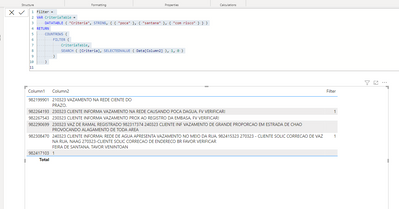
If your search criteria is constant, you may try the following DAX measure. Anything that is not blank matches any of the text string. Just change the text strings accordingly. Also attached is a sample pbix for your reference.
Filter =
VAR CriteriaTable =
    DATATABLE ( "Criteria", STRING, { { "poca" }, { "santana" }, { "com risco" } } )
RETURN
    COUNTROWS (
        FILTER (
            CriteriaTable,
            SEARCH ( [Criteria], SELECTEDVALUE ( Data[Column2] ), 1, 0 )
        )
    )
Dane Belarmino | Microsoft MVP | Proud to be a Super User!
Did I answer your question? Mark my post as a solution!
"Tell me and I’ll forget; show me and I may remember; involve me and I’ll understand."
Need Power BI consultation, get in touch with me on LinkedIn or hire me on UpWork.
Learn with me on YouTube @DAXJutsu or follow my page on Facebook @DAXJutsuPBI.
- Mark as New
- Bookmark
- Subscribe
- Mute
- Subscribe to RSS Feed
- Permalink
- Report Inappropriate Content
Hi @WilliamAzevedo ,
If your search criteria is constant, you may try the following DAX measure. Anything that is not blank matches any of the text string. Just change the text strings accordingly. Also attached is a sample pbix for your reference.
Filter =
VAR CriteriaTable =
    DATATABLE ( "Criteria", STRING, { { "poca" }, { "santana" }, { "com risco" } } )
RETURN
    COUNTROWS (
        FILTER (
            CriteriaTable,
            SEARCH ( [Criteria], SELECTEDVALUE ( Data[Column2] ), 1, 0 )
        )
    )
Dane Belarmino | Microsoft MVP | Proud to be a Super User!
Did I answer your question? Mark my post as a solution!
"Tell me and I’ll forget; show me and I may remember; involve me and I’ll understand."
Need Power BI consultation, get in touch with me on LinkedIn or hire me on UpWork.
Learn with me on YouTube @DAXJutsu or follow my page on Facebook @DAXJutsuPBI.
- Mark as New
- Bookmark
- Subscribe
- Mute
- Subscribe to RSS Feed
- Permalink
- Report Inappropriate Content
Ok, I saw it: I forgot to put the columns in the visual 🤣.
Thank you very much, that's what I needed!
- Mark as New
- Bookmark
- Subscribe
- Mute
- Subscribe to RSS Feed
- Permalink
- Report Inappropriate Content
You can the measure to the visual filter tile and filter it from there so it doesn't show in your table . [Measure] is not empty/blank
Dane Belarmino | Microsoft MVP | Proud to be a Super User!
Did I answer your question? Mark my post as a solution!
"Tell me and I’ll forget; show me and I may remember; involve me and I’ll understand."
Need Power BI consultation, get in touch with me on LinkedIn or hire me on UpWork.
Learn with me on YouTube @DAXJutsu or follow my page on Facebook @DAXJutsuPBI.
- Mark as New
- Bookmark
- Subscribe
- Mute
- Subscribe to RSS Feed
- Permalink
- Report Inappropriate Content
Done and it worked! Thank you again!
- Mark as New
- Bookmark
- Subscribe
- Mute
- Subscribe to RSS Feed
- Permalink
- Report Inappropriate Content
Hi! I tried that and the visual gave me no result. There's how I did it:
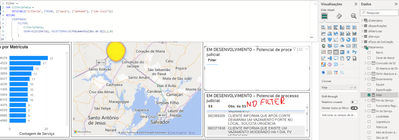
Did I do anything wrong? Did I miss anything?

- Mark as New
- Bookmark
- Subscribe
- Mute
- Subscribe to RSS Feed
- Permalink
- Report Inappropriate Content
@WilliamAzevedo , Are looking for a search kind of option
Try Text Filter
https://appsource.microsoft.com/en-us/product/power-bi-visuals/WA104381309?src=office&tab=Overview
Text Filter Slicer and how to search on Multiple columns: https://youtu.be/RbeZRJ3uAZE
- Mark as New
- Bookmark
- Subscribe
- Mute
- Subscribe to RSS Feed
- Permalink
- Report Inappropriate Content
Thank you for your answer! It doesn't fit my needs, since the search is limited to a single term, but it got me to think: is it possible to do that filtering using a measure, or through a new column using DAX?

Helpful resources

Power BI Monthly Update - May 2026
Check out the May 2026 Power BI update to learn about new features.

Data Days 2026 coming soon!
Sign up to receive a private message when registration opens and key events begin.

New to Fabric Survey
If you have recently started exploring Fabric, we'd love to hear how it's going. Your feedback can help with product improvements.

Power BI DataViz World Championships - June 2026
A new Power BI DataViz World Championship is coming this June! Don't miss out on submitting your entry.

| User | Count |
|---|---|
| 32 | |
| 25 | |
| 24 | |
| 24 | |
| 14 |


| User | Count |
|---|---|
| 61 | |
| 48 | |
| 27 | |
| 23 | |
| 20 |


